Monday, March 4, 2024

Oracle Fusion Analytics - Refresh Materialized Views via Custom Function After Pipeline Completion

Introduction


Oracle Fusion Data Intelligence Platform (FDIP, formerly Fusion Analytics Warehouse ) is an Oracle Cloud Infrastructure (OCI) native service that leverages the power of Oracle Autonomous Data Warehouse (ADW) and Oracle Analytics Cloud (OAC). It provides a comprehensive analytics solution that includes a data pipeline, data warehouse, semantic model, and pre-built content such as dashboards and reports.

As businesses expand and develop, the importance of automation in managing data and analytics applications also grows. Based on user input, Oracle has delivered in Preview the Fusion Analytics Event Producer service, giving you more control over tracking customized events and notifications. This service is an effective automated solution for creating consolidated events and notification workflows that can streamline your Fusion Analytics business operations.

Friday, March 1, 2024

Best Practices For Implementing Row-Level Security In Oracle Analytics

It’s intended for Model Administrators who are using row-level security filters and covers row-level security which has “or logic” and uses empty values when a part of the filter is not applicable. Many businesses have security constraints involving different dimensions for different groups of users and for combinations of them. The simplest implementation will apply filters for all possibilities and use an empty value for dimensions that do not apply to the specific user. The correct results are obtained, but the SQL contains extra tables that are not used, which can negatively impact performance. This post explains how to get Oracle Analytics to dynamically exclude these tables.

Row-Level Security Example


There are a couple of parts to setting up table elimination for row-level security. Set up a series of session variables that determine first, when to apply a security filter and second, which security filters to apply.

First, set up a series of control session variables that determine whether security should be applied. The session variables are binary and are set to either 1 or 0. 1 means the data is restricted and to use the security session variables; 0 means the data is unrestricted and ignores the security session variables.

This example describes setting up security on 4 entities: business hierarchy, country, department, and legal organization.

There are 5 control session variables set up, one for turning on security in general, and one to turn on security for each of the entities.

Control variables:

  1. NQ_SESSION.Data_Security_Restricted – turns security on or off.
  2. NQ_SESSION.Data_Sec_Control_BH – turns security on or off for the business hierarchy entity.
  3. NQ_SESSION.Data_Sec_Control_Country – turns security on or off for the country entity.
  4. NQ_SESSION.Data_Sec_Control_Department – turns security on or off for the department entity.
  5. NQ_SESSION.Data_Sec_Control_Legal_Org – turns security on or off for the legal organization entity.

After that, set up security session variables for each entity that contains restricted data. These variables contain the values of the security filters to be passed to report filters.

Security filter variables:

  1. NQ_SESSION.Data_Security_BH – sets the security filter for the business hierarchy entity.
  2. NQ_SESSION.Data_Security_Country – sets the security filter for the country entity.
  3. NQ_SESSION.Data_Security_Department – sets the security filter for the department entity.
  4. NQ_SESSION.Data_Security_Legal_Org – sets the security filter for the legal organization entity.

You will want to pay attention to the underlying datatypes, as they determine the format of the value of the session variable. In this case, business hierarchy and legal organization are integers, while country and department are character strings. The value of the session variable is the actual value of the entity to be passed to the filter.

To help understand how the control variables and the indexcol function work, let's review an example in which security is set only for department, and the control variables and indexcol function are not used. The row-level filter is shown below:

"Core"."Dim - Business Hierarchy"."Business Hierarchy Identifier" = VALUEOF(NQ_SESSION."Data_Security_BH")
OR "Core"."Dim - Country"."Country Name" = VALUEOF(NQ_SESSION."Data_Security_Country")
OR "Core"."Dim - Legal Org"."Legal Org Identifier" = VALUEOF(NQ_SESSION."Data_Security_Legal_Org")
OR "Core"."Dim - Department"."Department Name" = VALUEOF(NQ_SESSION."Data_Security_Department")

The session variables are populated with the list of values the user can access and, if there is no restriction, then the “empty” placeholder value is used.

When applied to the sample report below, the security filter is: (with Data_Security_Department = ‘Dept 1’, Data_Security_Country = ‘No Values’, Data_Security_Legal_Org = -1, Data_Security_Department = -1 )

SELECT
   0 s_0,
   "Jobs Analysis"."Grade"."Grade Name" s_1,
   "Jobs Analysis"."Time"."Month Name" s_2,
   "Jobs Analysis"."Time"."Year" s_3,
   DESCRIPTOR_IDOF("Jobs Analysis"."Time"."Month Name") s_4,
   SORTKEY("Jobs Analysis"."Time"."Month Name") s_5,
   "Jobs Analysis"."Facts - Job Counts"."Jobs" s_6
FROM "Jobs Analysis"
WHERE
(("Time"."Year" = 2023) AND ("Time"."Month Name" = 'July'))
ORDER BY 4 ASC NULLS LAST, 6 ASC NULLS LAST, 3 ASC NULLS LAST, 5 ASC NULLS LAST, 2 ASC NULLS LAST
FETCH FIRST 500001 ROWS ONLY

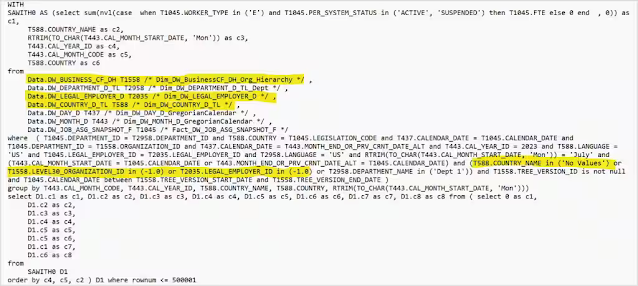
Here is the SQL generated by the report:
Best Practices For Implementing Row-Level Security In Oracle Analytics

In the sample above, the extra SQL is highlighted. There are 3 tables, DW_BUSINESS_DF_DH, DW_LEGAL_EMPLOYER_D and DW_COUNTRY_D_TL, that are used in the security filter but are not filtering anything. Depending upon the scope of the data in each of the additional tables, the query execution time is going to be higher than if those tables were not included.

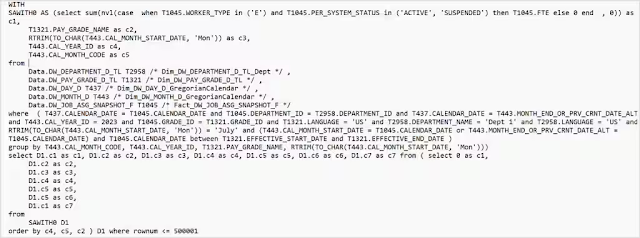
To get those tables eliminated from the query, replace the row-level filter from above with this one:

INDEXCOL( VALUEOF(NQ_SESSION."Data_Security_Restricted"), '0', '1') = '0' OR  INDEXCOL( VALUEOF(NQ_SESSION."Data_Sec_Control_BH"), '0',  VALUEOF(NQ_SESSION."Data_Security_BH")) =  INDEXCOL( VALUEOF(NQ_SESSION."Data_Sec_Control_BH"), '1', "Core"."Dim - Business Hierarchy"."Business Hierarchy Identifier") OR  INDEXCOL( VALUEOF(NQ_SESSION."Data_Sec_Control_Country"), '0',  VALUEOF(NQ_SESSION."Data_Security_Country")) =  INDEXCOL( VALUEOF(NQ_SESSION."Data_Sec_Control_Country"), '1', "Core"."Dim - Country"."Country Name") OR  INDEXCOL( VALUEOF(NQ_SESSION."Data_Sec_Control_Dept"), '0',  VALUEOF(NQ_SESSION."Data_Security_Department")) =  INDEXCOL( VALUEOF(NQ_SESSION."Data_Sec_Control_Dept"), '1', "Core"."Dim - Department"."Department Name") OR  INDEXCOL( VALUEOF(NQ_SESSION."Data_Sec_Control_Legal_Org"), '0',  VALUEOF(NQ_SESSION."Data_Security_Legal_Org")) =  INDEXCOL( VALUEOF(NQ_SESSION."Data_Sec_Control_Legal_Org"), '1', "Core"."Dim - Legal Org"."Legal Org Identifier")

The SQL now generated by the report will have only the needed tables:
Best Practices For Implementing Row-Level Security In Oracle Analytics

The key function to use to get these dynamic security filters is the indexcol function. To set up the indexcol function, use the session variables set up in the example and populated with the entity values.

A control initialization block is set up to determine which filters to apply based on the original control variables.

Control initialization block:
select 'Data_Sec_Control_BH', case when (Instr('valueof(NQ_SESSION.Data_Security_BH)','-1')>0) then 0 else 1 end from dual
union
select 'Data_Sec_Control_Dept', case when (Instr('valueof(NQ_SESSION.Data_Security_Department)','No Values')>0) then 0 else 1 end from dual
union
select 'Data_Sec_Control_Country', case when (Instr('valueof(NQ_SESSION.Data_Security_Country)','No Values')>0) then 0 else 1 end from dual
union
select 'Data_Sec_Control_Legal_Org', case when (Instr('valueof(NQ_SESSION.Data_Security_Legal_Org)','-1')>0) then 0 else 1 end from dual

It is important to set the precedence property on the control initialization block so it is executed after the initialization blocks that populate the security filter variables. In other words, the security filter variables must be populated before they are used in the control initialization block.

Best Practices For Implementing Row-Level Security In Oracle Analytics

Call to Action


Following these steps will help ensure your row-level security formulas have the best possible performance by eliminating unnecessary filters and tables.

Source: oracle.com

Wednesday, February 28, 2024

Conversations are the next generation in natural language queries

Conversations are the next generation in natural language queries

Autonomous Database Select AI has just introduced a powerful new capability that lets you have conversations with your data. What’s the difference between a natural language query and a conversation? A lot!

Conversations provide a natural way to analyze your data. Ask a question, review the result, and then follow up with questions to clarify or seek more information. It’s simple because we all have been doing this since we learned to speak. 

Let’s look at an example. Below we started with a top-level question asked by an analyst for a movie streaming service. The analyst then followed up with additional questions:

  • “What are our total streams?”
  • “Break that out by genre”
  • “Add customer segment”
  • “Keep the top 5 customer segments and genres by total views. Include a rank in the result”

It’s a typical conversation you may have with a colleague (although perhaps a little bossy 😉).  You can see in the demo below how Select AI lets you have this same conversation with your data, with help from an LLM that interprets the conversational thread and generates SQL:


Notice that Select AI now supports a new kind of SQL: 

SELECT AI
Start with our total streams
The “SELECT” keyword will look familiar to those who know SQL. After that, everything changes. SQL in Autonomous Database has been enhanced with a new “AI” keyword. This indicates that the subsequent text will be natural language. You don’t need to worry about where the data resides or how to formulate the query. Just ask a question. Your natural language will be translated into Oracle SQL using an LLM. 

And at the end of the demo, it asks Select AI to explain the generated query - both the SQL code and what the code means. With all the back and forth in the conversation, this explanation can be really helpful when confirming the results.

How to enable conversations


You enable conversations in your Select AI profile. The Select AI profile captures information about your AI provider, the LLM used to translate natural language into queries, the source tables to use for the queries, and more. For conversations, you need to use an OpenAI GPT model (from Azure or directly from OpenAI). In the profile, simply set the conversations flag to “true” to enable the capability:

BEGIN
  DBMS_CLOUD_AI.CREATE_PROFILE (
    profile_name => 'your_profile',
    attributes =>       
        '{"provider": "azure",
          "azure_resource_name": "your-resource",                    
          "azure_deployment_name": "your-deployment",
          "credential_name": "AI_CREDENTIAL",
          "comments":"true", 
          "conversation": "true",         
          "object_list": [
            {"owner": "moviestream", "name": "GENRE"},
            {"owner": "moviestream", "name": "CUSTOMER"},
            {"owner": "moviestream", "name": "PIZZA_SHOP"},
            {"owner": "moviestream", "name": "STREAMS"},            
            {"owner": "moviestream", "name": "MOVIES"},
            {"owner": "moviestream", "name": "ACTORS"}              
          ]          
          }'
    );
END;
/
Then, enable the profile for your session:

BEGIN
    DBMS_CLOUD_AI.SET_PROFILE (
        profile_name => 'your_profile'
    );
END;
/
That’s it! Start having conversations with your data.

Summary    

Conversations are a real breakthrough for natural language queries. They let you explore your data in any direction in the most natural way possible. You can get started using conversations today. If you’re using Autonomous Database – it’s already deployed. Or spin up an Autonomous Database Always Free instance and give it a try. Don’t forget to go to the Autonomous Database Getting Started page to find webcasts, tutorials, demos, and more.

Source: oracle.com

Monday, February 26, 2024

Enhanced PDB automation on Exadata and Base Database Services

Enhanced PDB automation on Exadata and Base Database Services

We are announcing new Pluggable Database (PDB) automation capabilities on Exadata Database Service on Cloud@Customer (ExaDB-C@C), Exadata Database Service on Dedicated Infrastructure (ExaDB-D), and Base Database Service (BaseDB) in all OCI commercial regions. The new set of enhancements brings the automation via OCI Console/API/Terraform for the following PDB-specific features to the Exadata Database and Base Database services:

◉ Backup and restore
◉ Remote clone
◉ Refreshable clone
◉ Relocate
◉ View open modes per VM

Key Benefits


◉ Leverage new PDB automation capabilities for end-to-end application development and deployment in the cloud.
◉ Access Oracle Multitenant features via OCI Console/API/Terraform on Exadata Database Service and Base Database Service.

Let's go over the core user journeys!

Note: For ExaDB-C@C, ExaDB-D, and BaseDB services in the OCI console, we refer to Container Database (CDB) as 'Database'. Any mention of CDB below is for clarity and brevity only.

PDB backup


When you create a PDB, you can specify if you would like to take an immediate backup of that PDB. This option is also available during local clone, remote clone, and relocate operations if the CDB is configured with the auto-backup feature. The PDB backup destination will always be the same as that of the CDB, and the backups cannot be accessed directly or created on demand. Oracle recommends immediately backing up the PDB after you create, clone, and relocate it, to ensure your PDB is recoverable before the next CDB auto-backup is completed successfully.

Enhanced PDB automation on Exadata and Base Database Services

PDB restore - In-place and Out-of-place restore


You can now restore a PDB within the same CDB (in-place restore) or to a new CDB (out-of-place restore, applicable to ExaDB-D and BaseDB).  In-place restore allows you to choose to restore to the latest or a specified timestamp. This is not applicable to PDBs on a Data Guard enabled CDB.

Enhanced PDB automation on Exadata and Base Database Services

Enhanced PDB automation on Exadata and Base Database Services

Out-of-place restore of a PDB(s) is achieved when you restore a PDB to a new CDB. 'Create database from backup' is enhanced to allow restore of a PDB or a set of PDBs to a new CDB. You can specify a PDB or a group of PDBs by the 'Choose the PDBs to restore' option. By default, the PDB(s) will always be restored on a new CDB to be created on an existing VM Cluster or in a new DB System.

Enhanced PDB automation on Exadata and Base Database Services

Remote clone


You can create a copy of the PDB within the same CDB (local clone) or to a different CDB (remote clone). The destination CDB can be of the same database version or higher. You can optionally provide an existing common user name (a user created in the CDB$root container) that the database link will use to connect. There is an option to take the backup of the PDB after remote cloning. PDB remote cloning works across Data Guard environments.

Enhanced PDB automation on Exadata and Base Database Services

Enhanced PDB automation on Exadata and Base Database Services

Refreshable Clone


You can create a refreshable copy of a PDB (refreshable clone). Providing an existing common user name is mandatory for the database link connection. A refreshable clone PDB can be refreshed at will by going to the PDB details page and initiating the action 'Refresh.' To be able to refresh successfully depends on the availability of the archive redo log files.

Enhanced PDB automation on Exadata and Base Database Services

Enhanced PDB automation on Exadata and Base Database Services

To disconnect the refreshable clone PDB from the source, you can convert it to a regular PDB. Once converted, the PDB will be opened read-write, and all the lifecycle operations can be performed. There is an option to take a backup of the PDB after converting from a refreshable clone to a regular PDB. The operation to convert a refreshable clone to a regular PDB when performed on a Data Guard primary will also create a PDB on its standby and be available in mount mode.

Enhanced PDB automation on Exadata and Base Database Services

Enhanced PDB automation on Exadata and Base Database Services

PDB relocate


You can move a PDB to another CDB. The destination CDB can be in a different compartment, VM cluster, or DB system. The destination container database can be on the same database release version or higher. You can provide a new PDB name while relocating a PDB to a different CDB. Optionally provide an existing common user name the database link will use to connect. There is an option to backup the PDB after relocation to the destination CDB is complete. The time to relocate depends on the size of the PDB, and network bandwidth during file copy from source to destination. Once relocated, the PDB will be opened read-write on the destination. If the destination is a Data Guard primary, a PDB will be created on the standby and will be available in mount mode.

Enhanced PDB automation on Exadata and Base Database Services

Enhanced PDB automation on Exadata and Base Database Services

PDB open modes


A PDB can be opened on a specific VM (a database instance) in the case of a multi-node RAC CDB. If the open mode across the VMs is the same, you will see either of these values: Read Write, Read Only, Mounted. If the open mode across the VMs differs, you will see which VM PDB is opened in Read Write mode by hovering the mouse over the information icon. You cannot change the open modes of the PDB through the OCI console or API. However, you can start or stop a PDB. Starting a PDB and stopping a PDB will bring it into read-write and mount mode accordingly. On standby, starting a PDB and stopping a PDB will bring it into read-only and mount mode depending on the Data Guard type (Active Data Guard / Regular Data Guard).

Enhanced PDB automation on Exadata and Base Database Services

Considerations


  • Enhanced PDB automation is supported on database releases 19c and later.
  • PDB clone (remote, refreshable) and relocate are supported across the Compartment, VM Cluster, DB System (BaseDB), VCN, Network (ExaDB-C@C), and database version (same or higher). The same is not supported across the Availability Domain (AD) and Exadata Infrastructure.
  • A Data Guard standby cannot be either a source or a destination for the PDB clone and PDB relocate operations.
  • A refreshable clone PDB created on a Data Guard primary will not appear on standby - its existence will be deferred until converted to a regular PDB.
  • Currently, PDB automation is supported for the databases using TDE wallet-based encryption (Oracle-managed keys).

Source: oracle.com

Thursday, February 22, 2024

Oracle 1Z0-076 Exam Prep: Tips & Resources

Oracle Data Guard 19c is a powerful feature of Oracle Database. Find out how to prepare for the Oracle 1Z0-076 exam and get certified.

Are you planning to take the Oracle 1Z0-076 exam and become a certified Oracle Database 19c: Data Guard Administration? If yes, you might wonder how to prepare for this challenging exam and what resources to use. This article will share tips and resources to help you ace the 1Z0-076 exam and boost your career as an Oracle Data Guard expert.

What Is the Oracle 1Z0-076 Exam?

The Oracle 1Z0-076 certification exam for Oracle Database 19c: Data Guard Administrations. It tests your knowledge and skills on Oracle Data Guard concepts, configuration, management, optimization, monitoring, data protection, high availability, and disaster recovery. The exam consists of 74 multiple-choice questions you must answer in 120 minutes. The passing score is 61%.

Why Should You Take the Oracle 1Z0-076 Exam?

Oracle Data Guard is a powerful feature of Oracle Database that enables you to create and maintain one or more standby databases to protect your data from failures, disasters, human errors, and data corruption. Oracle Data Guard also provides high availability, scalability, and performance benefits for your database applications.

By taking the Oracle 1Z0-076 exam and becoming a certified Oracle Database 19c: Data Guard Administration, you can prove your proficiency and expertise in Oracle Data Guard and gain a competitive edge in the job market. You can also improve your career prospects and credibility as an Oracle Data Guard professional.

According to ZipRecruiter, the average salary of an Oracle Data Guard Administrator in the US is $115,000 annually. The demand for Oracle Data Guard Administrators is also expected to grow as more and more organizations adopt Oracle Database 19c and leverage its Data Guard capabilities.

How to Prepare for the Oracle 1Z0-076 Exam: Tips and Resources

Preparing for the Oracle 1Z0-076 exam requires a lot of dedication, practice, and revision. Here are some tips and resources that can help you prepare effectively and efficiently for the exam:

  • Review the exam objectives and topics: The first step in your preparation is to review the exam objectives and issues and understand what the exam expects from you. You can reference the official website and list the topics you must study and master.
  • Study the official Oracle documentation: The official Oracle documentation is the best source of information and guidance for Oracle Data Guard 19c. You can find the documentation on the Oracle website and read the relevant sections that cover the exam topics. The documentation provides detailed explanations, examples, and Oracle Data Guard 19c best practices.
  • Take an online course: If you prefer a more structured and interactive way of learning, you can take an online course that covers the Oracle 1Z0-076 exam topics. Many online platforms, such as Udemy, Pluralsight, and Oracle University, offer high-quality and affordable courses for Oracle Data Guard 19c. You can choose a course that suits your learning style, budget, and schedule. An online course can help you learn the concepts, techniques, and best practices for Oracle Data Guard 19c from experienced instructors and experts.
  • Practice with hands-on labs: One of the best ways to reinforce your learning and test your skills is to practice with hands-on labs. Hands-on labs permit you to apply your knowledge and gain practical experience with Oracle Data Guard 19c. You can use a virtual machine, a cloud service, or a physical server to set up your own Oracle Data Guard environment and perform various tasks and scenarios that simulate the actual exam. You can also use the Oracle LiveLabs service, which provides free access to Oracle Cloud environments and guided workshops for Oracle Data Guard 19c.
  • Take practice tests: Another effective way to prepare for the Oracle 1Z0-076 exam is to take practice tests. Practice tests can help you evaluate your knowledge, recognize your strengths and weaknesses, and familiarize yourself with the exam format and question types. You should take practice tests regularly and review your results and feedback carefully. It would help if you also aimed to score at least 80% on the practice tests before taking the exam.
  • Revise and relax: The final step in your preparation is to revise and relax. You should review the exam objectives, topics, official Oracle documentation, online course materials, and practice test questions and answers. You should also make a summary or a cheat sheet of the key points and concepts you must remember for the exam. You should also relax and rest well before the exam day. You should avoid cramming and stressing yourself out. You should also eat well, sleep well, and stay hydrated. You should also arrive at the exam center early and be confident and calm.

Apply Your Knowledge and Skills in Real or Simulated Scenarios

Preparing for the Oracle 1Z0-076 exam requires applying your knowledge and skills in actual or simulated scenarios. The best way to master Oracle Data Guard 19c is to practice it in a realistic and relevant context, where you can apply the concepts, techniques, and tools you have learned.

You can apply your knowledge and skills in actual or simulated scenarios by:

  • Setting up your own Oracle Data Guard 19c environment: You can set up your own Oracle Data Guard 19c environment by using Oracle VirtualBox, Oracle Cloud, or Oracle Database Appliance. You can then create, configure, manage, optimize, monitor, protect, and recover your Oracle Data Guard 19c databases and experiment with different scenarios and options.
  • Taking online or offline Oracle Data Guard 19c courses or labs: You can take online or offline Oracle Data Guard 19c courses or labs that provide hands-on and guided learning experiences on Oracle Data Guard 19c features and functions. These courses or labs are found on Oracle University, Oracle Learning Library, or Oracle LiveLabs.
  • Participating in online or offline Oracle Data Guard 19c projects or challenges: You can join in online or offline Oracle Data Guard 19c projects or challenges that provide real-world and complex problems or tasks on Oracle Data Guard 19c features and functions. You can find some of these projects or challenges on Oracle Developer Community, Oracle Code, or Oracle Hackathons.

By applying your knowledge and skills in actual or simulated scenarios, you can develop your practical and analytical abilities and prepare yourself for the exam and the job.

Conclusion

The Oracle 1Z0-076 exam is a challenging but rewarding exam that can help you become a certified Oracle Database 19c: Data Guard Administration and advance your career as an Oracle Data Guard professional.

Following the tips and resources we shared in this article, you can prepare effectively and efficiently for the exam and achieve your certification goal.

We wish you all the best for your exam and your future endeavors.

Wednesday, February 21, 2024

Oracle Database 23c: New feature - Direct Joins for UPDATE and DELETE Statements

Oracle Database 23c introduces a host of powerful features aimed at enhancing database performance and query optimization. Among these innovations, Direct Join stands out as an efficient mechanism to streamline update and delete operations involving multiple related tables.

23c now allows you to use direct joins to other tables in UPDATE and DELETE statements in the FROM clause, in this article we will use SQL code examples to HR schema, so you can practice and learn it.

The main benefit is to make the coding of these Direct Joins simpler, using less code and more readable for SQL developers.

Scenario 1: Updating Salaries based on Department and City


Consider the scenario where we need to update the salaries of employees working in the Marketing department in the city of Toronto by increasing their salaries by 10%.

Prior to Oracle Database 23c, we might have used a query similar to this:

Oracle Database 23c: New feature - Direct Joins for UPDATE and DELETE Statements

Oracle Database 23c: New feature - Direct Joins for UPDATE and DELETE Statements

Once we identify the records that need to be updated, we proceed to design our UPDATE statement to modify only those records. Therefore, in Oracle versions prior to 23c, the filter used in the UPDATE statement is quite similar to the filter used in the SELECT statement.

Prior to Oracle Database 23c, the common approach to formulate the UPDATE statement involved employing an inner query within the WHERE clause.

Oracle Database 23c: New feature - Direct Joins for UPDATE and DELETE Statements

Oracle Database 23c: New feature - Direct Joins for UPDATE and DELETE Statements

However, in 23c, we can harness the power of Direct Join to optimize this update operation:

Oracle Database 23c: New feature - Direct Joins for UPDATE and DELETE Statements

Oracle Database 23c: New feature - Direct Joins for UPDATE and DELETE Statements

By utilizing Direct Join, we simplify the query, eliminate subqueries, and improve overall performance.

Scenario 2: Delete employee Neena's job history where she worked as AC_ACCOUNT


Suppose we need to delete employee Neena's job history where she worked as AC_ACCOUNT.

Prior to Oracle Database 23c, we might have used a query similar to this:

Oracle Database 23c: New feature - Direct Joins for UPDATE and DELETE Statements

Oracle Database 23c: New feature - Direct Joins for UPDATE and DELETE Statements

Once we identify the records that need to be deleted, we proceed to design our DELETE statement to remove only those records. Therefore, in prior to 23c, the filter used in the DELETE statement is quite similar to the filter used in the SELECT statement.

Prior to Oracle Database 23c, the common approach to formulating the DELETE statement involved employing a subquery or inner query within the WHERE clause.

Oracle Database 23c: New feature - Direct Joins for UPDATE and DELETE Statements

Oracle Database 23c: New feature - Direct Joins for UPDATE and DELETE Statements

However, 23c, we can harness the power of Direct Join to optimize this DELETE operation:

Oracle Database 23c: New feature - Direct Joins for UPDATE and DELETE Statements

Oracle Database 23c: New feature - Direct Joins for UPDATE and DELETE Statements

Oracle Database 23c: New feature - Direct Joins for UPDATE and DELETE Statements

Source: oracle.com