Showing posts with label MongoDB. Show all posts

Friday, April 12, 2024

Proper SQL comes to MongoDB applications .. with the Oracle Database!

Proper SQL comes to MongoDB applications .. with the Oracle Database!

As some of you might know, an exciting part of my job is working with the Oracle Database API for MongoDB (short MongoDB API), a part of Oracle's converged database that brings MongoDB's document store API to the world's best database (personal opinion, no need to rebuff here but to discuss offline). No, it's not about Oracle wanting to be a MongoDB - they're probably better at chasing their niche - but to offer their simple and widely used document store APIs and framework integration just like Mongo does, together with all of Oracle's powerful support of all workloads and datatypes. And the integration continues.

MongoDB added a new operator $sql to their aggregation pipeline framework not too long ago (as of end of February 2024 it's currently still in beta), so we at Oracle figured, hey, we have SQL, too ;-). But unlike them, we've been doing SQL for quite some time, so why not support that operator and offer our customers the world of Oracle's powerful SQL within the realms of the MongoDB API? That's precisely what we did.

Use Oracle SQL with the Oracle MongoDB API and instantaneously benefit from Oracle's converged database.

What can I use it for?


  • Have data in classical relational tables that you want to share as a collection in your MongoDB app? We got you covered.
  • Have data in classical relational tables that you want to combine and process together with collections in your MongoDB application? We got you covered.
  • Want to leverage some advanced SQL functionality that is hard or impossible to do in MongoDB? We got you covered.
  • Have some procedural logic you want to integrate in an aggregation pipeline? We got you covered.
  • Need a pragmatic and straightforward way to deal with the ever-decreasing little things we have not gotten to implement without leaving the Mongo ecosystem? We got you covered with that, too.

Yes, you use Oracle SQL without leaving the world of MongoDB API and integrate and work jointly with relational data and MongoDB collections side-by-side.

A Quick Walk-Through


Let me give you some simple examples to give you a glimpse of what's doable here. The following are simple mongosh examples for illustration, but needless to say that any integration - like using bind variables - can be fully embedded in your application.

Expose relational data

Suppose you just simply want to expose data coming from your relational core system as a read only collection without persisting and periodically updating the data as Mongo collection. No need to copy or transfer data: you just select the information dynamically with SQL from the pure relational structures and put it in your application.

db.aggregate([{$sql: `
             select fiscal_year, fiscal_quarter_number, sum(amount_sold) as sum_amount
             from sh.times t join sh.sales s on (t.time_id = s.time_id)
             group by fiscal_year, fiscal_quarter_number order by 1,2`}
])

In real world this is often embedded in the context of an application and previous filters and values, so let's use bind variables to limit the result set in your application. Using binds just like in JDBC helps to improve performance and prevents any sort of SQL injection:

db.aggregate([ {$sql: 
                  { statement: ` 
                      select 
                         fiscal_year, fiscal_quarter_number, sum(amount_sold) as sum_amount 
                      from sh.times t join sh.sales s on (t.time_id = s.time_id) 
                      where fiscal_year = :1 
                      group by fiscal_year, fiscal_quarter_number 
                      order by 1,2`, 
                    binds: [
                        { index: 1, value: 2019}
                        ]
                    }}
])

That just works fine in any Oracle Database 19c and above, on-premises and with Autonomous Database.

Simple lookup with relational data

Let's make things a bit more interesting: you're running your Mongo application for a specific business unit that now wants to augment their collections with data from common corporate entitities, stored centrally in your enterprise database. You can do so with a simple "$sql lookup" - join in the relational lingo - and add as many additional common attributes as you like. Within an aggregation pipeline, you are using $sql just like any other stage that consumes the input documents from the previous stage and produces documents for subsequent stages.

Since I am an Oracle person for a long time and there are many of us out there, I assume - in fact, hope - that some of you are reading this blog. I also assume that some of you have heard about EMP and DEPT, one of the oldest relational examples out there. I figured I am just using this to illustrate the functionality I am talking about. Yes, you can use this schema everywhere.

Let's first JSON-ize our EMP table and consider this our document collection (we name it empJSON), with a referencing model linking to our purely relational table DEPT. We want to expose our employee information (excluding salary) in a simple web application. Let's use mongosh for that:

jason> db.aggregate([{$sql:`
                         select json{empno, ename, job, mgr, hiredate, deptno} from emp`
                      },
...                   {$out: "empJSON"}])

jason> db.empJSON.findOne()
{
  _id: ObjectId('65ea34720af5351d8f7bf901'),
  empno: 7839,
  ename: 'KING',
  job: 'PRESIDENT',
  mgr: null,
  hiredate: ISODate('1981-11-17T00:00:00.000Z'),
  deptno: 10
}

That wasn't too hard, was it?

However, we want to not show the department number, but the name of the department in our app. And for some reason, we don't want to persist the department name in our stored collection. So let's just look it up in realtime using a $sql stage whenever we need the result, joining our collection with our purely relational table.

jason> db.empJSON.aggregate([{$sql: `
                                select json_transform(e.data, set '$.dname' = d.dname, remove '$.deptno') 
                                from input e, dept d 
                                where e.data.deptno.number() = d.deptno`
                               },
...                            {$limit: 1}])
[
  {
    _id: ObjectId('65ea34720af5351d8f7bf901'),
    empno: 7839,
    ename: 'KING',
    job: 'PRESIDENT',
    mgr: null,
    hiredate: ISODate('1981-11-17T00:00:00.000Z'),
    dname: 'ACCOUNTING'
  }
]

What you see in this little example is how we integrated the $sql stage transparently into Mongo's aggregation pipeline framework: collections produced by previous stages are represented as a JSON collection table INPUT with a single column DATA, containing your documents. We simply joined our collection empJSON with the relational table DEPT, added the field 'dname' and removed the unnecessary field 'deptno'. Mission accomplished, EMP and DEPT are now officially a part of MongoDB demos.

Using the aggregation pipeline in such a manner requires Oracle Database 23c.

Leverage analytics and encapsulated business logic

So you are as savvy in SQL as you are in MongoDB lingo? Choose what you do best and fastest. The following is a rather simple example that aggregates and ranks your yearly gross revenue with your movies using SQL, sorts the data and gives us the key attributes for the top ten.

db.movies.aggregate([
          {$match: {year:2019, gross : {$ne: null}}},
          {$sql:`
              select json_mergepatch(i.data, json {'rank': rank() over (order by i.data."gross" desc)})
              from input i`},
          {$project: { rank: 1, year: 1, title: 1, gross: 1, "_id": 0 }},
          {$match: {rank : {$le : 10}}},
          {$sort: {rank: 1}}
])

In this simple example, we are doing the ranking in SQL, but the sorting and limiting to the top ten in the aggregation pipeline, just to show the interchangeability. We could have done everything in SQL (or the Mongo aggregation pipeline for that matter), but decided to only do the ranking (and implicitly required sorting) in Oracle, letting Oracle's enterprise performance features loose to munge through the data. 

But wait. 

Our finance department had worked hard on our magical global financial gross adjustment that is applied everywhere and encapsulated in SQL. What now? Well, just add a pipeline stage and apply the magic to your Mongo collection, calculate the right number, and add the adjusted gross revenue to your collection:

db.movies.aggregate([{$sql: `
                      select json_mergepatch(i.data,
                             json{'adjGross':adjust_gross(i.data.gross.number())})
                      from input i, dual`}
])

Bridge the gaps

Last but not least, you can use SQL for everything that Oracle MongoDB API does not support. As briefly mentioned before, our vision and aim is not to be a Me-Too Mongo. Our vision is the enterprise and the completeness of a converged database, supporting any datatype with any workload. There will most likely always be gaps in functionality as long as MongoDB and Oracle exist.

One of the most prominent gaps as of today is the lack of index creation through the MongoDB API in Oracle Database 19c. Prior to the $sql operator, you had to leave the MongoDB eco system, connect with a SQL tool, and create any index from there. With the introduction of the $sql operator, you still use SQL, but there is no need to leave the MongoDB eco system. Just use the $sql operator in Oracle Database 19c, and bridge this gap pragmatically for now, until Oracle Database 23c is on your radar. Oracle Database 23c supports index creation through the MongoDB API, but prior to that - like in Autonomous Database - our $sql stage comes to the rescue.

db.aggregate([{ $sql: `
                create index i_movies_sku
                on movies(json_value(data, '$.sku.stringOnly()' ERROR ON ERROR))`}
])

You will see the successful index creation right afterwards:

jason> db.movies.getIndexes()
[
  {
    name: 'I_MOVIES_SKU',
    indexNulls: false,
    unique: false,
    v: 2,
    key: { 'sku.stringOnly()': 1 },
    ns: 'jason.movies'
  },
  { v: 2, key: { _id: 1 }, ns: 'jason.movies', name: '_id_' }

]

See the index at work:

jason> db.movies.find({"sku":"NTV55017"}).explain()
{
  queryPlanner: {
    plannerVersion: 1,
    namespace: 'jason.movies',
    indexFilterSet: false,
    parsedQuery: { sku: { '$stringOnly': 'NTV55017' } },
    rewrittenQuery: { sku: { '$stringOnly': 'NTV55017' } },
    winningPlan: {
      stage: 'SELECT STATEMENT',
      inputStage: {
        stage: 'TABLE ACCESS',
        options: 'BY INDEX ROWID BATCHED',
        source: 'MOVIES',
        columns: '"MOVIES"."ID"[RAW,4000], "CREATED_ON"[TIMESTAMP,11], "LAST_MODIFIED"[TIMESTAMP,11], "VERSION"[VARCHAR2,255], "DATA" /*+ LOB_BY_VALUE */ [JSON,8200]',
        inputStage: {
          stage: 'INDEX',
          options: 'RANGE SCAN',
          source: 'I_MOVIES_SKU',
          columns: `"MOVIES".ROWID[ROWID,10], JSON_VALUE("DATA" /*+ LOB_BY_VALUE */  FORMAT OSON , '$.sku.stringOnly()' RETURNING VARCHAR2(4000) ERROR ON ERROR)[VARCHAR2,4000]`,
          filterType: 'access',
          filter: `JSON_VALUE("DATA" /*+ LOB_BY_VALUE */  FORMAT OSON , '$.sku.stringOnly()' RETURNING VARCHAR2(4000) ERROR ON ERROR)=:1`,
          path: "$.sku.stringOnly()'"
        }
      }
    },
    rejectPlans: []
  },
  serverInfo: { host: 'localhost', port: 27017, version: '4.2.14' },
  ok: 1
}

That's quite a list of cool things you can do now, isn't it?

Source: oracle.com
Friday, March 11, 2022

At Last, MongoDB Developers Get Full Autonomous Capabilities

MongoDB Developers, Oracle Database Exam Prep, Oracle Database Certification, Database Preparation, Database Career, Database Skills, Database Job

For many enterprises, JavaScript Object Notation (JSON) documents are critical elements in their online applications. These documents fuel customer experience (CX), sales, and operational applications on the edge, where performance and reliability are critical. JSON enables users to build data structures defined directly by program code. Whenever new developments require data structure changes, developers can implement those changes immediately, without needing to apply to a DBA or wait for a schema upgrade process to complete.

MongoDB has become a leader in the area of JSON databases, and many organizations that use Oracle for enterprise relational applications have turned to MongoDB for their JSON database needs.

A year ago, Oracle announced Autonomous JSON Database (AJD), a new cloud service based upon the foundation of Oracle’s flagship Autonomous Database, as a simple, affordable package designed for JSON-centric developers. It included native JSON features along with a MongoDB-inspired NoSQL API called SODA (Simple Oracle Document Access) and full SQL support for accessing JSON content on Oracle Database. This capability is now enhanced so that the native JSON support is tied directly to the MongoDB API running on Oracle Autonomous Database (ADB), providing a plug-compatible alternative to MongoDB Atlas.

Prior to the introduction of the Oracle Database API for MongoDB, users and developers of MongoDB who wanted to perform analytical queries on document collections had to use an operationally separate database. Operations that ensure overall integrity of data, such as backups, could not be done on all the data together. They had to be done on each database separately, with no guarantee that databases containing logically related data could be recovered in a way that ensures full integrity. Users of separate, differently structured databases that must be coordinated were generally faced with performing that coordination using extract-transform-load (ETL) processes that expose the whole system to problems of data consistency and other faults resulting from operations problems and human error. In addition, the ETL process takes time, meaning that data to be analyzed would often be stale.

Maintaining JSON data in the multi-model AJD, the same database that manages the related table data, overcomes this problem, enabling users to perform SQL queries over JSON documents. Also, AJD offers the benefits of ADB. This means that those same machine learning-driven self-tuning and self-healing capabilities that underpin ADB are also available to MongoDB users who move their data to AJD.

Since Oracle Database users can fold their JSON documents under the Oracle Database umbrella, they can greatly simplify their database operations in the cloud. Using Oracle Database to manage the full range of operational data means that resources, including processors and storage, are allocated at the same rate, and there is just one bill to pay. Some JSON database users may argue that Oracle’s JSON support is less efficient than a specialized DBMS. That may have been true at one time, when JSON documents were stored as objects in tables. However, for the past year, Oracle Database has featured document handling and storage capabilities designed specifically for JSON documents including a new binary data type. In that mode, it is a native JSON database.

AJD is essentially a self-managing, self-healing, dynamically scaling JSON database with MongoDB API compatibility, running on OCI. It is affordably priced for those only using the JSON features, but can be expanded with just one click to the full transaction processing (ATP) configuration of ADB. Customers can also add Oracle Autonomous Data Warehouse (ADW) to the mix. For those who wish to try before they buy, there is an always-free tier.

It is clear that the concentration of all data on one database instance cannot completely solve an enterprise’s data management problems, and that having just one schema for all data is not practical. At the same time, there is a clear benefit with the ability to reduce the total number of database operational assets both from a management and billing perspective, and to blending database operations across models where it makes sense to do so. Using the same core technology for the range of database models required, as in Oracle’s converged database engine, means smoother integration and easier staff training and execution.

Why then use different database models? Some models are more effective in certain use cases than others. JSON documents have established a clear role in supporting applications that require both control over the data format and a high degree of flexibility; the absence of a schema enables developers to evolve applications quickly to address shifting requirements. So, a native JSON document database offers clear advantages for these requirements.

AJD enables users to run their JSON document databases on the self-driving ADB platform, entirely managed by Oracle on OCI, and to coordinate those operations with their other operational databases that are relational in nature, especially those running on Oracle Database. As for the future, Oracle has said that over 90% of its JSON customers are using another data model, suggesting that a greater convergence lies ahead for Oracle users. Those Oracle users who also use other JSON database systems, such as MongoDB or MongoDB-compatible databases, may want to give AJD and the Oracle Database API for MongoDB a good, hard look.

Source: oracle.com
Friday, March 4, 2022

Oracle Database API for MongoDB

Today, we are announcing the general availability of a new API for Autonomous JSON Database: the Oracle Database API for MongoDB.

Seamless development and migration of MongoDB application

With the new API, developers can continue to use MongoDB's open-source tools and drivers connected to an Oracle Autonomous JSON Database while gaining access to Oracle’s multi-model capabilities and the benefits of a self-driving database. Customers can now run MongoDB workloads on Oracle Cloud Infrastructure (OCI).

Often, little or no changes are required to existing applications—just change the connection string.

Now available for Oracle Autonomous JSON Database

Autonomous JSON Database is designed for JSON-centric development at low cost. Developers can use both the API for MongoDB and Oracle SQL for accessing the same document data, avoiding the need to move data to a separate database for analytics, machine learning, spatial analysis, and more. This provides an alternative to MongoDB Atlas, with advanced features such as:

◉ Full analytical queries and reports using scalable SQL

◉ Joins between different JSON document collections, or between JSON documents and other relational data

◉ Expose relational data and analytical query results as MongoDB collections

◉ Run machine learning algorithms or spatial analysis over JSON document data

◉ Low Code application development using Oracle APEX

◉ ACID transactions without limits on duration or data sizes

◉ Enterprise security features, such as Database Vault to prevent administrators from accessing user data.

The API for MongoDB is also available for Oracle’s flagship cloud database service, Autonomous Database.

Getting Started with Autonomous JSON Database and the API for MongoDB

This quick-start guide steps you through the stages needed to get started with the Oracle Database API for MongoDB. The full documentation is available at the locations below -

Autonomous Database chapter about configuring Database API for MongoDB

Documentation for Oracle Database API for MongoDB

First, if you don't have one already, you will need to sign up for an Oracle Cloud account. You can use an Always-Free account, and nothing will ever be charged to your credit card unless you explicitly upgrade your account to a paid account.

When we're signed up, we will need to create an Autonomous JSON Database, or AJD (you can also use the Database API for MongoDB with other Autonomous Database workloads, but we'll stick with AJD here).

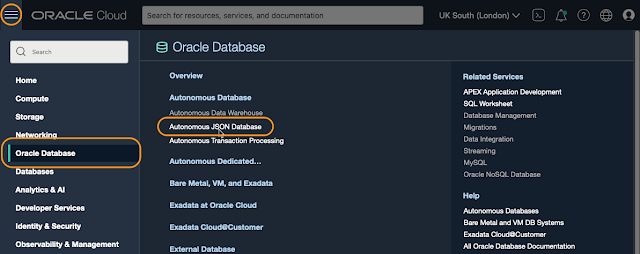
Once signed into Oracle Cloud, you'll use the "Hamburger Menu" in the top left to choose Oracle Database, then Autonomous JSON Database:

Oracle Database API, Database MongoDB, Oracle Database, Database Certification, Database Skills, Database Jobs, Database Preparation, Database Exam

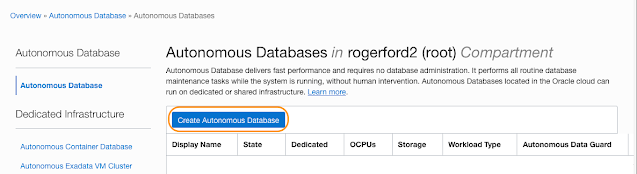
Now click on Create Autonomous Database

Oracle Database API, Database MongoDB, Oracle Database, Database Certification, Database Skills, Database Jobs, Database Preparation, Database Exam

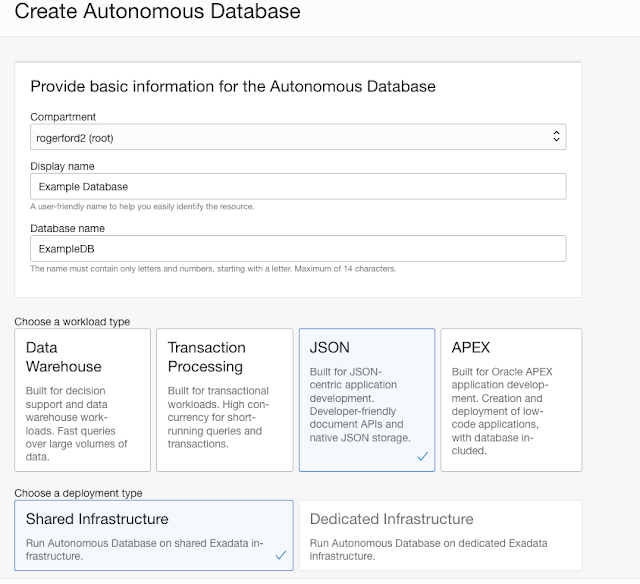
Provide a Display name and Database Name (or leave them at the generated defaults). Leave workload type set to JSON and deployment type as Shared Infrastructure.

Oracle Database API, Database MongoDB, Oracle Database, Database Certification, Database Skills, Database Jobs, Database Preparation, Database Exam

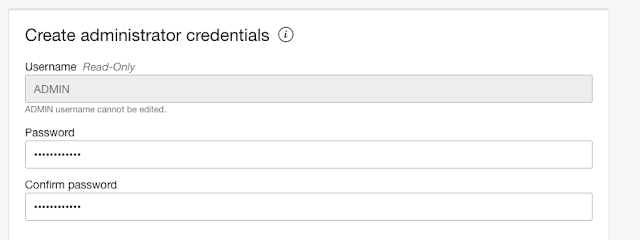
Scroll down to "Create administrator credentials", and enter and confirm a password for the ADMIN user. Don't forget this password!

Oracle Database API, Database MongoDB, Oracle Database, Database Certification, Database Skills, Database Jobs, Database Preparation, Database Exam

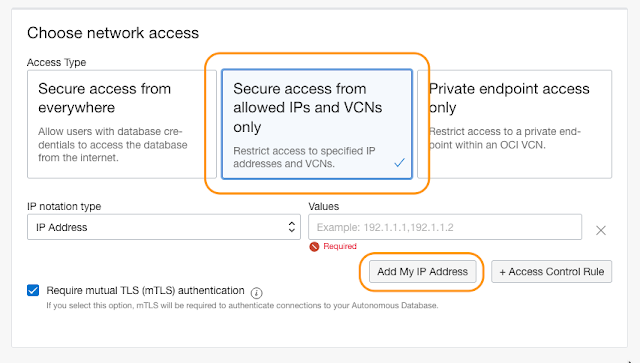
The next part is important. The Database API for MongoDB will only be available if you define "Secure access from allowed Ips and VCNs only". Click that option (it is not the default):

Oracle Database API, Database MongoDB, Oracle Database, Database Certification, Database Skills, Database Jobs, Database Preparation, Database Exam

If you will just want to connect from your current machine, use the "Add My IP Address" button. If you will want to connect from other machines (such as an Oracle Cloud VM) you can enter the addresses of those as well.

Hint: If you’re not sure what compute instances you will want to connect from, you can change the IP notation type field to CIDR block, and enter a value of 0.0.0.0/0. That will allow you to connect from anywhere, but naturally you should only use that for testing.

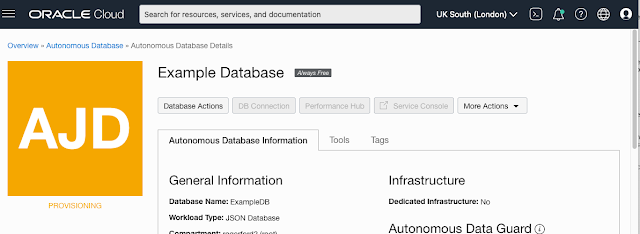
When done, click “Create Autonomous Database” at the bottom of the screen. You will see an orange AJD logo with PROVISIONING underneath.

Oracle Database API, Database MongoDB, Oracle Database, Database Certification, Database Skills, Database Jobs, Database Preparation, Database Exam

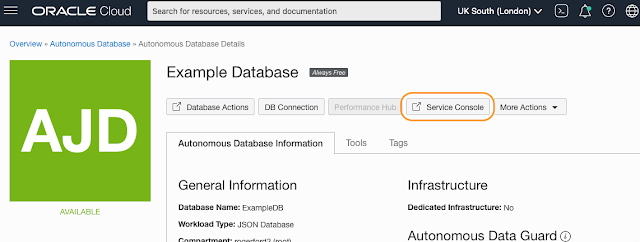
When finished (it typically takes around one minute), the logo will go green with AVAILABLE underneath.

You can now go to the Service Console.

Oracle Database API, Database MongoDB, Oracle Database, Database Certification, Database Skills, Database Jobs, Database Preparation, Database Exam

The Service Console will open in a new tab, and you can choose Development.

Oracle Database API, Database MongoDB, Oracle Database, Database Certification, Database Skills, Database Jobs, Database Preparation, Database Exam

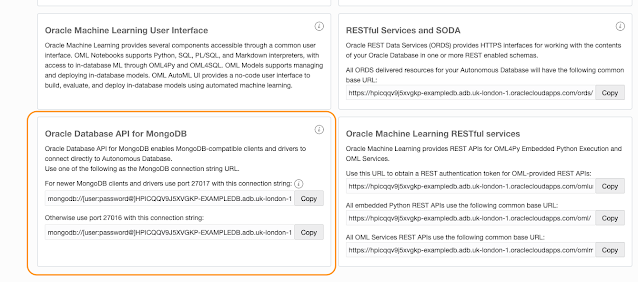
You may need to scroll down a little on the Development page, but you should see "Oracle Database API for MongoDB", with two URLs listed.

Oracle Database API, Database MongoDB, Oracle Database, Database Certification, Database Skills, Database Jobs, Database Preparation, Database Exam

Don't see that? Most likely you didn't define "Secure Access from allowed IPs" for your database. If the database is set up for "Secure Access from anywhere" then this card will not be shown (in later versions it may be shown, but grayed out).

Port 27017 should work for most newer clients and tools, but if you have problems it may be worth trying the port 27016 URL instead.

Copy the first URL using the Copy button, and save it somewhere for later use.

The URL has the format:

mongodb://[user:password@]autonomousDatabaseAddress:27017/[user]?authMechanism=PLAIN&authSource=$external&ssl=true&retryWrites=false&loadBalanced=true

Take out the initial [user:password@] (we will provide separate credentials) and change the [user] in the second part of the URL to our database username, currently "admin". So the modified URL will look something like:

mongodb://autonomousDatabaseAddress:27017/admin?authMechanism=PLAIN&authSource=$external&ssl=true&retryWrites=false&loadBalanced=true

Now we need to connect from our local machine using the MongoDB tool "mongosh". This can be installed from MongoDB's page here: https://www.mongodb.com/try/download/shell

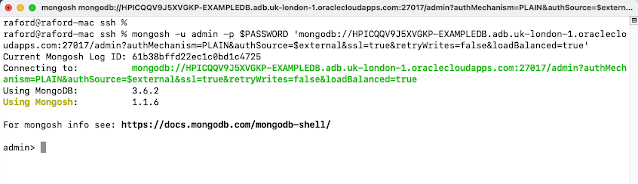
Make sure you're not connecting through any kind of VPN or proxy server (which will alter your IP address and prevent you from connecting), and run mongosh from a command prompt with "-user admin" and the URL we modified above, enclosed in single quotes (Linux/Mac) or double quotes (Windows). So the command will look something like:

mongosh -u admin -p MyPassword123 'mongodb://autonomousDatabaseAddress:27017/admin?authMechanism=PLAIN&authSource=$external&ssl=true&retryWrites=false&loadBalanced=true'

Oracle Database API, Database MongoDB, Oracle Database, Database Certification, Database Skills, Database Jobs, Database Preparation, Database Exam

Can't connect? Check the URL is properly quoted, and that you have the correct IP address for your client system registered for the database (and you're not connected through any kind of VPN). Also make sure the mongosh command is on a single line and you haven't unwittingly introduced any extra newline characters.

Once you're connected, you can use the Mongo Shell to create a collection and add some documents. For example we can create a collection called 'emp' and add some employee documents in JSON format:

db.createCollection('emp')

db.emp.insertOne(
  { "name":"Blake", "job": "Intern", "salary":30000 }
)

db.emp.insertOne(
{ "name":"Smith", "job": "Programmer", "salary": 60000, "email" : "smith@example.com" }
)

db.emp.insertOne(
{ "name":"Miller", "job": "Programmer", "salary": 70000 }
)

You can run most Mongo operations when connected to AJD except for user management commands, index operations, and aggregation pipeline operations. Those should be done through SQL instead.

Other MongoDB tools, and programs using MongoDB drivers will work in a similar way, providing the URL as we did above, and the credentials as necessary.

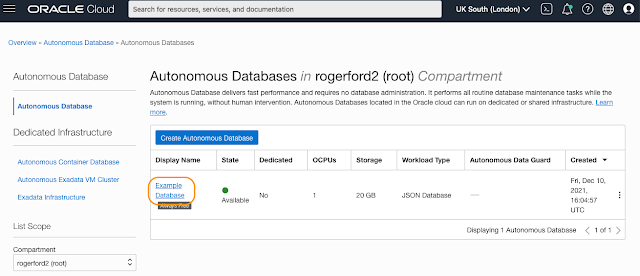
Next let's look at how we can work with collections through database tools. Go back to Oracle Cloud and find your database via Overview -> Autonomous Database -> Autonomous Databases. Click on the name of your database:

Oracle Database API, Database MongoDB, Oracle Database, Database Certification, Database Skills, Database Jobs, Database Preparation, Database Exam

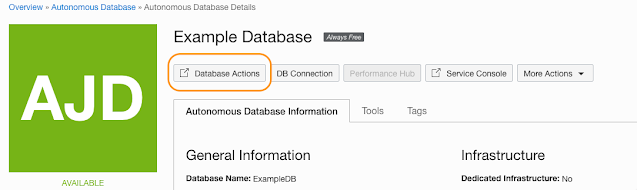
Then click on the Database Actions button:

Oracle Database API, Database MongoDB, Oracle Database, Database Certification, Database Skills, Database Jobs, Database Preparation, Database Exam

That will launch the Database Actions page in a new browser tab. Failed to launch? Probably a network connection issue - check your ACL is still valid for the IP address the browser is running on. When you're connected, you should be be logged in automatically as user ADMIN. If prompted for username and password, the username is ADMIN and the password is the one you supplied when creating the database.

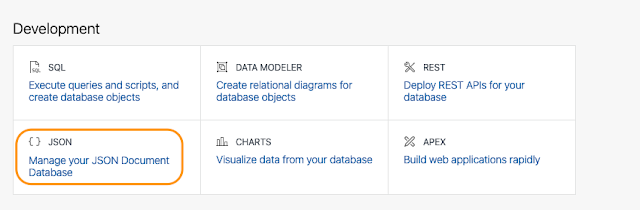
In Database Actions, there are several options available. We're interested in JSON and SQL. First, launch JSON:

Oracle Database API, Database MongoDB, Oracle Database, Database Certification, Database Skills, Database Jobs, Database Preparation, Database Exam

That will take us to the "JSON Workshop". On first entry, you will see a short tutorial. I recommend stepping through it, but you can always find it again later using the button in the top right of the screen.

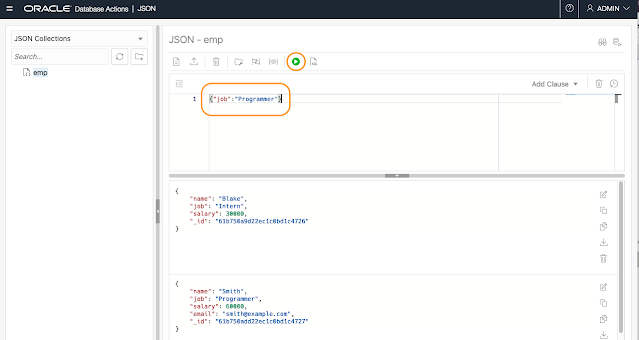
The JSON Workshop will show your collections on the left, and documents on the right. You can create, edit and delete collections and documents from within the Workshop. The box above your documents is a search box where you can enter queries. These are known as "Queries by Example" or QBEs. Try entering a simple search: { "job":"Programmer" }, and click the "Run" button

Oracle Database API, Database MongoDB, Oracle Database, Database Certification, Database Skills, Database Jobs, Database Preparation, Database Exam

You can also create indexes on JSON content from here. It's clearly not necessary to use an index to speed up queries on a three-document collection, but we'll do so just to illustrate how.

Right-click on the collection "emp" at the left of the screen:

Oracle Database API, Database MongoDB, Oracle Database, Database Certification, Database Skills, Database Jobs, Database Preparation, Database Exam

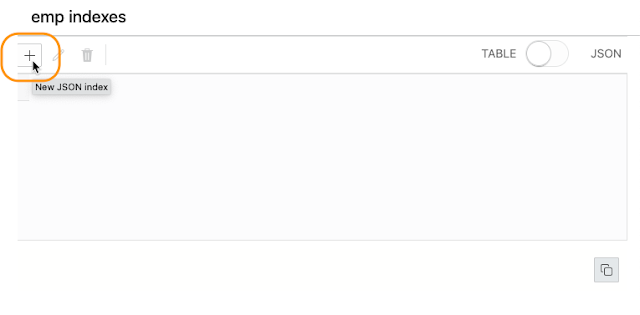
Click on Indexes and it will bring up the indexes dialog. Click on the "+" sign to add a new JSON index:

Oracle Database API, Database MongoDB, Oracle Database, Database Certification, Database Skills, Database Jobs, Database Preparation, Database Exam

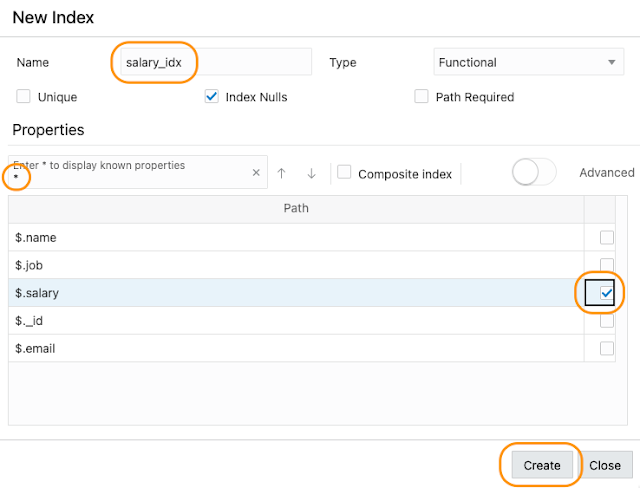
We have a number of options here - more if we select "advanced". We won't go into all the options here, but let's create a functional (normal) index on salary. Give it a name such as "salary_idx" and enter * in the Properties box. Check the box next to "salary", then click on "Create" at the bottom:

Oracle Database API, Database MongoDB, Oracle Database, Database Certification, Database Skills, Database Jobs, Database Preparation, Database Exam

Feel free to explore the JSON Workshop further, or we can move on to SQL.

Click on Database Actions in the header:

Oracle Database API, Database MongoDB, Oracle Database, Database Certification, Database Skills, Database Jobs, Database Preparation, Database Exam

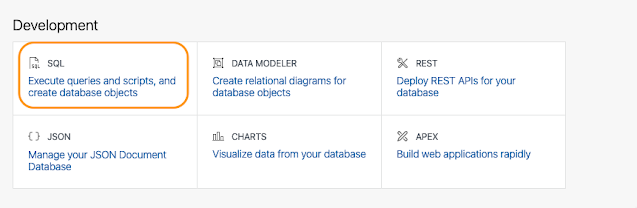
Then choose SQL:

Oracle Database API, Database MongoDB, Oracle Database, Database Certification, Database Skills, Database Jobs, Database Preparation, Database Exam

This takes us to "SQL Developer Web". It should be familiar to people used to using the desktop SQL Developer tool. Again, a tutorial will run on first entry.

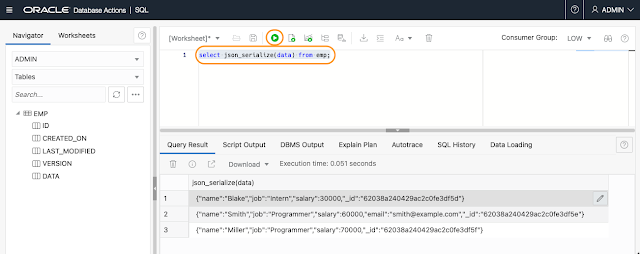
On our left we will see "Tables", and we'll see a table called EMP. This is a table which was automatically created to hold our "emp" collection. If you open it, you will see it contains several columns, one of which is called DATA. You might guess that contains our JSON document, but what is less obvious is that this is a binary represention which we can't see if we just do something like "select * from emp". Instead we can use JSON_SERIALIZE to examine the contents. Let's try that:

select json_serialize(data) from emp;

Enter that, and click the "Run Statement" button.

Oracle Database API, Database MongoDB, Oracle Database, Database Certification, Database Skills, Database Jobs, Database Preparation, Database Exam

We can see that each of our three JSON documents is stored in a separate row of the EMP table.

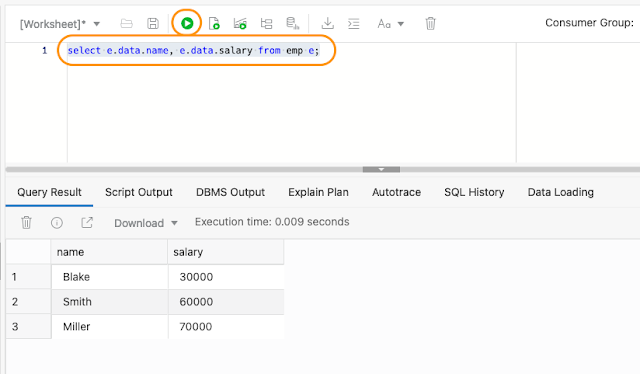
That's great, we can get the JSON out of the table using SQL as well as mongosh or the JSON Workshop. But what if we want to do SQL on fields inside the JSON?  That's pretty easy as well, we can use the "simple dot notation" to fetch a value from the JSON "data" column. Note that we must use a table alias ("e" in the next example) in order to use dot notation:

select e.data.name, e.data.salary from emp e;

Oracle Database API, Database MongoDB, Oracle Database, Database Certification, Database Skills, Database Jobs, Database Preparation, Database Exam

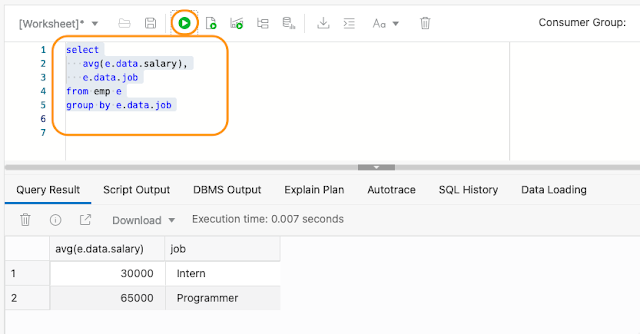
You can see that our data is returned exactly as though it was relational data in table columns. Indeed, we can do anything with this data that we could do with normal columns. Let's get the average salary by job for our simple collection:

select
   avg(e.data.salary),
   e.data.job
from emp e
group by e.data.job

Oracle Database API, Database MongoDB, Oracle Database, Database Certification, Database Skills, Database Jobs, Database Preparation, Database Exam

We have only scratched the surface of SQL/JSON capabilities here, but the intention was simply to show you that you can work seamlessly with MongoDB tools, Oracle JSON tools, and SQL/JSON on the same data.

Source: oracle.com
Friday, October 29, 2021

Oracle Database API for MongoDB with Oracle Autonomous Database opens up an entirely new set of use cases for MongoDB applications

Oracle Database API, MongoDB, Oracle Autonomous Database, MongoDB Applications, Oracle Database Exam Prep, Oracle Database Preparation, Oracle Database Career, Oracle Database Jobs

Simpler database development experience

Developers like simplicity in building applications using choice of programming languages, frameworks, tools and databases. Document databases have become a popular choice for storing and processing application data in a language independent Java Script Object Notation (JSON) documents as a collection.

Document databases offer simple APIs for CRUD operations (Create, Read, Update, Delete) and frameworks that make it easy to persist application objects. This allows developers to focus on the application logic in microservices / API driven architecture without having to learn SQL (Structured Query Language).

Easily adapt to application changes

Unlike relational database models where application objects are mapped to database tables with predefined set of columns a.k.a schema, JSON documents are schema-flexible and allows values in each document to vary throughout a collection, making them ideal for Agile development methodology. 

Further, JSON supports nested structures that can be used to selectively add redundant data, so it can be read and written as a single unit to avoid joins and multiple DML (Data Manipulative Language) statements when reading or writing an application object.

Finally, document database architecture provides internet scale applications required performance and scalability with scale-out storage and compute capacity with minimum response time from database.  Document databases typically provide single-digit millisecond latencies for small reads and writes, while serving 1000s of concurrent users. 

Document Databases are great, but...

MongoDB has popularized document databases for developers with their free to use community edition. MongoDB offers simple document database APIs; however, it has limitations supporting multi-document ACID transactions critical to enterprise applications. For developers, implementing basic SQL engine functionality requires writing, testing and maintaining hundreds of lines of application code, resulting in security vulnerabilities, increased development time and maintenance.

As the use cases for the applications change, supporting additional data types, workload types require external integration with other single-purpose databases such as Graph, Spatial etc, potentially using different APIs and need to move the data to those databases, resulting in data fragmentation, data inconsistency and security risks.

Keeping it together with converged database

Oracle's converged database has built-in support for all modern data types and the latest development paradigms. Converged databases support spatial data for location awareness, JSON for document stores, IoT for device integration, in-memory technologies for real-time analytics, and of course, traditional relational data. By providing support for various data types, a converged database can run all sorts of workloads from IoT to Blockchain to Analytics and Machine Learning. It can also handle various development paradigms, including Microservices, Events, REST, SaaS, and CI/CD eliminating data replication or duplication, reducing the cost and increasing developer productivity.

Oracle Database API, MongoDB, Oracle Autonomous Database, MongoDB Applications, Oracle Database Exam Prep, Oracle Database Preparation, Oracle Database Career, Oracle Database Jobs

Overview of Oracle Autonomous Databases


Oracle Autonomous Database combines the flexibility of cloud with the power of machine learning to deliver data management as a service that enables businesses to run mission-critical workloads in a most secure and highly available environment, while reducing the administration and runtime costs up to 90%.

Oracle Autonomous Database is family of cloud services deployed on Oracle Exadata, a high performance engineered platform for converged database, optimized for specific workload typ

Oracle Database API, MongoDB, Oracle Autonomous Database, MongoDB Applications, Oracle Database Exam Prep, Oracle Database Preparation, Oracle Database Career, Oracle Database Jobs

◉ Oracle Autonomous Data Warehouse(ADW): ADW uses adaptive machine learning to deliver unprecedented simplicity, performance, and highly elastic data management that enables data warehouse deployment in seconds.

◉ Oracle Autonomous Transaction Processing(ATP): ATP provides simpler application development, real-time analytics, personalization, and fraud detection for complex mix of high-performance transactions, batch reporting, and Internet of Things (IoT) applications.

◉ Oracle Autonomous JSON Database(AJD): AJD makes it simple to develop JSON-centric applications with document APIs, serverless scaling and high-performance ACID transactions.

◉ APEX Service: Oracle APEX Application Development (APEX Service) is a fully managed, low-code application development platform for building and deploying modern, data-driven applications in Oracle Cloud

Introducing Oracle Database API for MongoDB with Oracle Autonomous JSON Database


Oracle Database API for MongoDB is the latest initiative to help developers connect applications, drivers and tools built for MongoDB to Oracle Autonomous Databases*.

With the Oracle Database API for MongoDB developers can continue to use their skills but also leverage converged database and Autonomous Database capabilities over their MongoDB collections, opening an entirely new set of use cases for their applications.

Getting Started with Oracle Database API for MongoDB


Currently Oracle Database API for MongoDB is in Limited Availability (LA), this means it Is not enabled for every cloud database by default.

◉ If you haven’t already signed up for ‘Always Free’ services in Oracle Cloud Free Tier, please do so now, you are entitled to two (2) instances of Autonomous JSON databases and follow the steps outlined in the blog to create and manage instance.

Oracle Database API, MongoDB, Oracle Autonomous Database, MongoDB Applications, Oracle Database Exam Prep, Oracle Database Preparation, Oracle Database Career, Oracle Database Jobs

◉ Oracle Database API for MongoDB requires an Access Control List (ACL) secured network access. ‘Secure access from everywhere’ and ‘Private endpoint access only’ options are not supported currently. In the ‘Access Control List’ setup under ‘Network’ section of the instance, as specified in Configure ACL for an existing Autonomous Database Instance.

Connecting MongoDB Clients


Use MongoDB Shell, a command-line utility to connect and query data in Autonomous JSON Database. We recommend v3.6 or later. For applications built using popular languages such as Java, Node, .NET and Python, we recommend Java driver 3.6 or later, Node.js 3.0 or later, .NET 2.5 or later, Python 3.6 or later with load_balanced, parameter set as ‘true’.

◉ Once your instance is authorized to use MongoDB APIs, retrieve connection string from the ‘Service Console’

Oracle Database API, MongoDB, Oracle Autonomous Database, MongoDB Applications, Oracle Database Exam Prep, Oracle Database Preparation, Oracle Database Career, Oracle Database Jobs

Oracle Database API, MongoDB, Oracle Autonomous Database, MongoDB Applications, Oracle Database Exam Prep, Oracle Database Preparation, Oracle Database Career, Oracle Database Jobs

◉ Create database user(s) from ‘Database Actions’ and grant ‘SODA_APP’  role for the user, e.g. TESTUSER

◉ Test connectivity from MongoDB Shell for TESTUSER

Oracle Database API, MongoDB, Oracle Autonomous Database, MongoDB Applications, Oracle Database Exam Prep, Oracle Database Preparation, Oracle Database Career, Oracle Database Jobs

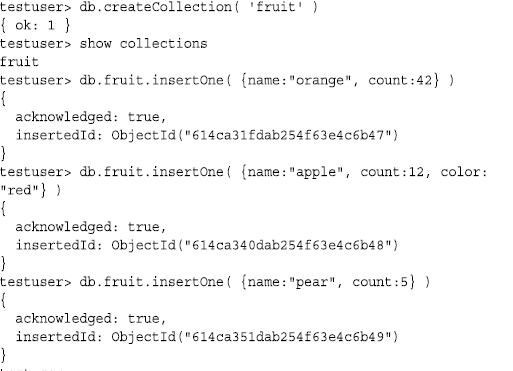
◉ Create collection(s) and insert documents as you would normally do using MongoDB Shell

Oracle Database API, MongoDB, Oracle Autonomous Database, MongoDB Applications, Oracle Database Exam Prep, Oracle Database Preparation, Oracle Database Career, Oracle Database Jobs

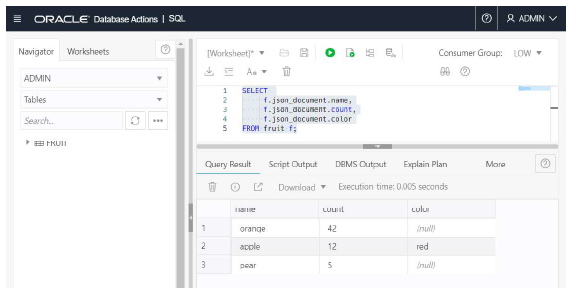
◉ Verify the collection from Autonomous Database SQL Web Client

Oracle Database API, MongoDB, Oracle Autonomous Database, MongoDB Applications, Oracle Database Exam Prep, Oracle Database Preparation, Oracle Database Career, Oracle Database Jobs

Source: oracle.com
Tuesday, February 16, 2021

Difference between Oracle and MongoDB

Oracle, MongoDB, Oracle Database Exam Prep, Oracle Database Certifications, Database Preparation, Database Career

1. Oracle :

Oracle is a relational database management system (RDBMS). It was developed by Oracle Corporation in 1980. It is the first database designed for grid computing that provides the most flexible and cost-effective way to manage information and application. It runs on major platforms like Windows, Unix, Linux, and macOS. It is a relational database in which data is accessed by user through application or query language called SQL.

2. MongoDB :

MongoDB is a cross-platform document-oriented and a non relational (i.e., NoSQL) database program. It is an open-source document database, that stores the data in the form of key-value pairs. MongoDB was developed by MongoDB Inc. and initially released on 11 February 2009. It is written in C++, Go, JavaScript, Python languages. MongoDB offers high speed, high availability, and high scalability. Once MongoDB is installed, users can make use of Mongo shell as well. Mongo shell provides a JavaScript interface through which the users can interact and carry out CRUD operations.

Difference between Oracle and MongoDB :

ORACLE MONGODB 
It was developed by Oracle Corporation in 1980.  It was developed by MongoDB Inc. in 2009.
It is written in C and C++.  It is written in C++, Go, JavaScript, Python languages. 
It is a commercial software.  It is an open-source software. 
Server operating systems for Oracle are Solaris, Linux, OS X, Windows.  Server operating systems for MongoDB are Solaris, Linux, OS X, Windows, AIX, HP-UX. 
It uses Horizontal partitioning method for storing different data on different nodes.  It uses Sharding partitioning method for storing different data on different nodes. 
Referential integrity is used in Oracle.  No concept of referential integrity and no Foreign keys. 
JDBC, ODBC, ODP.NET, OCI are the APIs and access methods used in Oracle.  Proprietary protocol using JSON are the APIs and access methods used in MongoDB. 
The replication methods that Oracle supports are Master-Slave Replication and Master-Master Replication.  The replication method that MongoDB supports is Master-Slave Replication. 
It provides fine grained access rights according to SQL-standard.  It provides access rights for users and roles. 
Immediate Consistency method ensures consistency in Oracle.  Eventual Consistency and Immediate Consistency methods ensures consistency in MongoDB.