Oracle Enterprise Manager 13.5 customers gain greater operations, capacity planning, and forecasting insight by enabling rich Enterprise Manager target-level data and sharing it with Oracle Cloud Observability & Management platform services. Enterprise Manager transfers data from managed targets and Oracle Management Repository (OMR) to OCI Object Storage, where it is accessible by Oracle Cloud O&M services like Operations Insights, Logging Analytics, etc.
Gain greater insight from the data Enterprise Manager already collects
Oracle Cloud enables new storage, processing, and machine learning technologies to help customers solve more business problems using target-level data already collected and managed by Enterprise Manager. It helps eliminate custom scripting, warehousing building, or the need to have extra hardware or storage onsite to perform IT Operational analytics and planning.
Customers configure Oracle Enterprise Manager to transfer data from the targets it manages and the Oracle Management Repository (OMR) into Oracle Cloud Infrastructure (OCI) Object Storage, enabling it to be securely accessible by Oracle Cloud services. Once OCI connectivity is set up, data automatically and routinely uploads to OCI Object Storage to enable a data lake. IT Operations and DBAs then use OCI Operations Insights to perform capacity planning and forecasting activities from Enterprise Manager data and other sources. Prerequisites for this capability include: customers should already have the Oracle Diagnostics Pack licensed or add it, and have an Oracle Cloud account set up with credentials and connectivity as detailed in the EM 13.5 documentation.
The following graphic illustrates how to target data flows from Enterprise Manager to an Oracle Cloud service once the configuration process has been completed.
Figure 1: Oracle Enterprise Manager to Oracle Cloud Flow
Set up and configure Enterprise Manager to target data flows to an Oracle Cloud service
Step 1: Export Enterprise Manager data to OCI
For target data to move from Enterprise Manager to OCI, create an OCI Bridge in Enterprise Manager. The OCI Bridge defines a data connection to the OCI Object Storage bucket residing in the Oracle Cloud. The user needs Super Administrator privileges for this one-time setup.
Log in to Enterprise Manager and from the Setup menu, choose Export EM Data to OCI.
Figure 2: Choosing Export EM Data to OCI
Then the Manage EM Data for OCI Services page displays. Note that it will be empty the first time you access it. Click the Enable Data Export tab.
Figure 3: Managing EM Data to OCI Services
The OCI Service Data Export dialog displays as follows:
Figure 4: Setting up an OCI Bridge
Click the + to the right of the Source text field and the Select Group dialog displays.
Then, select a group that contains the targets for which you want data exported to OCI and then click Select Target Group. Either select an existing OCI Bridge from the drop-down menu or click the + to create a new OCI Bridge as shown below.
Figure 5: Configuring an OCI Bridge
Enter the OCI properties.
The Save As field displays an auto-generated bridge name (you can optionally change the name).
Click the Test button to the right of the field to validate the properties you entered.
When you are all done with your entries, click Submit to create the OCI Bridge. Note that only one OCI Bridge per OCI service is allowed.
Step 2: Import Data from the Object Storage Bucket to the OCI Service
Once you've set up an OCI Bridge to enable data to move from Enterprise Manager to the OCI Object Storage bucket, you will need to create an EM Bridge to move Enterprise Manager target data from the Object Storage bucket to your OCI service for processing.
Setup OCI Bridge and target groups in OCI to validate configuration worked
Once you've successfully created an OCI Bridge in Enterprise Manager and selected one or more target groups for data export to OCI, the Manage EM Data for OCI Services dashboard will show the current upload status for each service including the groups that have been added for each service.
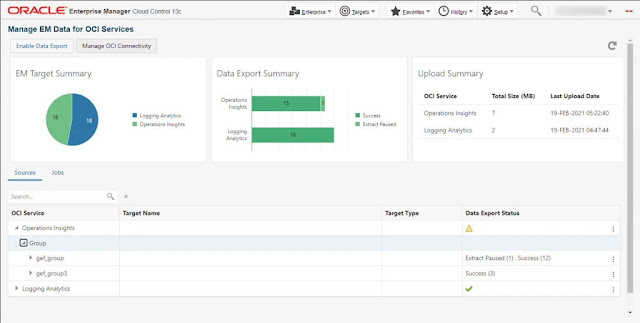
Figure 6: Validate the configuration works
Connecting EM to Oracle Cloud enables data lake capabilities so users can harvest rich metric, database telemetry, SQL, and other configuration data for operational analytic reporting and forecasting use-cases.
Bridge
◉ Connects EM with OCI - harvesting metric, SQL, and configuration data for deep operational analytics
◉ Provides visibility and analytics across multiple EM installations
Data Lake
◉ Automated Extract, Transform, Load (ETL) of EM data to Oracle Cloud
◉ Enables capacity planning analysis, trending, and forecasting on long-term metrics and configuration data
◉ Allows other cloud services such as OPSI to provide visibility into the performance of critical workloads including Exadata, Oracle Database, and more
Source: oracle.com


 Posts
Posts

