Showing posts with label Oracle Autonomous Database. Show all posts

Monday, July 1, 2024

Announcing New Spatial Machine Learning Algorithms in OML4Py on Autonomous Database Serverless

We are pleased to announce the general availability of a new feature of Oracle Machine Learning for Python (OML4Py), Spatial AI. OML4Py Spatial AI provides specialized machine learning algorithms that incorporate the effects of location. Using machine learning with spatial algorithms can improve model quality and prediction accuracy by accounting for the effects of location. For example, spatial regression algorithms are able to enhance home value predictions by incorporating the influence of neighboring home values. Spatial algorithms also allow you to detect location patterns, like spatial clustering of traffic accidents. As part of OML4Py on Autonomous Database Serverless, Spatial AI provides  a single environment for spatial ML workflows that minimizes data movement to external ML engines, simplifies your architecture, and accelerates time to value.

Sample notebooks are provided to help get you started. From the Oracle Machine Learning user interface, navigate to Templates > Examples and filter for "spatial". Clicking on the title of a sample notebook opens it in read-only mode to review the content. To create your own editable/runnable copy of a sample notebook, first select the sample notebook by clicking on the tile, click "Create Notebook", and then select your project. Begin with the notebook "OML4Py Spatial AI Run Me First" to seed sample data, and then try other notebooks based on your areas of interest.

Announcing New Spatial Machine Learning Algorithms in OML4Py on Autonomous Database Serverless

After the data are seeded, sample notebooks can be run in any order. For example, in the sample notebook OML4Py Spatial AI Agglomerative Clustering and Regionalization, you apply a spatial ML algorithm that combines sets of Census Block Groups into broad regions based on similar demographics. Such regions are useful for regional marketing, where strategies are adjusted based localized demographics and associated buying patterns. The following image shows the results of a non-spatial clustering based solely on similar feature values (left), and results of clustering with a spatial ML algorithm that combines areas into regions based on similarity of both feature values and location.

Announcing New Spatial Machine Learning Algorithms in OML4Py on Autonomous Database Serverless

Source: oracle.com

Friday, June 28, 2024

Announcing Globally Distributed Autonomous Database Support for Oracle Database 23ai Enabling Raft Replication

Announcing Globally Distributed Autonomous Database Support for Oracle Database 23ai Enabling Raft Replication

Over the last four years, the Oracle Database Development team has diligently worked to deliver the next long-term support release: Oracle Database 23ai, with a focus on AI and enhancing developer productivity.

Today, we are thrilled to announce support for Oracle Database 23ai on the Oracle Globally Distributed Autonomous Database!. Oracle Database 23ai, in conjunction with the Oracle Globally Distributed Autonomous Database, is a game-changer for enterprises worldwide seeking to build cloud-scale distributed databases with ultra-high scalability, availability, and advanced AI capabilities.

With the latest release, Oracle Globally Distributed Autonomous Database allows customers to select their preferred replication strategy to ensure high availability and disaster recovery. You can choose between the new built-in Raft replication (introduced in 23ai) and Oracle Data Guard (available in releases 19c and 23ai). The service automatically deploys the specified replication topology to the configured systems and enables seamless data replication. If you are used to NoSQL databases and do not expect to know anything about how replication works, Globally Distributed Autonomous Database built-in Raft replication just works.

Key benefits for Raft replication include:


Fast failover with zero data loss: Raft replication is built into Globally Distributed Autonomous Database to provide a consensus-based, high-performance, low-overhead availability solution, with distributed replicas and fast failover with zero data loss, while automatically maintaining the replication factor if shards fail.

Active-Active symmetric configuration: Each node accepts writes and reads for a subset of data facilitating an Active-Active symmetric distributed database architecture that enhances availability, and optimizes resource utilization globally.

Simplified management: Raft replication is integrated and transparent to applications without requiring configuration of Oracle GoldenGate or Oracle Data Guard. Raft replication automatically reconfigures replication in case of shard host failures or when shards are added or removed from the sharded database.

Automatic data distribution: The service handles workload distribution and balancing upon scaling (addition or removal of shards), including planned or unplanned changes in shard availability. 

Announcing Globally Distributed Autonomous Database Support for Oracle Database 23ai Enabling Raft Replication

By supporting Oracle Database release 23ai, Globally Distributed Autonomous Database offers customers enhanced replication options and advanced AI capabilities including Select AI and AI Vector Search. It provides all of the new benefits on top of 23ai including unparalleled flexibility, improved operational efficiency, enhanced performance, simplified scalability, and compliance for modern applications. Stay tuned for more updates and detailed guides on leveraging these new capabilities to maximize your database’s potential.

Source: oracle.com

Friday, May 31, 2024

The 5 major benefits of ECPUs in the Oracle Autonomous Database

Oracle Autonomous Database (ADB) recently introduced a more advanced ECPU billing metric and is now retiring the legacy OCPU billing metric for Autonomous Data Warehouse and Autonomous Transaction Processing in the next 12 months. Oracle recommend switching from the OCPU billing metric to the ECPU billing metric, which will not incur any downtime or service interruptions.

The 5 major benefits of ECPUs in the Oracle Autonomous Database

ECPUs will provide the same great price-performance as OCPUs and continuous improvements in price-performance over time. Updating to the ECPU billing metric provides the following benefits:

  • 50% lower entry cost: The smallest Autonomous Database that can be provisioned with ECPUs is 50% less expensive ($0.672 per hour vs $1.3441 per hour with OCPUs)
  • Finer granularity for database scaling: Each incremental increase in ECPU database size is only $0.336
  • Lower storage costs: Autonomous Data Warehouse storage price reduced from $118.40 to $25.00 per TB per month and Autonomous Transaction Processing storage can be provisioned in increments of 1GB (this is a huge thing!), with a minimum of 20GB – this brings the ADW in-database storage price on par with the object storage and thus this helps to build data lakes solely on the architectural requirements and not focusing on cost
  • Up to 87% lower costs with database consolidation: Elastic Resource Pools, available on ECPU ADB Serverless databases, help consolidate deployments leading to major cost savings
  • New features for Autonomous Database may only be available with ECPU’s

Note that the prices mentioned above are the current list prices for Autonomous Databases with the License Included license type.

The 5 major benefits of ECPUs in the Oracle Autonomous Database

There are also differences in backups between OCPU’s and ECPU’s. ECPU’s backup storage is billed separately, and the backup retention period may be selected between 1 and 60 days. With OCPU’s, 60-days of backup storage is included in the storage price. This new ECPU customer-controllable backup is beneficial because customers can now control the backup storage size and further reduce the cost of dev/test environments. Here is how I reduced the size from 60 to 31 days (later on I did reduce it to 7 days).

The 5 major benefits of ECPUs in the Oracle Autonomous Database

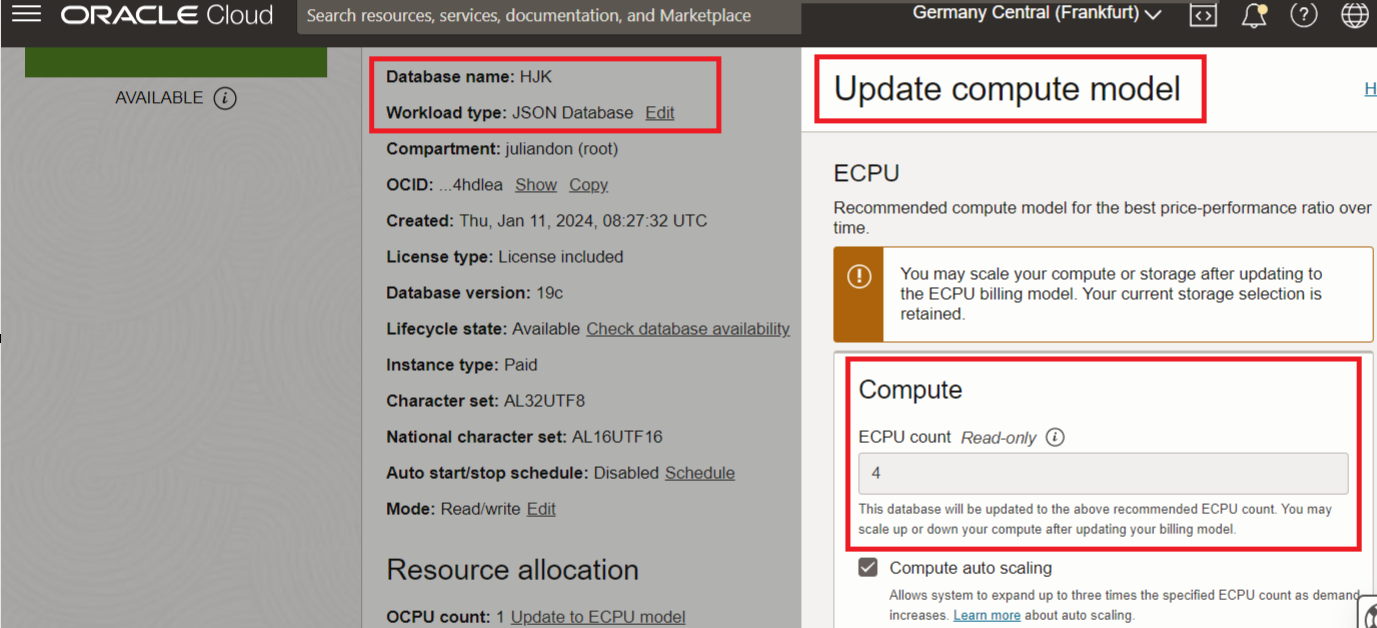
I did scale down my database in 2 phases: (1) I switched to the ECPU model (1 OCPU –> 4 ECPUs) and then (2) reduced the ECPU count from 4 to 2 and the storage from 1024GB to 20GB (those two in one go with no downtime).

The 5 major benefits of ECPUs in the Oracle Autonomous Database

Here are some general guidelines related to the new ECPU metric:

  1. Provision all new Autonomous Data Warehouse and Autonomous Transaction Processing databases or clones with the ECPU billing metric
  2. Update all existing databases to the ECPU billing metric, which is a simple and seamless button click or API call
  3. Note that if you choose not to update your existing databases’ billing metric at this time, Oracle may convert your databases from the OCPU billing metric to the ECPU billing metric in the future

Updating your Autonomous Database Serverless to the ECPU billing metric will have no impact to your service and incur no downtime. Oracle Autonomous Database will be retiring the OCPU-based SKUs and replacing them with the ECPU-based SKUs. Starting in August 2023, some new Autonomous Database features may be available only on ECPU’s. For example, Elastic Resource Pools are only available with ECPU’s.

Note that ECPU’s have also already been introduced for MySQL Heatwave on AWS, and other services may also offer ECPU’s in the future.

The 5 major benefits of ECPUs in the Oracle Autonomous Database

Source: juliandontcheff.wordpress.com

Monday, May 20, 2024

Consolidating Development Environments with Autonomous Database Elastic Pools

Consolidating Development Environments with Autonomous Database Elastic Pools

You are dying to get a reservation at that hot new restaurant for you and another couple. You get a tip that a table may be available for this weekend. Since you want to keep the spot, you call them and make the reservation for a table of 4, then try to track down your friends.

Saturday comes around, and your friends still have not committed, so you head to the restaurant anyway. They seat the 2 of you at a table of 4, and your friends never show. Afraid the restaurant will charge you for no-show friends, you are pleasantly surprised to pay for the meal for the two even though you had a lovely big table ready for 4.

Autonomous Database Elastic Pools


Similarly, Autonomous Database Elastic Pools (Elastic Pools) allow you to plan for what you could use but only pay for what you actually do use in terms of ECPUs. You choose a set pool of ECPUs (e.g., 128, 256, 512,1024, 2048, 4096) but can use up to 4X that amount of ECPU (e.g., 4 * 128 = 512, 4* 256 = 1024) when needed. Because you have allocated the required space in the pool for each database when it needs to expand to that size, the capacity is there for you, but you only pay based on the pool utilization each hour. Elastic Pools also give you finer-grained controls via ECPUs with any database in the pool since Elastic Pools only require a minimum of 1 ECPU instead of the standard 2 ECPU for non-pooled databases.

Development and Test Environments


Your development and test environments are probably notorious for having resources that are either overallocated or have resources sitting idle. Idle and overallocated resources contradict the benefits of running in the cloud. I worked with a financial services customer that runs 11 non-production databases for every major application. All these environments, though, are not required to be fully on all the time. This is the situation where the elasticity of the cloud starts to pay off. With hundreds of applications spawning many different non-production copies, the chance of you having idle or overallocated databases is high if not properly managed.

Autonomous Database Autoscaling and scheduled startup and stops can help you at a database level by controlling the minimum ECPUs and shutting them down when they are not in use. Although this will help to cut down on unused asset costs, it does not take advantage of the economies of scale with a large amount of highly transitory databases you find in development.

Moving your development databases to an Elastic Pool minimizes or eliminates the time and effort to manage resources for transitory databases, which may start and stop multiple times per sprint. The Elastic Pool allows you to manage resources at a pool level with databases able to consume what they need and then release those resources back to other development databases without administrator intervention.

Example

Assume you have a shared development environment for 50 applications with five development/test environments each. Development may use these databases for a single sprint or less, but they must be sufficiently sized when in use and able to start up on demand without administrative wait time.

Configuring with Autoscaling

Using an Autoscaling Autonomous Database, you would also have to start and stop each database and individually manage each database.

  • With 50 Applications * 5 environments = 250 possible databases
  • In a non-pooled environment, you could start with a 2 ECPU with autoscaling up to 3X the initial size for each database.

Configuring with Elastic Pools

If you run this in an Elastic Pool, you can improve your efficiency further and get more resources and finer-grained controls.

  • The first benefit is that each database minimum is 1 ECPU
  • Some of these databases could be allocated to as low as 1 ECPU, while you may allocate test databases to a higher capacity.
  • As long as you stay below the 512 (4X of 128) pool capacity of a 128 ECPU Elastic Pool, you would only need a 128 ECPU Elastic Pool.
  • If a database only uses 1 ECPU but suddenly needs more capacity, it would have up to the allocated amount ready, which you should reflect in the allocation level. Elastic Pools immediately release those extra ECPUs to the pool when the workload scales back down.

Development High Peak Use Case

In the rare case that all 250 databases ran at low usage during a peak hour, in an autoscaling configuration, you would consume 250 databases at 2 EPCU each = 500 ECPU for that hour. Elastic Pools would handle this differently by scaling the Elastic Pool to meet the concurrent databases. At 250 databases with a minimum of 1 ECPU, this is half of the autoscale usage, and you could handle with a 256 ECPU Elastic Pool for that hour and scale back to 128 as the demand drops. The result is nearly halving the cost of development ECPUs for that hour.

Idle Development Database Use Case

If databases are used but left idle and not shut down, they will continue to be billed at the minimum ECPU in an autoscaling configuration. Databases in an Elastic Pool will consume the ECPUs in the Elastic Pool only when utilized. For example, 20% of the 250 development databases, each with a minimum configuration of 2 ECPUs, are left running by mistake. In an autoscaling configuration, this would be 25 databases * 2 ECPU, or 50 ECPU consumption for every hour they are left on. In Elastic Pools, unless you are utilizing these databases, they will not consume ECPUs from the pool, resulting in a savings of the cost of up to 50 ECPUs.

Conclusion

Autoscaling is a way to manage your capacity for individual databases. Elastic Pools takes this further by providing an innovative way to consolidate your database environment by simplifying Autonomous Databases' overall management and capacity planning across large estates of development databases. By understanding and using the concept of 4X capacity and allocating databases properly, you can put a pool in place that will lower overall costs and ensure the capacity is there when needed. The development environment is one of many use cases in which Elastic Pools can simplify and cut costs in a modern database estate.

Source: oracle.com

Friday, April 26, 2024

The 5 major benefits of ECPUs in the Oracle Autonomous Database

Oracle Autonomous Database (ADB) recently introduced a more advanced ECPU billing metric and is now retiring the legacy OCPU billing metric for Autonomous Data Warehouse and Autonomous Transaction Processing in the next 12 months. Oracle recommend switching from the OCPU billing metric to the ECPU billing metric, which will not incur any downtime or service interruptions.

The 5 major benefits of ECPUs in the Oracle Autonomous Database

ECPUs will provide the same great price-performance as OCPUs and continuous improvements in price-performance over time. Updating to the ECPU billing metric provides the following benefits:

  • 50% lower entry cost: The smallest Autonomous Database that can be provisioned with ECPUs is 50% less expensive ($0.672 per hour vs $1.3441 per hour with OCPUs)
  • Finer granularity for database scaling: Each incremental increase in ECPU database size is only $0.336
  • Lower storage costs: Autonomous Data Warehouse storage price reduced from $118.40 to $25.00 per TB per month and Autonomous Transaction Processing storage can be provisioned in increments of 1GB (this is a huge thing!), with a minimum of 20GB – this brings the ADW in-database storage price on par with the object storage and thus this helps to build data lakes solely on the architectural requirements and not focusing on cost
  • Up to 87% lower costs with database consolidation: Elastic Resource Pools, available on ECPU ADB Serverless databases, help consolidate deployments leading to major cost savings
  • New features for Autonomous Database may only be available with ECPU’s

Note that the prices mentioned above are the current list prices for Autonomous Databases with the License Included license type.

The 5 major benefits of ECPUs in the Oracle Autonomous Database

There are also differences in backups between OCPU’s and ECPU’s. ECPU’s backup storage is billed separately, and the backup retention period may be selected between 1 and 60 days. With OCPU’s, 60-days of backup storage is included in the storage price. This new ECPU customer-controllable backup is beneficial because customers can now control the backup storage size and further reduce the cost of dev/test environments. Here is how I reduced the size from 60 to 31 days (later on I did reduce it to 7 days).

The 5 major benefits of ECPUs in the Oracle Autonomous Database

I did scale down my database in 2 phases: (1) I switched to the ECPU model (1 OCPU –> 4 ECPUs) and then (2) reduced the ECPU count from 4 to 2 and the storage from 1024GB to 20GB (those two in one go with no downtime).

The 5 major benefits of ECPUs in the Oracle Autonomous Database

Here are some general guidelines related to the new ECPU metric:

  1. Provision all new Autonomous Data Warehouse and Autonomous Transaction Processing databases or clones with the ECPU billing metric
  2. Update all existing databases to the ECPU billing metric, which is a simple and seamless button click or API call
  3. Note that if you choose not to update your existing databases’ billing metric at this time, Oracle may convert your databases from the OCPU billing metric to the ECPU billing metric in the future

Updating your Autonomous Database Serverless to the ECPU billing metric will have no impact to your service and incur no downtime. Oracle Autonomous Database will be retiring the OCPU-based SKUs and replacing them with the ECPU-based SKUs. Starting in August 2023, some new Autonomous Database features may be available only on ECPU’s. For example, Elastic Resource Pools are only available with ECPU’s.

Note that ECPU’s have also already been introduced for MySQL Heatwave on AWS, and other services may also offer ECPU’s in the future.

The 5 major benefits of ECPUs in the Oracle Autonomous Database

Source: juliandontcheff.wordpress.com

Wednesday, April 24, 2024

Performance Tuning in the Oracle Autonomous Database: Creating Indexes for JSON Collections

The Oracle Database and in particular the Oracle Autonomous Database offers multiple technologies to accelerate queries and improve database performance over JSON data, including indexes, materialized views, in-memory column storage, and Exadata storage-cell pushdown.

Simple Oracle Document Access (SODA) is a NoSQL query language for storing, editing and deleting JSON documents. A SODA collection is a set of documents (in particular JSON) that is backed by an Oracle Database table or view. By default, creating a SODA document collection creates the following in the Oracle Database:

◉ Persistent default collection metadata.
◉ A table for storing the collection, in the database schema to which your SODA client is connected.

If the init.ora parameter compatible is at least 20, then SODA uses JSON data type by default for JSON content, and the version method is UUID. If the init.ora parameter compatible is less than 20, then SODA uses BLOB textual data by default for JSON content and the data is character data. 

Collection metadata is composed of multiple components. The kind of database you use determines the collection metadata that is used by default, and which of its field values you can modify for custom metadata.

Let us consider a collection of movies within the ADMIN schema in a 19c Oracle Autonomous JSON Database (think of one JSON file per movie). After opening JSON from Database Actions, we will create an index on the MOVIES colection:

Performance Tuning in the Oracle Autonomous Database: Creating Indexes for JSON Collections

Performance Tuning in the Oracle Autonomous Database: Creating Indexes for JSON Collections

Creating an index for a JSON collection requires the name and the type. The different options are Functional, Spatial and Search.

Before creating a functional index on the runtime field (we will be running order-by queries against it), let us see what are the field needed (fields to enter):

  • For a functional type index, the fields to enter are:
    • Unique: make all indexed values unique
    • Index Nulls: use the index in order-by queries
    • Path Required: the path must select a scalar value, even a JSON null value
    • Properties: select the property that you want to index on, or easier is to just type * to display all available document properties in the collection
    • Composite Index: use more than one property
    • Advanced: change the storage properties of the indexed property
  • For search index, the options are:
    • Dataguide off-on: create JSON data guide for collection
    • Text Search off-on: index all properties in documents to support full-text search based on string equality
    • Range Search off-on: choose on to support range search when string-range search or temporal search (equality or range) is required
  • Spatial index is used to index GeoJSON geographic data. The selected property should be of GeoJSON type.
    • Path Required: the path must select a value, even if it is a JSON null value
    • Lax: the targeted field does not need to be present or does not have a GeoJSON geometry object as its value

Performance Tuning in the Oracle Autonomous Database: Creating Indexes for JSON Collections

The properties of the selected index appear in JSON format below the listed indexes:

Performance Tuning in the Oracle Autonomous Database: Creating Indexes for JSON Collections

We can also index a singleton scalar field using SQL, here is how:

CREATE INDEX YEAR_NDX ON movies (json_value(data, '$.year.number()' ERROR ON ERROR));

Item method numberOnly() is used in the path expression that identifies the field to index, to ensure that the field value is numeric. As I have the year field in one of the JSON files as a string, I am getting the following error if I use the method numberOnly(): ORA-01722: invalid number. Method numberOnly() is used instead of method number(), because number() allows also for conversion of non-numeric fields to numbers. Clearly as some moview are produced during the same year I cannot make the index unique: ORA-01452: cannot CREATE UNIQUE INDEX; duplicate keys found.

Creating a collection relational views of JSON documents is simple, select the columns we need, say title, year and runtime:

Performance Tuning in the Oracle Autonomous Database: Creating Indexes for JSON Collections

In SQL, we can use the view and order the movies by runtime:

Performance Tuning in the Oracle Autonomous Database: Creating Indexes for JSON Collections

Regardless of your database release you can create whatever Oracle Database indexes you need directly, using:

(1) the JSON Page of Using Oracle Database Actions, check Creating Indexes for JSON Collections

(2) Simple Oracle Document Access (SODA)

(3) SQL — see Indexes for JSON Data in Oracle Database JSON Developer’s Guide.

Using the JSON page in ADB is perhaps the easiest approach to indexing JSON data.

The static data dictionary views USER_SODA_COLLECTIONS lists the basic features of all of your SODA collections. Correspondently, you have also DBA_SODA_COLLECTIONS and ALL_SODA_COLLECTIONS. Collection metadata, expressed in JavaScript Object Notation (JSON) can be obtained from the last column, called JSON_DESCRIPTOR.

Users will typically work with JSON collections using native language drivers, for example, SODA for Java or SODA for Python. SODA native language drivers generally provide more throughput (operations per second) than the REST driver (SODA for REST). It is recommended to configure the SODA drivers as follows:

  • Enable SODA Metadata Cache: The SODA driver needs to know the metadata of each JSON collection (the column names, types, etc.). By enabling the metadata cache, roundtrips to the database can be saved, improving latency and throughput.
  • Enable Statement Cache: Statement caching improves performance by caching executable statements that are used repeatedly, such as in a loop or in a method that is called repeatedly. For Java, the statement cache is enabled using JDBC.
  • For load-balanced systems: turn off DNS caching: Load balancing allows to distribute SODA operations across different nodes. If DNS caching is turned on, then all connections are likely to use the same node and nullifying the load balancing. For Java, the following system property should be set: inet.addr.ttl=0

The database performance tuning techniques also apply to SODA: for example, SODA collections can be partitioned or sharded, and queries can be accelerated using indexes and/or materialized views.

Performance Tuning in the Oracle Autonomous Database: Creating Indexes for JSON Collections

How to monitor all that? You can turn on performance monitoring of the SQL operations that underlie a SODA read or write operation, by adding a SQL hint to the SODA operation.

Use only hint MONITOR (turn on monitoring) or NO_MONITOR (turn off monitoring). You can use this to pass any SQL hints, but MONITOR and NO_MONITOR are the useful ones for SODA, and an inappropriate hint can cause the optimizer to produce a suboptimal query plan.

Note in addition that when using SODA with Autonomous Database the following restrictions apply:

  • Automatic indexing is not supported for SQL and PL/SQL code that uses the SQL/JSON function json_exists.
  • Automatic indexing is not supported for SODA query-by-example (QBE)

Final note: since Auto Indexing is disabled by default in the Autonomous Database, you can enable it by running: EXEC DBMS_AUTO_INDEX.CONFIGURE('AUTO_INDEX_MODE','IMPLEMENT');

Source: juliandontcheff.wordpress.com

Monday, April 22, 2024

Oracle Database API for MongoDB - Best Practices

Oracle Database API for MongoDB - Best Practices

The Oracle Database API for MongoDB (hereafter MongoDB API) allows you to access Oracle Databases from MongoDB-compatible programs and drivers simply by modifying the access URI of your program or application.

There are two ways to use the Oracle Database API for MongoDB (or MongoDB API):

1. As part of a fully managed Autonomous Database Serverless.
2. Using a standalone ORDS server connected to an Autonomous Database Dedicated/CC or an unmanaged Oracle Database, on-premises or in the Cloud.

As a fully managed service, the first option requires no configuration (beyond turning the feature on) nor any maintenance from a customer perspective. This document will therefore concentrate on the second option, where the customer manages the deployment and support of the MongoDB API.

MongoDB API architecture


MongoDB programs and drivers communicate with their database(s) over a socket connection, usually using port 27017. A URI contains all the information needed to define the server connection and typically takes the form

mongodb://[user:pass@]servername:27017/databasename?parameters

In the case of a MongoDB database, the database server itself listens on port 27017 and acts on incoming requests. Oracle MongoDB API provides the same transparent connection through Oracle REST Data Services (ORDS), so all you need to do is to change your connection string. No additional port openings or firewall changes are required; all you need is network connectivity to your ORDS installation, on-premises, or in the Cloud. 

The MongoDB API is an integral part of ORDS. It rewrites MongoDB requests into appropriate Oracle SQL or SODA operations and passes them to the Oracle database server over SQL*Net. Storing your documents centrally in an Oracle Database enables you to provide MongoDB compatibility with your data stored and managed in the most mature, mission-critical Oracle Database and enhance your capabilities to work with the data beyond pure document-store APIs, such as full SQL/JSON access for analytics.

Oracle Database API for MongoDB - Best Practices

You need to deploy ORDS as a standalone application, meaning that the ORDS process spins up its own Jetty Web Server. Such a deployment has the advantage of requiring only Java and a minimal resource footprint.

The following defines some best practices for deploying the MongoDB API for your applications.

I have an Autonomous Database Serverless. Is there any reason to use a standalone ORDS server??


No.

In most cases, the built-in MongoDB API support is sufficient, and you don’t want to deploy and manage anything yourself. However, you may get more tunability and performance under certain challenging conditions by utilizing a standalone ORDS server on an OCI VM or a machine outside of OCI. If you decide to deploy your own ORDS, you can still use the MongoDB API interface provided by the Autonomous Database Service in parallel, for example, for testing or development purposes.

Can I use WebLogic Server or Apache Tomcat?


No.

Although ORDS itself can run standalone or as part of WebLogic Server (WLS) or Tomcat, the MongoDB API is currently only supported through standalone ORDS deployments.

Where should I run ORDS?


The location of where to deploy ORDS is primarily a decision of your architectural preference and how you leverage ORDS in your enterprise. It also depends on whether ORDS is just a means for providing the MongoDB API or is also leveraged for other ORDS functionality, such as serving as a REST Server or as a backend for Oracle APEX. Depending on your use case, you can either:

◉ Deploy ORDS centrally as a separate component.
◉ Consider ORDS part of your application that requires MongoDB API compatibility.
 
When working with ORDS, where the sole purpose is to provide the MongoDB API, it is usually best to run the ORDS server in the application node next to your application. When you have multiple application servers on individual nodes, you can run an ORDS instance with each application server. That way:

◉ The MongoDB API scales with the number of application server nodes.
◉ You only need to size the resources for each ORDS installation based on the requirements of a single application node.
◉ There’s no need to keep other ports open between your application node and the ORDS node. The only connection port required to communicate with the Oracle Database is the port for your SQL*Net connection.
◉ You don’t need to maintain separate hardware or containers for the ORDS nodes.
◉ Assuming you have a high-availability and/or load-balancing solution for your application nodes, that will also automatically work for ORDS.

However, there can be advantages to running ORDS on a separate cluster, mainly in the case of using ORDS for more than the MongoDB API. The benefits would be:

◉ A single ORDS instance can serve multiple applications and/or databases.
◉ ORDS can be scaled independently of the application.
◉ You can maintain a shared connection pool.

When deploying ORDS as a separate central component in a multi-tenant fashion, you need to ensure that:

◉ Your HA requirements must be met with multiple deployments and a mechanism to transparently work with any of your deployed ORDS instances, for example, through Load Balancers in a Cloud environment.
◉ You need to size the resources required for ORDS based on the aggregated requirements of all ORDS-supported services.

Are there other recommendations for installing and using Standalone ORDS?


Yes. Please see Oracle REST Data Services (ORDS) best practices, but when reading it, remember that any references to WLS or Tomcat should be ignored—any recommendation wrt. High Availability is applicable for standalone ORDS installations. Most of these recommendations will be more relevant for separate, centrally deployed ORDS environments.

Anything I need to do to achieve high throughput?


Yes. ORDS is configured with a relatively basic set of performance settings out of the box. Those might be ok for testing or small applications with light-weight utilization, but if you want high throughput, you must configure some settings like the connection pool size. Please see Section 9.7, Achieving High Performance in the ORDS Installation and Configuration Guide. 

Source: oracle.com

Monday, April 8, 2024

Introducing Zero to low-cost Autonomous Database for Developers

Oracle has recently been recognized as a leading cloud service provider (CSP), providing a full suite of cloud computing solutions including Infrastructure as a Service (IaaS), Platform as a Service (PaaS), and industry-specific application solutions via Software as a Service (SaaS).

To accomplish this, we created a next-generation cloud experience that focuses on enterprise performance, availability, security and cloud economics where you pay for what you use. The economic benefits of Oracle Cloud Infrastructure (OCI) are substantial, enabling workloads such as AI and Oracle Database to achieve outstanding price-performance.

We are now further improving OCI economics for our Oracle Database cloud service portfolio with the introduction of Oracle Autonomous Database for Developers, which provides Autonomous databases for developers on Dedicated Exadata Infrastructure and Exadata Cloud@Customer at no additional cost. 

Oracle Autonomous Database is an ideal database for developers. It provides multi-model database capabilities for many types of data (including relational, JSON, spatial, graph, multimedia, XML, files, and more), many workloads (transactional, data warehouse, and analytics), and typical developer interfaces (full SQL, REST data access, and language drivers). It comes with free development tools such as Database Actions, Oracle Application Express (APEX) for low-code app creation, and Oracle REST Data Services. It also includes in-database machine learning algorithms and Select AI which enables users to query data using generative AI powered natural language processing.

Autonomous Database for Developers enables developers to experiment with Autonomous Database and build applications with no additional cost. The free developer databases are intended solely for development and functional testing. There is no limit on the number of developer databases users can create on their Exadata and these databases have no expiration dates. Autonomous Database for Developers supports Transaction Processing and Data Warehousing workload types. Each developer database instance has 4 ECPUs, 20 GB of data storage, and supports up to 30 concurrent database sessions.

Introducing Zero to low-cost Autonomous Database for Developers

Except for Autonomous Data Guard, Database In-Memory, Autoscaling, and long-term backups, all other features of Autonomous Database, such as backup and restore, cloning, patching, APEX, Database Actions, ORDS, Performance Hub, Select AI, APIs, metrics, and notifications are included in Autonomous Database for Developers. While developer databases may lack a few production database features, they are otherwise 100% compatible with the Autonomous databases used in production environments, letting developers create and test their applications against identical database environments.

Introducing Zero to low-cost Autonomous Database for Developers

Developer databases are automatically patched following the same schedule as regular Autonomous databases. Developers can file service requests (SR) to Oracle Support to get assistance with their developer databases; however, there is no severity 1 SR support or critical one-off patches. Autonomous Database for Developers adheres to a 99.5% service level objective (SLO).

While Autonomous Database for Developers is for development and functional testing only, users can access the full suite of Autonomous Database features or scale up the database for non-development deployments such as load/stress testing and production by cloning a developer database to a full-featured Autonomous Database instance and running there.

Oracle Autonomous Database offers developers a powerful and user-friendly platform for building and deploying mission-critical applications with high performance, scalability, and built-in security while minimizing administrative overhead and costs. With the introduction of Autonomous Database for Developers and it’s free Autonomous databases for developers, there is now an even more compelling reason to start all new application development with Autonomous Database.

Source: oracle.com

Wednesday, March 20, 2024

How to help AI models generate better natural language queries

Using natural language to query your data is an easy way to answer business questions. One question I’m often asked is, “how can this work on my data? Have you seen my table and column names? The names are meaningless.”  Fear not! It is possible when you’re using Autonomous Database.

There is no magic. If your table and column names aren’t descriptive, you can help the large language model (LLM) interpret the meaning of tables and columns by using a built-in database feature called “comments”. Comments are descriptions or notes about a table or column’s purpose or usage. And, the better the comment, the more likely the LLM will know how to use that table or column to generate a the right query.

Adding Comments to your tables and columns


Let’s take an example. My database has 3 tables. The table names and columns are meaningless:

TABLE1
CREATE TABLE table1 (
c1 NUMBER,
c2 VARCHAR2(200),
c3 NUMBER
TABLE2
CREATE TABLE table2 (
c1 TIMESTAMP,
c2 NUMBER,
c3 NUMBER,
c4 NUMBER,
c5 VARCHAR2(100),
c6 NUMBER,
c7 NUMBER
)
TABLE 3
CREATE TABLE table3 (
c1 NUMBER,
c2 VARCHAR2(30)
)

There is zero chance that a natural language query will know that these tables represent movies, genres and streams. We can fix that ambiguity by adding database comments:

TABLE1
COMMENT ON TABLE table1 IS 'Contains movies, movie titles and the year it was released';
COMMENT ON COLUMN table1.c1 IS 'movie ids. Use this column to join to other tables';
COMMENT ON COLUMN table1.c2 IS 'movie titles';
COMMENT ON COLUMN table1.c3 IS 'year the movie was released';
TABLE2
COMMENT ON TABLE table2 IS 'transactions for movie views - also known as streams';
COMMENT ON COLUMN table2.c1 IS 'day the movie was streamed';
COMMENT ON COLUMN table2.c2 IS 'genre ids. Use this column to join to other tables';
COMMENT ON COLUMN table2.c3 IS 'movie ids. Use this column to join to other tables';
COMMENT ON COLUMN table2.c4 IS 'customer ids. Use this column to join to other tables';
COMMENT ON COLUMN table2.c5 IS 'device used to stream, watch or view the movie';
COMMENT ON COLUMN table2.c6 IS 'sales from the movie';
COMMENT ON COLUMN table2.c7 IS 'number of views, watched, streamed';
TABLE3
COMMENT ON TABLE table3 IS 'Contains the genres';
COMMENT ON COLUMN table3.c1 IS 'genre id. use this column to join to other tables';
COMMENT ON COLUMN table3.c2 IS 'name of the genre';
 
That’s it! The meaningless table and column names can now be understood by the LLM using Select AI.

Set up your Select AI profile to use comments

A Select AI profile encapsulates the information needed to interact with an LLM. It includes the AI provider, the model to use, the source tables used for natural language queries – and whether comments should be passed to the model for SQL generation.

begin

  dbms_cloud_ai.create_profile(

    profile_name => 'myprofile',
    attributes =>       
        '{"provider": "azure",
          "azure_resource_name": "my_resource",                    
          "azure_deployment_name": "my_deployment",
          "credential_name": "my_credential",
          "comments":"true",  -- enable the use of comments
          "object_list": [
            {"owner": "moviestream", "name": "table1"},
            {"owner": "moviestream", "name": "table2"},
            {"owner": " moviestream", "name": "table3"}             
          ]          
          }'
    );

    dbms_cloud_ai.set_profile(
        profile_name => 'myprofile'
    );
end;
/

Run your queries

You can now start asking questions using natural language against your complex schema. Even though the table and column names are meaningless, the LLM is able to identify the appropriate tables and columns through the comments and generate a query:

How to help AI models generate better natural language queries

Source: oracle.com

Friday, March 15, 2024

Introducing Zero to low-cost Autonomous Database for Developers

Oracle has recently been recognized as a leading cloud service provider (CSP), providing a full suite of cloud computing solutions including Infrastructure as a Service (IaaS), Platform as a Service (PaaS), and industry-specific application solutions via Software as a Service (SaaS).

To accomplish this, we created a next-generation cloud experience that focuses on enterprise performance, availability, security and cloud economics where you pay for what you use. The economic benefits of Oracle Cloud Infrastructure (OCI) are substantial, enabling workloads such as AI and Oracle Database to achieve outstanding price-performance.

We are now further improving OCI economics for our Oracle Database cloud service portfolio with the introduction of Oracle Autonomous Database for Developers, which provides Autonomous databases for developers on Dedicated Exadata Infrastructure and Exadata Cloud@Customer at no additional cost. 

Oracle Autonomous Database is an ideal database for developers. It provides multi-model database capabilities for many types of data (including relational, JSON, spatial, graph, multimedia, XML, files, and more), many workloads (transactional, data warehouse, and analytics), and typical developer interfaces (full SQL, REST data access, and language drivers). It comes with free development tools such as Database Actions, Oracle Application Express (APEX) for low-code app creation, and Oracle REST Data Services. It also includes in-database machine learning algorithms and Select AI which enables users to query data using generative AI powered natural language processing.

Autonomous Database for Developers enables developers to experiment with Autonomous Database and build applications with no additional cost. The free developer databases are intended solely for development and functional testing. There is no limit on the number of developer databases users can create on their Exadata and these databases have no expiration dates. Autonomous Database for Developers supports Transaction Processing and Data Warehousing workload types. Each developer database instance has 4 ECPUs, 20 GB of data storage, and supports up to 30 concurrent database sessions.

Introducing Zero to low-cost Autonomous Database for Developers

Except for Autonomous Data Guard, Database In-Memory, Autoscaling, and long-term backups, all other features of Autonomous Database, such as backup and restore, cloning, patching, APEX, Database Actions, ORDS, Performance Hub, Select AI, APIs, metrics, and notifications are included in Autonomous Database for Developers. While developer databases may lack a few production database features, they are otherwise 100% compatible with the Autonomous databases used in production environments, letting developers create and test their applications against identical database environments.

Introducing Zero to low-cost Autonomous Database for Developers

Developer databases are automatically patched following the same schedule as regular Autonomous databases. Developers can file service requests (SR) to Oracle Support to get assistance with their developer databases; however, there is no severity 1 SR support or critical one-off patches. Autonomous Database for Developers adheres to a 99.5% service level objective (SLO).

While Autonomous Database for Developers is for development and functional testing only, users can access the full suite of Autonomous Database features or scale up the database for non-development deployments such as load/stress testing and production by cloning a developer database to a full-featured Autonomous Database instance and running there.

Oracle Autonomous Database offers developers a powerful and user-friendly platform for building and deploying mission-critical applications with high performance, scalability, and built-in security while minimizing administrative overhead and costs. With the introduction of Autonomous Database for Developers and it’s free Autonomous databases for developers, there is now an even more compelling reason to start all new application development with Autonomous Database.

Source: oracle.com

Wednesday, March 6, 2024

Announcing the general availability of Oracle Globally Distributed Autonomous Database

Announcing the general availability of Oracle Globally Distributed Autonomous Database

Today, we have the pleasure of announcing the general availability of the Oracle Globally Distributed Autonomous Database. This fully managed Oracle Cloud Infrastructure (OCI) service is available in data centers around the world. Built-in, cutting-edge capabilities redefine how enterprises manage and process distributed data to achieve the highest possible levels of scalability and availability, and provide data sovereignty features. And, with Autonomous Database’s automated management and ease of use you don’t need to have an extensive staff of experts to take advantage of the power of a distributed database.

The Oracle Globally Distributed Autonomous Database simplifies the deployment and management of distributed databases. It provides transparent access for applications using these databases by automatically placing data in the appropriate location. The addition of distributed database capabilities on top of the proven SQL capabilities of Oracle Database enables customers to immediately benefit from decades of innovation in performance optimization, RAC parallel clusters, converged database architecture, and security.

Why Use Oracle’s Globally Distributed Autonomous Database


Oracle Globally Distributed Autonomous Database is designed to address global enterprises’ needs for high levels of performance and availability, and data sovereignty. It makes it easier for organizations to run critical distributed databases that use all types of data with high performance and availability. It  is ideal for a wide range of applications including payment processing, credit card fraud detection, personalized marketing, mobile messaging, internet infrastructure, and the Internet of Things (IoT).

Let's explore some of the key capabilities.

High Availability: Oracle's Globally Distributed Autonomous Database splits a single logical database into multiple physical databases (called shards) that are distributed across multiple data centers, availability domains, or regions. Faults in one shard do not affect others, enhancing overall availability. Automatic replication of shards across domains or regions provides protection from outages. The Oracle Globally Distributed Autonomous Database runs on fault-tolerant Exadata infrastructure for the highest possible availability.

Horizontal Scalability: Organizations can scale Globally Distributed Autonomous Database horizontally by adding servers and their associated database shards online and without interrupting database operations. Data and accesses are automatically redistributed to maintain a consistently balanced workload. The database infrastructure scales from multi-terabyte to multi-petabyte levels, addressing the requirements of the most demanding applications. In addition, each Globally Distributed Autonomous Database shard runs on an Exadata platform in OCI, providing high levels of vertically scaled performance that can automatically increase to meet local demand or scaled down to help reduce costs.

Data Sovereignty: Organizations can specify where data is stored using a choice of customer-defined data placement policies. Updates are automatically inserted into database shards in the correct location based on these policies.

Choice of Data Distribution Methods: Globally Distributed Autonomous Database offers extensive control over how data is distributed across shards. Unlike other databases with limited methods, we support value-based, system-managed consistent hash, user-defined, duplicated, and partitioned distribution within shards, as well as allowing flexible combinations.

Autonomous Management: This service brings the advanced, ML-driven capabilities of Autonomous Database to distributed databases with automatic database patching, security, tuning, and performance scaling within shards. The service combines vertical and horizontal scalability to achieve optimum levels on demand.

AI: Autonomous Database Select AI is also supported, letting users access their distributed databases using LLM-enabled natural language queries without having to know how data is structured or where it is located.

Simple Application Development: The Globally Distributed Autonomous Database offers a unified logical database view to applications. Its cloud-native capabilities and support for Oracle Database’ rich feature set provide the ideal platform for modern applications. Automated and transparent data distribution and access simplify the development of distributed applications.

Announcing the general availability of Oracle Globally Distributed Autonomous Database
Oracle Globally Distributed Autonomous Database
 

Oracle Globally Distributed Autonomous Database can help you:


◉ Achieve hyperscale performance for transaction processing and mixed workloads

◉ Address data sovereignty requirements for distributed data warehousing and data lakes

◉ Deploy concurrent data pipelines and machine learning analytics

◉ Provide maximum availability for mission-critical applications

◉ Build cloud-native, scalable applications

Pricing


Globally Distributed Autonomous Database is priced based on the number of shards being used and the amount of database consumption on each shard. Our pricing is simple and predictable. You can find our pricing for the service at https://www.oracle.com/autonomous-database/distributed-autonomous-database/pricing/

The Future of Distributed Data Management is Here!


Oracle’s Globally Distributed Autonomous Database is a powerful and easy-to-use service designed to help you meet your diverse data needs. Whether it's enabling data residency, achieving extreme availability, managing massive scale, or delivering high performance with low local-access latency for global users, this service has you covered. If you're seeking a fully managed distributed database service, we invite you to experience the capabilities of Globally Distributed Autonomous Database. Explore the next era of data management and elevate your data operations.

Source: oracle.com

Wednesday, February 28, 2024

Conversations are the next generation in natural language queries

Conversations are the next generation in natural language queries

Autonomous Database Select AI has just introduced a powerful new capability that lets you have conversations with your data. What’s the difference between a natural language query and a conversation? A lot!

Conversations provide a natural way to analyze your data. Ask a question, review the result, and then follow up with questions to clarify or seek more information. It’s simple because we all have been doing this since we learned to speak. 

Let’s look at an example. Below we started with a top-level question asked by an analyst for a movie streaming service. The analyst then followed up with additional questions:

  • “What are our total streams?”
  • “Break that out by genre”
  • “Add customer segment”
  • “Keep the top 5 customer segments and genres by total views. Include a rank in the result”

It’s a typical conversation you may have with a colleague (although perhaps a little bossy 😉).  You can see in the demo below how Select AI lets you have this same conversation with your data, with help from an LLM that interprets the conversational thread and generates SQL:


Notice that Select AI now supports a new kind of SQL: 

SELECT AI
Start with our total streams
The “SELECT” keyword will look familiar to those who know SQL. After that, everything changes. SQL in Autonomous Database has been enhanced with a new “AI” keyword. This indicates that the subsequent text will be natural language. You don’t need to worry about where the data resides or how to formulate the query. Just ask a question. Your natural language will be translated into Oracle SQL using an LLM. 

And at the end of the demo, it asks Select AI to explain the generated query - both the SQL code and what the code means. With all the back and forth in the conversation, this explanation can be really helpful when confirming the results.

How to enable conversations


You enable conversations in your Select AI profile. The Select AI profile captures information about your AI provider, the LLM used to translate natural language into queries, the source tables to use for the queries, and more. For conversations, you need to use an OpenAI GPT model (from Azure or directly from OpenAI). In the profile, simply set the conversations flag to “true” to enable the capability:

BEGIN
  DBMS_CLOUD_AI.CREATE_PROFILE (
    profile_name => 'your_profile',
    attributes =>       
        '{"provider": "azure",
          "azure_resource_name": "your-resource",                    
          "azure_deployment_name": "your-deployment",
          "credential_name": "AI_CREDENTIAL",
          "comments":"true", 
          "conversation": "true",         
          "object_list": [
            {"owner": "moviestream", "name": "GENRE"},
            {"owner": "moviestream", "name": "CUSTOMER"},
            {"owner": "moviestream", "name": "PIZZA_SHOP"},
            {"owner": "moviestream", "name": "STREAMS"},            
            {"owner": "moviestream", "name": "MOVIES"},
            {"owner": "moviestream", "name": "ACTORS"}              
          ]          
          }'
    );
END;
/
Then, enable the profile for your session:

BEGIN
    DBMS_CLOUD_AI.SET_PROFILE (
        profile_name => 'your_profile'
    );
END;
/
That’s it! Start having conversations with your data.

Summary    

Conversations are a real breakthrough for natural language queries. They let you explore your data in any direction in the most natural way possible. You can get started using conversations today. If you’re using Autonomous Database – it’s already deployed. Or spin up an Autonomous Database Always Free instance and give it a try. Don’t forget to go to the Autonomous Database Getting Started page to find webcasts, tutorials, demos, and more.

Source: oracle.com