Showing posts with label Oracle RDBMS. Show all posts

Tuesday, August 17, 2021

Difference Between RDBMS and Hadoop

The key difference between RDBMS and Hadoop is that the RDBMS stores structured data while the Hadoop stores structured, semi-structured, and unstructured data.

The RDBMS is a database management system based on the relational model. The Hadoop is a software for storing data and running applications on clusters of commodity hardware.

RDBMS and Hadoop, Oracle Database Tutorial and Material, Database Career, Database Preparation, Oracle Database Certification

What is RDBMS?


RDBMS stands for Relational Database Management System based on the relational model. In the RDBMS, tables are used to store data, and keys and indexes help to connect the tables. A table is a collection of data elements, and they are the entities. It contains rows and columns. The rows represent a single entry in the table. The columns represent the attributes.

For example, the sales database can have customer and product entities.  The customer can have attributes such as customer_id, name, address, phone_no. The item can have attributes such as product_id, name etc. The primary key of customer table is customer_id while the primary key of product table is product_id. Placing the product_id in the customer table as a foreign key connects these two entities. Likewise, the tables are also related to each other.  They provide data integrity, normalization, and many more.  Few of the common RDBMS are MySQL, MSSQL and Oracle. They use SQL for querying.

What is Hadoop?


The Hadoop is an Apache open source framework written in Java. It helps to store and processes a large quantity of data across clusters of computers using simple programming models. The main objective of Hadoop is to store and process Big Data, which refers to a large quantity of complex data. The throughput of Hadoop, which is the capacity to process a volume of data within a particular period of time, is high.

RDBMS and Hadoop, Oracle Database Tutorial and Material, Database Career, Database Preparation, Oracle Database Certification

There are four modules in Hadoop architecture. They are Hadoop common, YARN, Hadoop Distributed File System (HDFS), and Hadoop MapReduce. The common module contains the Java libraries and utilities. It also has the files to start Hadoop. Hadoop YARN performs the job scheduling and cluster resource management.

Furthermore, the Hadoop Distributed File System (HDFS) is the Hadoop storage system. It uses the master-slave architecture. The Master node is the NameNode, and it manages the file system meta data. Other computers are slave nodes or DataNodes. They store the actual data. On the other hand, Hadoop MapReduce does the distributed computation. It has the algorithms to process the data. In the HDFS, the Master node has a job tracker. It runs map reduce jobs on the slave nodes. There is a Task Tracker for each slave node to complete data processing and to send the result back to the master node. Overall, the Hadoop provides massive storage of data with a high processing power.

What is the Difference Between RDBMS and Hadoop?


RDBMS vs Hadoop
RDBMS is a system software for creating and managing databases that based on the relational model. Hadoop is a collection of open source software that connects many computers to solve problems involving a large amount of data and computation. 
Data Variety
RDBMS stores structured data.   Hadoop stores structured, semi-structured and unstructured data.
Data Storage
RDBMS stores average amount of data.  Hadoop stores a large amount of data than RDBMS.
Speed
In RDBMS, reads are fast.   In Hadoop, reads and writes are fast.
Scalability
RDBMS has vertical scalability.   Hadoop has horizontal scalability.
Hardware
RDBMS use high-end servers.   Hadoop uses commodity hardware.
Throughput
RDBMS throughput is higher. Hadoop throughput is lower.

Source: differencebetween.com

Monday, November 2, 2020

Difference between RDBMS and DBMS

Oracle RDBMS, Oracle DBMS, Oracle Database Exam Prep, Oracle Database Learning, Oracle Database Certification

Database Management System (DBMS) is a software that is used to define, create and maintain a database and provides controlled access to the data.

Relational Database Management System (RDBMS) is an advanced version of a DBMS.

DBMS RDBMS 
DBMS stores data as file. RDBMS stores data in tabular form.
Data elements need to access individually.   Multiple data elements can be accessed at the same time. 
No relationship between data.   Data is stored in the form of tables which are related to each other. 
Normalization is not present.   Normalization is present. 
DBMS does not support distributed database.   RDBMS supports distributed database. 
It stores data in either a navigational or hierarchical form.   It uses a tabular structure where the headers are the column names, and the rows contain corresponding values. 
It deals with small quantity of data.   It deals with large amount of data. 
Data redundancy is common in this model.   Keys and indexes do not allow Data redundancy. 
It is used for small organization and deal with small data.   It is used to handle large amount of data. 
It supports single user.   It supports multiple users. 
Data fetching is slower for the large amount of data. Data fetching is fast because of relational approach.
The data in a DBMS is subject to low security levels with regards to data manipulation.   There exists multiple levels of data security in a RDBMS. 
Low software and hardware necessities. Higher software and hardware necessities. 
Examples: XML, Microsoft Access, etc.   Examples: MySQL, PostgreSQL, SQL Server, Oracle, etc. 

Wednesday, June 17, 2020

DBMS - Data Recovery

DBMS - Data Recovery, Oracle Database Certification, DB Exam Prep, DB Learning

Crash Recovery


DBMS is a highly complex system with hundreds of transactions being executed every second. The durability and robustness of a DBMS depends on its complex architecture and its underlying hardware and system software. If it fails or crashes amid transactions, it is expected that the system would follow some sort of algorithm or techniques to recover lost data.

Failure Classification


To see where the problem has occurred, we generalize a failure into various categories, as follows −

Transaction failure

A transaction has to abort when it fails to execute or when it reaches a point from where it can’t go any further. This is called transaction failure where only a few transactions or processes are hurt.

Reasons for a transaction failure could be −

◉ Logical errors − Where a transaction cannot complete because it has some code error or any internal error condition.

◉ System errors − Where the database system itself terminates an active transaction because the DBMS is not able to execute it, or it has to stop because of some system condition. For example, in case of deadlock or resource unavailability, the system aborts an active transaction.

System Crash

There are problems − external to the system − that may cause the system to stop abruptly and cause the system to crash. For example, interruptions in power supply may cause the failure of underlying hardware or software failure.

Examples may include operating system errors.

Disk Failure

In early days of technology evolution, it was a common problem where hard-disk drives or storage drives used to fail frequently.

Disk failures include formation of bad sectors, unreachability to the disk, disk head crash or any other failure, which destroys all or a part of disk storage.

Storage Structure


We have already described the storage system. In brief, the storage structure can be divided into two categories −

◉ Volatile storage − As the name suggests, a volatile storage cannot survive system crashes. Volatile storage devices are placed very close to the CPU; normally they are embedded onto the chipset itself. For example, main memory and cache memory are examples of volatile storage. They are fast but can store only a small amount of information.

◉ Non-volatile storage − These memories are made to survive system crashes. They are huge in data storage capacity, but slower in accessibility. Examples may include hard-disks, magnetic tapes, flash memory, and non-volatile (battery backed up) RAM.

Recovery and Atomicity


When a system crashes, it may have several transactions being executed and various files opened for them to modify the data items. Transactions are made of various operations, which are atomic in nature. But according to ACID properties of DBMS, atomicity of transactions as a whole must be maintained, that is, either all the operations are executed or none.

When a DBMS recovers from a crash, it should maintain the following −

◉ It should check the states of all the transactions, which were being executed.

◉ A transaction may be in the middle of some operation; the DBMS must ensure the atomicity of the transaction in this case.

◉ It should check whether the transaction can be completed now or it needs to be rolled back.

◉ No transactions would be allowed to leave the DBMS in an inconsistent state.

There are two types of techniques, which can help a DBMS in recovering as well as maintaining the atomicity of a transaction −

◉ Maintaining the logs of each transaction, and writing them onto some stable storage before actually modifying the database.

◉ Maintaining shadow paging, where the changes are done on a volatile memory, and later, the actual database is updated.

Log-based Recovery


Log is a sequence of records, which maintains the records of actions performed by a transaction. It is important that the logs are written prior to the actual modification and stored on a stable storage media, which is failsafe.

Log-based recovery works as follows −

◉ The log file is kept on a stable storage media.

◉ When a transaction enters the system and starts execution, it writes a log about it.

<Tn, Start>

◉ When the transaction modifies an item X, it write logs as follows −

<Tn, X, V1, V2>

It reads Tn has changed the value of X, from V1 to V2.

◉ When the transaction finishes, it logs −

<Tn, commit>

The database can be modified using two approaches −

◉ Deferred database modification − All logs are written on to the stable storage and the database is updated when a transaction commits.

◉ Immediate database modification − Each log follows an actual database modification. That is, the database is modified immediately after every operation.

Recovery with Concurrent Transactions


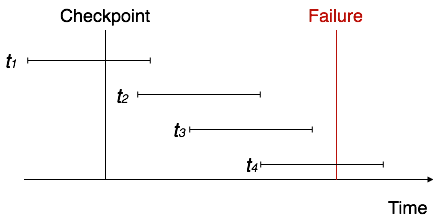
When more than one transaction are being executed in parallel, the logs are interleaved. At the time of recovery, it would become hard for the recovery system to backtrack all logs, and then start recovering. To ease this situation, most modern DBMS use the concept of 'checkpoints'.

Checkpoint

Keeping and maintaining logs in real time and in real environment may fill out all the memory space available in the system. As time passes, the log file may grow too big to be handled at all. Checkpoint is a mechanism where all the previous logs are removed from the system and stored permanently in a storage disk. Checkpoint declares a point before which the DBMS was in consistent state, and all the transactions were committed.

Recovery

When a system with concurrent transactions crashes and recovers, it behaves in the following manner −

DBMS - Data Recovery, Oracle Database Certification, DB Exam Prep, DB Learning

◉ The recovery system reads the logs backwards from the end to the last checkpoint.

◉ It maintains two lists, an undo-list and a redo-list.

◉ If the recovery system sees a log with <Tn, Start> and <Tn, Commit> or just <Tn, Commit>, it puts the transaction in the redo-list.

◉ If the recovery system sees a log with <Tn, Start> but no commit or abort log found, it puts the transaction in undo-list.

All the transactions in the undo-list are then undone and their logs are removed. All the transactions in the redo-list and their previous logs are removed and then redone before saving their logs.

Tuesday, May 26, 2020

Understanding Query Execution in Relational Database System Architecture

The Relational Database Management System (RDBMS) is built with numerous complex algorithms and data structure just to store and retrieve information properly. The complexity is almost akin to an operating system that functions in sync with many features almost in real time. Modern RDBMS has built-in facility for memory management, file buffering, network communication support etc. They form the basic architecture of the RDBMS package. The article provides a glimpse of what goes behind the scene when a user submits a query until the result is obtained from the database.

Understanding RDBMS


An RDBMS package is typically a database server that serves multiple clients via communication pathways under the aegis of network protocol such as such as socket, pipes etc. In a standalone database application client communicates with the database via programmatic interfaces. In such a case the database server becomes part of the client application or vice versa. Sometimes the database is contained within the embedded system as a slave to the host system. Generally, in a large database application, the RDBMS server is separated from the concern on the application by hosting the server in a remote location. The business logic interacts with the database server via network as per requirement. Regardless, the logic for query processing remains the same be it an embedded database application, network application or a standalone application.

Database Connectors


Applications connect to the database using a set of protocols called database connectors. The Open Database Connectivity (ODBC) is a well-known database connector that an application can use to connect to almost any database. There are also vendor specific database connectors for an RDBMS such as MySQL. MySQL supports connectors for Java (JDBC), PHP, Python, .NET etc. These implementations mostly support communication over network protocols. These connectors are designed (API) to transfer SQL commands to the database server and retrieve information upon request by the client. The connectors typically consist of database driver and client access APIs.

Query Interface


Queries are nothing more than questions put to the database according to the syntax and semantics of standard query language called SQL (Structured Query Language). The database server understands the language and replies back as per the query submitted. According to the semantics of SQL, queries can be of two types. The first type of query is a Data Definition Language (DDL) query, which is typically used to create and do things with the dataabse such as creating and altering tables, defining indexes, managing constraints, etc. A second type of query called the Data Manipulation Query (DML) is used to work on the data of the database. This includes actions such as SELECT querying, updating, and deleting data in the database tables.

A typical SELECT query syntax may be written as follows. The square bracket ([]) represents optional parameters and the lowercase notation depicts user-defined variables.

SELECT [ DISTINCT ] columns
FROM tables
[ WHERE expression ]
[ GROUP BY columns ]
[ HAVING expression ]
[ ORDER BY columns ] ;

◉ The DISTINCT keyword removes the duplicate records in the final result.
◉ The FORM clause forms a projection on the references that appear in the other clauses.
◉ The WHERE applies the expression on the referenced table.
◉ The GROUP BY clause groups the result according to the specified attribute.
◉ The HAVING clause applies filter on the groups.
◉ The ORDER BY clause sorts the result.

Query Processing


Once the client submits a database query statement via network protocol to the database server, it is first interpreted and then executed. The interpretation is meant to decipher the meaning of the query. This is done by parsing the SQL statement and breaking it into elements before executing. The interpretation of the query is a two-step process: one, in the logical plan it describes what the query is supposed to do and secondly, in the physical plan, it describes how to implement the query.

The physical plan of the query is handled by the database system’s query execution engine. A tree structure is created where each node represents query operator with number of children. These children represent a number of tables involved in the operation. The query is passed through several phases before execution such as parsing, validation, optimization, plan generation/compilation and finally execution.

◉ Parsing breaks the SQL statement into parts, validates it and translate the logical query (SQL query) into a query tree according to the syntactical scheme of the relational algebra. This is the logical plan.

◉ The logical query is then translated into a physical plan. There can be many such plans, but the query optimizer finds the best one, say, according to the estimated execution performance. This is done by taking on the relational algebra tree into optimizer’s search space and expanding it by forming alternative execution plans and then finally choosing the best among them. The result is akin to the code-generation part the compiling of SQL. The critical resources to optimize the code is obtained from the database system’s catalog that contains the information about number if tuples, and many other things such as stored relations referenced by the query etc. The optimizer finally copies the optimal plan from the memory structure and send it to the query execution engine. The query execution engine executes the plan using database relation as input and generates new table with rows and columns that matches the query criteria.

Oracle Database Tutorial and Material, Database Learning, Database Guides, Database Certification, Database RDBMS

Note that the plan is always optimal or near optimal within the search space of the optimizer. The interpretation of a SQL query by the RDBMS is not that simple after all. Optimization is a costly affair because it analyses on alternative execution plans. A single query can have an infinite number of possibilities. Therefore, it consumes additional processing time impacting on both the query optimizer, query execution engine and overall database response time.

Saturday, March 7, 2020

How do OODBMS and ORDBMS Differ from RDBMS?

Relational databases catered to the need of backend database in application development arena for quite a long time, but there are other types of databases that have the potential to do the same. We should not overlook their merit while dealing with a RDBMS as they can serve similar purposes equally well, and possibly in a better way. These database models are related to the relational concepts in doing what they do best. This article provides a perspective on the philosophies of database systems that are designed to be different from the relation database model yet have a similar kind of vibe in their approach.