Showing posts with label Technical Solutions. Show all posts

Friday, May 10, 2024

OCI multicloud solutions with Megaport Cloud Router

OCI multicloud solutions with Megaport Cloud Router

Organizations are rapidly moving and scaling their applications into the cloud ecosystem. Enterprise customers who want to optimize and modernize their operations in this cloud ecosystem need interconnectivity to and between multiple cloud service providers (CSPs). While several architectures are available, demand from enterprise customers for split-stack multicloud deployments, where an analytics application runs on one cloud and the data resides on another cloud, are on the rise, especially to support data integration from disparate sources and reporting using the powerful Oracle Analytics Cloud (OAC) platform. The enterprise analytics application user or the line of business (LOB) decision-maker benefits from the modernized connecting and reporting across best-in-class cloud providers’ applications without having to incur expensive migration, data replication, and data redundancy costs.

The described scenario can be accomplished horizontally across any industry and between any CSP’s platform connecting to the OAC platform. This blog post provides a solution that drives economies of scale for the customer’s increasing analytics needs.

Megaport Cloud Router


The Megaport Cloud Router (MCR) is a virtual routing appliance, which delivers a fast, secure, and scalable solution to connect multiple cloud platforms through private network connections in a colocation facility. Coupled with private network solutions, such as Oracle FastConnect and Amazon Web Services (AWS) Direct Connect, the MCR bypasses the public internet and enables cloud-to-cloud connectivity, purpose-built for high throughput and predictable performance. Data moves between multiple public cloud platforms directly, reducing end-to-end latency between Oracle Cloud Infrastructure (OCI) and other cloud platforms for data migrations or steady-state split-stack architectures.

Why Megaport for Oracle multicloud implementations 


Megaport’s multicloud connectivity solution connecting through its virtual cloud router for Oracle enables OCI Database services, such as Autonomous Database and Exadata Database Service on Dedicated Infrastructure, with cloud-to-cloud connectivity to other CSPs, such as Microsoft Azure, AWS, and Google Cloud Platform (GCP). This connectivity benefits the coexistence of best-of-breed applications that can span multiple clouds and helps organizations realize better performance and scalability, while helping to ensure efficiencies in interoperability and availability.

Customers gain the following capabilities by using the Megaport virtual cloud router solution for Oracle:

  • Ability to move workloads to hybrid cloud architecture ecosystems.
  • Run workloads on low-latency, highly reliable (five nines availability) connectivity between apps and data, especially for data consolidation, integration, and analytics workloads.
  • Bypass public internet traffic with dedicated connectivity between client and provider data center networks.
  • Multicloud architecture with both full and split stacks.

Oracle multicloud: Split-stack architecture use case enabled by MCR


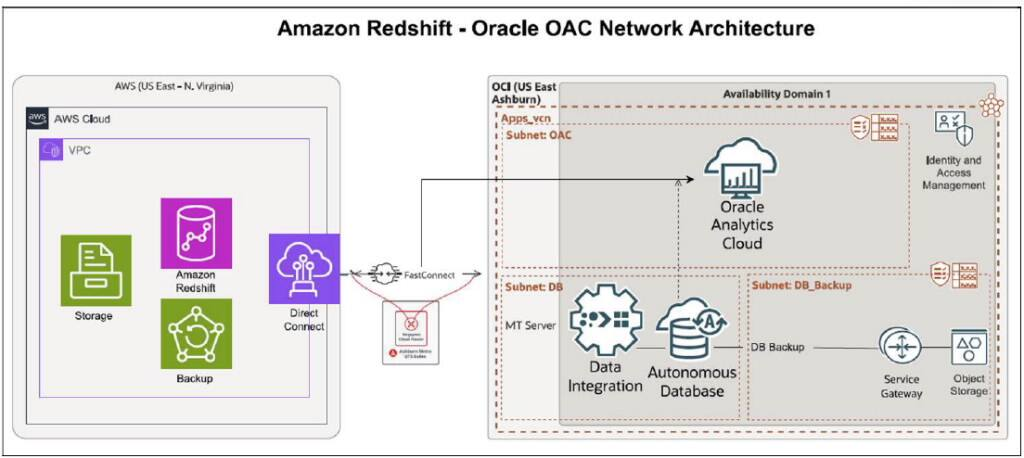
To test the MCR solution for multicloud connectivity, we built a split-stack multicloud architecture use case with the application stack running OAC on OCI, predominantly used for analytics and reporting by application users. We built another stack on Amazon Redshift, acting as a data warehouse that encompasses trend data and streaming data from multiple data feeds and downstream systems.

The three primary elements of this network architecture are Megaport Cloud Router (MCR), Megaport Virtual Cross Connect (VXC) to OCI FastConnect, and VXC to AWS Direct Connect.

OCI multicloud solutions with Megaport Cloud Router
Figure 1: Architecture Diagram for example solution connecting Amazon Redshift to Oracle Analyics Cloud using Megaport Cloud Router

Megaport’s cloud router solution made it possible to read and report on multicloud data sources through OAC’s advanced analytics and visualization capabilities. Organizations across many industries can use this scenario to achieve better performance and cost efficiencies for analytics.

This solution includes the following benefits:

  • Ability to run data analytics at the source.
  • Modern analytics reporting with real-time data and faster delivery of reports.
  • Increased throughput and sub 5-millisecond latency according to standard observations depending on location of cloud regions and onramps. In some cases, it can be lower depending on the architecture and gerographic regions. 
  • Dramatically improved data transfer rates from several hours to few minutes. 

Source: oracle.com

Wednesday, February 7, 2024

Oracle Database@Azure now Generally Available in Azure East US Region to accelerate your data center exit

We’re proud to announce the general availability of Oracle Database@Azure, a joint Oracle and Microsoft service that allows customers to easily provision, access, and operate enterprise-grade Oracle database services as native resources directly in Microsoft Azure. Customers can purchase Oracle Database@Azure in the Azure Marketplace and apply their Oracle database cost directly to their Microsoft Azure Consumption Commitment (MACC).

In this blog post, we provide a detailed explanation of provisioning and management.

Service overview


Since 2019, we have partnered with Microsoft to deliver the Oracle Interconnect for Azure, which offers secure, private interconnections with sub-2 millisecond latency, in 12 global regions to date. This high-performance network foundation enables customers to build applications with components straddling OCI and Azure. However, the flexibility to connect any resource in either cloud requires customers to configure and manage the connections between the cloud environments, DNS entries, and more.

With Oracle Database@Azure, Oracle and Microsoft deliver the same Oracle Database services that run on OCI, physically in Microsoft Azure data centers. By collocating OCI database services in Azure data centers, Oracle Database@Azure has low latencies like other Azure services, and provides the same high levels of performance, scale, security, and availability that we offer in OCI today. In a few steps, you can procure, deploy, and manage the service through the existing Azure portal, use Azure developer tools, software development kits (SDKs), and APIs. Metrics, logs, and events for the Oracle databases you create using the service will be available in Azure tooling for unified telemetry and monitoring in Azure environments.

We’ve made it easier for customers to migrate and modernize their Oracle Database workloads to Azure. With Oracle Database services running locally in Azure, you can benefit from proximity to familiar application development tools and frameworks to modernize your workloads and run cloud native applications with direct access to data in Oracle databases with the same security and compliance across the entire solution.

Purchasing

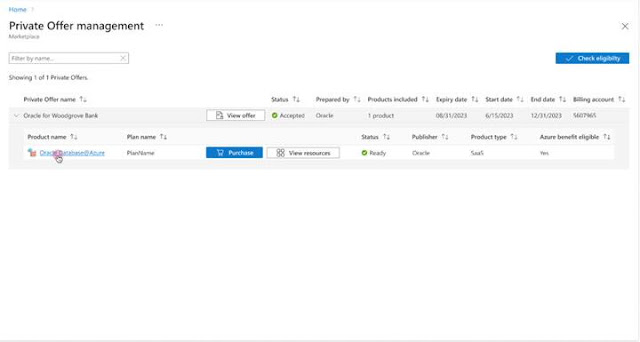
Purchasing Oracle Database@Azure is a simple process, facilitated by private offer in the Azure Marketplace. Azure permissions might be required for the user completing the private offer purchase.
Oracle Database@Azure now Generally Available in Azure East US Region to accelerate your data center exit

Private offer for database consumption

All who purchase Oracle Database@Azure must have a private offer created and made available in the Azure marketplace. To have your private offer created, existing Oracle customers can reach out to their Sales Representative.

Private offers for Oracle Database@Azure can be completed in a week for actively engaged customers. Working with your sales representative, you can customize a quote based on your specific needs, then sign and approve. Oracle then generates your private offer in the Azure marketplace. To access your private offer, log in to the Azure marketplace and view your private offers or use the Oracle-provided offer ID through your email. Move through a few screens to accept your private offer, and you can start provisioning Oracle Database@Azure directly from your Azure portal.

You must provide your Azure billing account ID to your Oracle sales representative to ensure single invoicing for the service from Azure. You can find your billing account ID through one of the following methods:

◉ Contact your Azure sales representative

Existing Azure and Oracle agreements are eligible for use with Oracle Database@Azure including MACCs, license included, or Bring Your Own License (BYOL). Database consumption from the service might also be eligible for Oracle Support Rewards. The Oracle databases you provision through the Oracle Database@Azure service apply to your existing Azure agreements just like other native Azure resources—no extra agreement required. If you aren’t an existing Azure customer, select Get Started on the Azure or Oracle webpage to create an account or contact an Azure Sales Representative. 

Onboarding


The following summary shows the onboarding process for Oracle Database@Azure with components in the Azure portal and the Oracle Cloud Console. Detailed explanations for many of the tasks are linked throughout this summary. Oracle and Azure specialists are available to address questions and provide any required support.

OCI tenancy

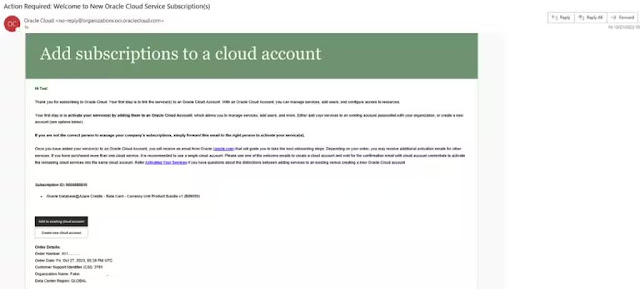
An OCI tenancy is required for billing orchestration, some database management tasks, such as provisioning and management of container databases, and for Oracle to provide infrastructure and software maintenance updates for your database service. You can create an OCI tenancy or link an existing tenancy to your Azure subscription. Click the corresponding link in the welcome email you received upon completing private offer acceptance.
Oracle Database@Azure now Generally Available in Azure East US Region to accelerate your data center exit

Identity federation

We recommend federating identities between Entra ID and OCI to reduce the overhead of managing two identity directories. This federation allows users to access their OCI account with an Azure login and helps enforce the same identity structure across both cloud providers. Oracle Database@Azure uses two sets of groups with specific policies: Groups in Azure and 

Groups in OCI. To set up federation, the Azure user must have the following Entra ID privileges:


To complete manual federation setup between Azure and OCI, follow the Identity Federation guide.

If you choose not to federate your OCI tenancy with Azure's identity service, you might need to create and maintain separate credentials for accessing the Oracle Cloud Console using the OCI Identity and Access Management (IAM) service.

Groups and roles

To ensure proper operation and permissions for the service, you must create groups, roles, and attached policies in Azure and OCI. Groups in Azure include infra-admins, virtual machine (VM) cluster admins, and others to administrate Exadata database resources and VM clusters in Azure. Other groups with attached policies are replicated in OCI during federation. Roles in Azure include database owner, and infra-amin, VM cluster admin, subscription manager, and database reader. Standard permissions apply, including read, write, delete, and action. Groups and policies are also created in OCI to manage database actions.

Provisioning


Provisioning Oracle Database@Azure resources is streamlined requiring a few simple steps in each portal, such as creating infrastructure and VM clusters in Azure and creating databases in the Oracle Cloud Console. Established workflows in the Azure portal and Oracle Cloud Console guide through each step. The summarize steps are included with links for readers seeking more details. Reach out to your Sales Representative if you want to chat with an engineering specialist.

Creating a resource

You can deploy resources directly from the Azure portal. Select Oracle Database@Azure from the Azure services on the home page, or search for Oracle Database@Azure in the search bar.

Oracle Database@Azure now Generally Available in Azure East US Region to accelerate your data center exit

As a prerequisite, the user must be part of the Exadata infrastructure administrators group in Azure and have sufficient limits assigned to the region.

On the Oracle Database@Azure overview page, you can access tutorials, create Oracle Exadata infrastructure, VM clusters, and more. Selecting Create cloud Exadata infrastructure opens the following flow for infrastructure creation:

  1. Basics: Select the Azure subscription, assign to a new or existing resource group, name the infrastructure, select a region, and select an availability zone.
  2. Configuration: The infrastructure model defaults to Exadata X9M. Customize the number of database servers (2–32) and storage servers (3–64) you need. OCPUs and storage (in TBs) automatically populate based on your selection.
  3. Maintenance: Set your maintenance method, schedule, and points of contact (up to 10).
  4. Consent: Agree to terms of use, privacy policy, and access permissions.
  5. Tags: Enter a name and value for your infrastructure resource.
  6. Review and create: Validate all information and create resource.

Provisioning an Exadata VM cluster

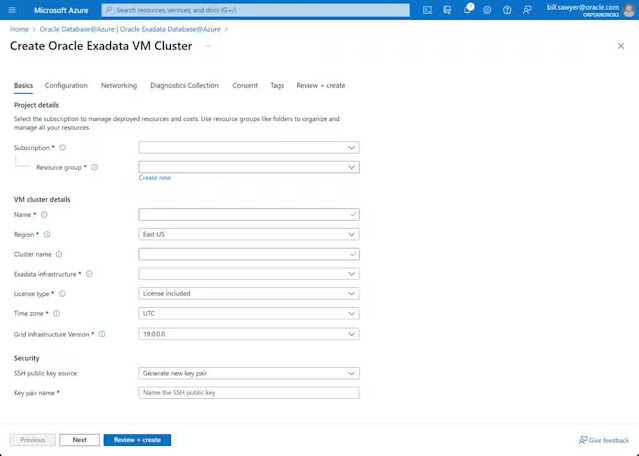
From the home page or Oracle Database@Azure page, you can quickly provision VM clusters.
Oracle Database@Azure now Generally Available in Azure East US Region to accelerate your data center exit

For prerequisites, ensure the appropriate permissions for VM cluster admins and Oracle Database@Azure, and create a virtual network (vNet) with two delegated subnets to Oracle Database@Azure. It requires the following permissions for an Oracle Database@Azure subscription:

  • Microsoft.Network/virtualNetworks/*
  • Microsoft.Network/virtualNetworks/subnets/*

On the Oracle Exadata VM Clusters tab of the Oracle Exadata Database@Azure page, click the Create link. Like Exadata infrastructure creation, the following multistep process displays:

  1. Basics: Select the Azure subscription, resource group (new or existing), name the cluster, select region, select infrastructure, license type, time zone, and set security with SSH keys and key pair name.
  2. Configuration: Select compute count, system shape, OCPU count per VM, memory per VM, and local storage per VM. Total OCPU count, requested memory, and local storage are computed based on the local values that you accept or select. Exadata sparse snapshots, and local backups are options that can only be set at this time before the Oracle Exadata VM cluster has been provisioned.
  3. Networking; Enter virtual network, client subnet, and DNS information.
  4. Diagnostics collection: Events, health monitoring, logs, and tracing are selected by default. Change if required.
  5. Consent: Agree to terms of use, privacy policy, and access permissions.
  6. Tags: Enter a name and Value for your infrastructure resource.
  7. Review and create: Validate all information and create resource.

Create a database

Database creation, deletion, and management is facilitated in the Oracle Cloud Console. Navigation through single sign-on (SSO) is provided in the Azure portal on the Resource page for the VM Cluster you want to connect. To proceed, on the VM Cluster overview page in the Azure portal, select “Go to OCI.”

Oracle Database@Azure now Generally Available in Azure East US Region to accelerate your data center exit

Oracle Database@Azure now Generally Available in Azure East US Region to accelerate your data center exit

As a prerequisite, you must set up Identity Federation with trust between Azure Entra ID and OCI identity domains and have groups created in Azure that are replicated in OCI.

When you click “Go to OCI” in the Azure portal, you arrive on a corresponding page in the Oracle Cloud Console. For example, if you were on the VM Cluster overview page in Azure, you’re not on the VM Cluster overview page in OCI. Using the Console or Database APIs, you can create database homes, container databases, and pluggable databases at any time.

Creating container databases requires entering basic information, such as name, Database service version (19c), creating a database home, admin credentials, and backup configuration. When you’re finished, select Complete, and your new database progresses from “Provisioning” to “Available.” An initial pluggable database is created at the time of container database creation, and extra pluggable databases are easy to provision by navigating to the Pluggable Database tab on the Container Database detail page and selecting Create.

Infrastructure as Code (IAC)

Oracle Database@Azure supports both GUI and CLI operations through PowerShell in Azure and Terraform in OCI. PowerShell is only applicable for resources within Azure. You can use Terraform in the following ways:

  • Native OCI service in Resource Manager: For operations in OCI, such as network operations in a virtual cloud network (VCN), container or pluggable database operations, and other permissions-based operations.
  • Standalone Terraform application: For running operations in Azure and OCI as two separate Terraform providers. Each provider requires its own permission set and operations.

Management


Management responsibility of Oracle Database@Azure is shared between Oracle, Microsoft, and the customer. The following list and chart describes each component of managing the service and ownership distribution between OCI, Microsoft, and the customer.

  • Oracle responsibilities: Exadata hardware, host infrastructure, Oracle Database@Azure API endpoint.
  • Azure responsibilities: Azure physical network, Azure SDN, Azure application infrastructure.
  • Oracle and Azure shared responsibilities: Data residency and support.
  • Customer responsibilities: The following table describes service components and location for task completion in the Azure portal and Oracle Cloud Console:

  Exadata
Infrastructure
VM Cluster
Management 
Database
Management 
Database
Maintenance 
Applications  Identity
Management 
Deployment  Azure Azure OCI OCI Azure Azure/OCI
Lifecycle  Azure  Azure  OCI  OCI  Azure  Azure/OCI 
Configuration  Azure  Azure  OCI  OCI  Azure  Azure/OCI 
Support          Azure  Azure/OCI 

Customer management activity in the Azure portal is facilitated from the Oracle Database@Azure service page, while activity in the Oracle Cloud Console is facilitated on the Oracle Exadata Database Service page.

Billing


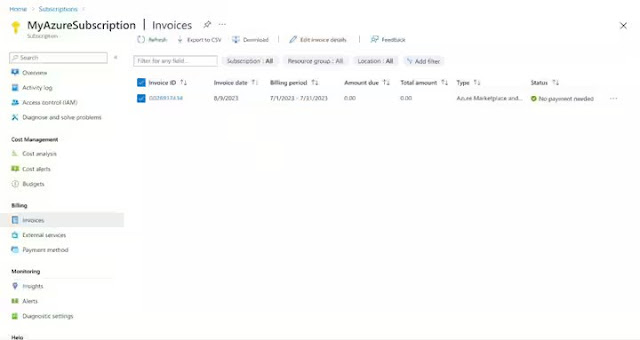
A single invoice provided by Azure is viewable on the subscriptions page in the Azure portal. All familiar capabilities, including detailed marketplace invoices, cost analysis, and more, are available like your other Azure subscriptions. Detailed Oracle database consumption information is accessible in the Oracle Cloud Console.
Oracle Database@Azure now Generally Available in Azure East US Region to accelerate your data center exit

Monitoring


You can monitor Oracle Database@Azure from a single screen in the Console. Because Oracle manages infrastructure monitoring, telemetry exposure to customers isn’t required. VM cluster telemetry is fully available for customer consumption and is automatically integrated with Azure Monitor. Telemetry for Oracle databases will be integrated with Azure and available for complete customer monitoring in early 2024.

Oracle Database@Azure now Generally Available in Azure East US Region to accelerate your data center exit

Source: oracle.com

Thursday, December 14, 2023

Navigate the World of Database APIs with Oracle

We delved into Oracle’s vision for the Converged Data Platform and how it streamlines data integration challenges while preserving developer flexibility. We saw how the Oracle Database service can easily handle various datatypes and be integrated with open source development platforms, analytics tools, and other Oracle Cloud Infrastructure (OCI) services. Now, it's time to translate theory into practice.

In this post, you learn how the Autonomous Database service inherently serves data, because APIs can be seamlessly integrated with Oracle API Gateway, and you can go through a hands-on Oracle LiveLab to experience this integration yourself. Oracle REST Data Services (ORDS) and OCI API Gateway not only simplify the process but also enable robust security, effective management, and comprehensive auditing, resulting in a powerful boost to your business applications by extracting the full potential of your data assets.

Oracle APEX


ORDS is part of Oracle APEX architecture, which includes features like Oracle Database Actions, Oracle APEX Access, REST APIs, and many more. This post focuses on the Oracle REST API features that allow database developers like you to expose data for other developers to consume and create productive business applications. By using REST API architecture, you gain the benefit of a converged data platform and the ability to manage data in many formats like text, JSON, Spatial, XML, and more, while still maintaining a consistent API syntax.

This architecture contrasts the inconsistency and code variability introduced when using multiple purpose-built data stores each employing its own API formats. With ORDS, as you build and integrate applications, you don’t have to shift gears as you traverse data stores and different APIs.

Oracle APEX is integrated into Oracle Autonomous Database. With a single click, you can deploy a highly available and completely managed environment for ORDS and APEX. ORDS allows you to publish RESTful webservices for your Oracle database, including tables, views, and even stored procedures. This opens the door for modern microservice development, enabling seamless data transfer to and from Oracle objects in various formats. This functionality allows you to dive into modern application development, while keeping the legacy development paradigms intact, without dealing with operational and integration issues from purpose-built databases.

Exposing the APIs originating from the database to the public internet can often lead to security concerns. Bad actors can call these APIs and gain access to all your valuable data. Securing these APIs is an essential part of modern app development. Let's look at how we can do that.

OCI API Gateway


Part of securing these APIs is deciding who gets to call them, where they call them from, and auditing their use. You probably also want to limit how many times APIs are being called. The Oracle API gateway is an OCI native service that provides all these capabilities.

InfStones and Autonomous JSON Database

InfStones and Autonomous JSON Database

The OCI API gateway receives all the API requests from various clients, translates those APIs to ORDS APIs, performs the requested action on the database objects and responds. It acts like a gatekeeper to help ensure that your ORDS APIs are never exposed.

Beyond helping to secure your ORDS APIs, OCI API Gateway can offer data on API usage. As your API ecosystem grows through the adoption of microservices, questions arise around how to understand which APIs are used most and which ones are unimportant or no longer valid. API Gateway helps you gain insight on your API usage across user categories, such as lines of business users, B2B users, or single users. With this data, you can decide which APIs to support, transition, monetize, and more.

Get Hands-on


If you want to try out this robust architecture and get real hands-on experience, check out our step-by-step LiveLab to create APIs from your Autonomous Database Dedicated and secure them with Oracle API Gateway.

Source: oracle.com

Friday, November 3, 2023

Essential tools for migrating to the Oracle Autonomous Database

Are you considering an Oracle Database migration to the Oracle Autonomous Database? What are the technical considerations? Which databases should you move first? How do you assess the effort required? Great news! Oracle provides free diagnostic tools that evaluate your overall database estate and help you prioritize databases to migrate and ensure technical compatibility. For this process, you need Oracle Estate Explorer and the Cloud Premigration Advisor.

But how do you know when your migration is successful? Is it after you copy all the records from one database to the other, or is it after you validate that the target database is performing better than where you started? For that, Oracle offers Real Application Testing, an Oracle Database option.

In this blog post, you’ll see the value of these three tools as I discussed their use with an Oracle customer who was planning to adopt the Oracle Autonomous Database.

Database migration concerns


Recently, I was discussing the advantages of the Oracle Autonomous Database with a customer. After the customer was becoming convinced of the value, the conversation shifted to migration. It turned out that the customer had over 100 diverse databases in their database estate. They had so many source versions, they didn’t even have a precise count. Even without that knowledge, the customer knew that their estate was complex, operating with multiple versions, different character sets, and various database options. Some even ran on Windows and Solaris.

The customer became concerned that their diversity would quickly lead to analysis paralysis and that the project would be too complicated and take too long. I started the conversation by describing that we can help them organize their decision making around migration, from planning through validation using advisors and diagnostic tools.

Oracle Autonomous Database, Oracle Database Career, Oracle Database Skills, Oracle Database Jobs, Oracle Database Prep, Oracle Database Preparation, Oracle Database Tutorial and Materials, Oracle Database Certification, Oracle Database Learning

Seamless and easy migration path to the Oracle Autonomous Database


Most importantly, I explained that we don’t want surprises that force them to reset, restart, and delay their switchover. Comprehensive automated planning and validation tools are the answer. As a highly automated system, Oracle Autonomous Database takes administrative responsibility for many database system management features and therefore needs to become the owner of objects and processes. In an Autonomous migration, those situations need to be discovered and then disabled or reconfigured. For example, database objects can’t have root privileges, tablespaces need defaults, tables can’t be clustered, and columns can’t have media types.

But these technical checks are merely syntax and simple to adjust. The more consequential issue is to ensure that the target database is performing as well as or better than the source database. One way to do that is to capture the actual performance of SQL statements on the source database and then compare it to the actual performance on the target database.

Across transaction processing and query processing use cases, source database indexes are often highly tuned, and retaining them is critical. But Autonomous Database offers a self-tuning option where you can abandon the source indexes and replace them with automated tuning. However, changing indexing strategies is likely to impact performance and user acceptance, so as a final step in our migration, we need to validate performance.

I described that we should identify key SQL, benchmark them, and ensure that they’re part of their post-migration regression tests. Ultimately, some of them would be retained and others autonomously built based on ongoing data distributions.

The good news is that Oracle has these two areas well-supported, and as our conversations continued, the customer became confident that our technical planning tools, and our performance validation tools in addition to our migration methods sufficiently met their needs.

Getting started with planning tools: Oracle Database Estate Explorer


I started by assessing their overall database estate and its technical migration readiness with the Oracle Database Estate Explorer. This free tool allowed them to group their databases by use case (development, test, production) and then prioritize the database migration effort by database from easiest to hardest based on their weighting of their in-house database administrator (DBA) skills and use case risk tolerance. Each database also receives a detailed evaluation on its fitness to migrate and the actions to take to correct any issues.

Oracle Autonomous Database, Oracle Database Career, Oracle Database Skills, Oracle Database Jobs, Oracle Database Prep, Oracle Database Preparation, Oracle Database Tutorial and Materials, Oracle Database Certification, Oracle Database Learning

But before we started the analysis, the customer had data privacy and performance impact concerns. I shared the data gathering scripts with their security team and pointed out that the scripts were read-only and that no database data or metadata would be shared with Oracle. I then explained to the DBA team that the tool takes only 15 seconds per database and reads it only once, so the performance impact on their production database would be negligible. Satisfied, they ran this self-service tool behind their firewall, and now had a complete technical profile of their database estate.

Getting started with database diagnostics: Cloud Premigration Advisor Tool


Now that we had our prioritized list of databases to migrate, we decided to do a deeper individual database technical evaluation using the Cloud Premigration Advisor Tool (CPAT).

CPAT is a highly leveraged tool for database upgrades and migrations that you can run for analysis only or use integrated within several of Oracle’s automated migration solutions, such as Oracle Zero Downtime Migration, OCI Database Migration service, Oracle Enterprise Manager Migration Workbench, and SQL command line.

Oracle Autonomous Database, Oracle Database Career, Oracle Database Skills, Oracle Database Jobs, Oracle Database Prep, Oracle Database Preparation, Oracle Database Tutorial and Materials, Oracle Database Certification, Oracle Database Learning

In our case, we were using CPAT to evaluate all our databases against a common target: the Oracle Autonomous Database. It performed metadata and data analysis on source Oracle databases and suggested three actions: Action required, Review required, or Review suggested.

We used the online and interactive CPAT user experience implemented within the OCI Database Migration service. In this video overview, DBAs can take accept, reject, exclude, or run scripts actions responding to the CPAT analysis.

Validating the database migration


Now, the conversation shifted to discuss the criteria for the switchover. The customer understood that counting the copied records and doing hash totals of field values would validate the record count and accuracy. But Autonomous Database was an entirely new database platform. The customer needed assurances that their committed service levels would be maintained – or improved.

I anticipated this service level conversation and explained that the final step of their migration is comparative SQL performance testing between the source and target databases. Our switchover goal was to ensure that the performance of the Autonomous Database was at least as good as the source system.

Validation using Real Application Testing: SQL Performance Analyzer


Real Application Testing is a sophisticated testing suite with three primary components: SQL Performance Analyzer, Workload Analysis, and Database Replay. For our migration, we focused on SQL Performance Analyzer.

SQL Performance Analyzer provides a detailed assessment of SQL processing plans and statistics by running the SQL statements in isolation and serially on the source and target databases. SQL Performance Analyzer uses several related SQL performance tools: SQL Tuning Advisor and SQL Plan Management.

The summary analysis impressed my customer. SQL Performance Analyzer evaluated all the SQL statements operating against the source database and found that they ran 30% faster in the Autonomous Database.

Oracle Autonomous Database, Oracle Database Career, Oracle Database Skills, Oracle Database Jobs, Oracle Database Prep, Oracle Database Preparation, Oracle Database Tutorial and Materials, Oracle Database Certification, Oracle Database Learning

The breakdown report summarized the top 100 SQL sorted by change impact, breakdown of overall improved, regressed, and unchanged and unsupported SQLs. What reassured them for system stability was that the bulk of the SQL statements were unchanged and only the automated execution plans were changed. Additional reporting also made further performance improvement recommendations.

Oracle Autonomous Database, Oracle Database Career, Oracle Database Skills, Oracle Database Jobs, Oracle Database Prep, Oracle Database Preparation, Oracle Database Tutorial and Materials, Oracle Database Certification, Oracle Database Learning

So, SQL Performance Analyzer provided business-level proof that they could meet their existing service level agreements. I added that this tool can also run on production systems to continue to improve performance.

Advice


I speak to a lot of customers about their excitement around the unique Oracle Autonomous Database. Its signature self-tuning, self-securing, and self-managing capabilities are highly valued. But when the conversation turns to migration planning and considering candidate databases, consolidation priorities, migration methods, and associated time, effort, and risk, customers often take a thoughtful step back and wonder if they have the skills they need.

Oracle is an industry leader, not because we have one great product, but because we preserve our customer’s mission-critical investments through generations of technology innovation. As we continuously innovate, it’s crucial that we make it easy for our customers to make these transitions.

These three tools—Oracle Estate Explorer, Cloud Premigration Advisor Tool, and Oracle Real Application Testing—are the cornerstone for a successful Oracle Autonomous Database migration project. While all these tools are designed for self-service, we suggest that you let Oracle and our global services partner community help you strategize and execute your migrations.

Source: oracle.com