Friday, October 8, 2021

Using Database Links with Autonomous Dedicated

Oracle Database Tutorial and Materials, Oracle Database Preparation, Oracle Database Learning, Oracle Database Guides, Database Career, Database Prep

Just a quick blog on a valuable but simple topic: Database Links and Autonomous Dedicated Databases (ADB). I have received multiple questions on database links lately, so I thought I would do a how-to and mention some things to look out for when using them with an ADB.

Read More: 1Z0-060: Upgrade to Oracle Database 12c

Many Oracle customers use database links between different Oracle databases on the same host or to read or transfer data to/from other hosts. Even though Autonomous is a locked-down system, database links are still a usable feature. 

Before I go into an example, there are a few key differences from what you may be used to on-prem:

1. Only TCP connections are supported currently.

2. Easy Connect syntax or the complete descriptor must be used, since there is no access to the local tnsnames.ora file for editing.

To refresh our memory, here is a typical syntax for creating a database link:

CREATE DATABASE LINK dblink CONNECT TO remote_user IDENTIFIED BY password USING 'remote_database';

I am going to create a database link in the ADB connecting to a database on OCI (VMDB) in a different subnet. This other machine could be anywhere as long as there is proper network connectivity with a private or public address. Many customers use VPNs or FastConnect with OCI to connect to their on-prem systems and this will work with database links also. 

CREATE DATABASE LINK dblinktest 

CONNECT TO jcowen IDENTIFIED by AdbTest2021##

USING '(DESCRIPTION =(ADDRESS = (PROTOCOL = TCP)(HOST = db19cjjc.ggsub.adbvcn.oraclevcn.com)(PORT = 1521))

(CONNECT_DATA =(SERVER = DEDICATED)(SERVICE_NAME = dblinktest.ggsub.adbvcn.oraclevcn.com)))';

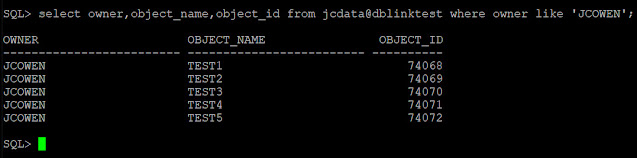
Now that we have our link created, we can test access with a simple query:

Oracle Database Tutorial and Materials, Oracle Database Preparation, Oracle Database Learning, Oracle Database Guides, Database Career, Database Prep

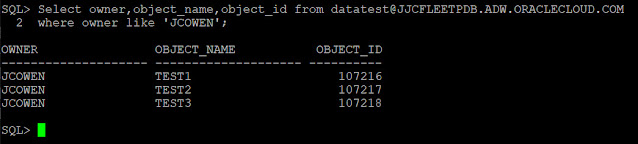
We can also create database links back into the Autonomous database. This connect string can be found in the tnsnames.ora that is located in the wallet zip file downloaded from the OCI console. 

CREATE DATABASE LINK JJCFLEETPDB.ADW.ORACLECLOUD.COM 

CONNECT TO jcowen identified by AdbTest2021##

USING '(DESCRIPTION=(CONNECT_TIMEOUT=120)(RETRY_COUNT=20)(RETRY_DELAY=3)(TRANSPORT_CONNECT_TIMEOUT=3)(ADDRESS_LIST=(LOAD_BALANCE=on)(ADDRESS=(PROTOCOL=TCP)(HOST=host-qr7it-scan.fleetsubnet.adbvcn.oraclevcn.com)(PORT=1521)))(CONNECT_DATA=(SERVICE_NAME=JJCFLEETPDB_medium.adw.oraclecloud.com)))';

Oracle Database Tutorial and Materials, Oracle Database Preparation, Oracle Database Learning, Oracle Database Guides, Database Career, Database Prep

Now that we have connected to and from an Autonomous dedicated database there are a few key points to keep in mind:

1. OCI Egress Rules on the Autonomous Dedicated Infrastructure subnet must be open on port 1521 using a security list or Network Security Group (NSG).

2. If connecting on-prem to Autonomous, you will need to make sure the hostname/scan used is resolvable by your source server through a host file or DNS lookup. 

3. If connecting over VPN or FastConnect, work with your network team to ensure the on-prem firewall is not blocking or timing out 1521 traffic for long queries.  

4. If connecting to a public IP Address the Autonomous Dedicated Infrastructure subnet will need proper route rules and network features enabled in the VCN such as a NAT Gateway if using a private subnet (recommended).

5. GLOBAL_NAMES is set to TRUE in OCI database services which requires the dblink and the database to have the same name. This parameter is modifiable if needed. 

As you can see, except for a few networking areas to pay attention to, creating a database link in Autonomous Dedicated is not much different than what you are already doing. But you get all the added features of Autonomous Dedicated!

Source: oracle.com

Wednesday, October 6, 2021

Oracle Cloud : Autonomous Database (ADW or ATP) - Export Data to an Object Store (expdp)

Oracle Cloud, Oracle Database Exam Prep, Oracle Database Career, Oracle Database Preparation, Oracle Database Tutorial and Materials

This article demonstrates how to export data from an Autonomous Data Warehouse (ADW) or Autonomous Transaction Processing (ATP) service on the Oracle Cloud using the expdp utility.

◉ Assumptions

For the export to work you will have to make a connection from an Oracle client to the ADW or ATP database. You can see the necessary setup to do this here.

The Oracle 18c impdp utility introduced the CREDENTIAL parameter to specify the object store credential to be used for an import. From Oracle 21c (21.3) we can also use the CREDENTIAL parameter with the expdp utility.

We need an object store bucket to export the data to. This could be an Oracle Cloud Object Storage bucket, or an AWS S3 bucket.

◉ Create Something to Export

We connect to an autonomous database and create a new test user.

conn admin/MyPassword123@obatp_high

create user testuser1 identified by "MyPassword123";

alter user testuser1 quota unlimited on data;

grant create session to testuser1;

grant dwrole to testuser1;

We create a test table which we will export.

create table testuser1.t1 as

select level as id,

       'Description for ' || level as description

from   dual

connect by level <= 1000;

commit;

◉ Object Store Credentials

Create a credential for your object store. For an Oracle object storage bucket we use our Oracle Cloud email and the Auth Token we generated.

conn admin/MyPassword123@obatp_high

begin

  dbms_cloud.drop_credential(credential_name => 'obj_store_cred');

end;

/

begin

  dbms_cloud.create_credential (

    credential_name => 'obj_store_cred',

    username        => 'me@example.com',

    password        => '{my-Auth-Token}'

  ) ;

end;

/

For AWS buckets we use our AWS access key and secret access key.

begin

  dbms_cloud.create_credential (

    credential_name => 'obj_store_cred',

    username        => 'my AWS access key',

    password        => 'my AWS secret access key'

  );

end;

/

◉ Export to Object Store

We can use a local Oracle 21.3 installation to export data from the autonomous database to an object store.

We use the CREDENTIALS parameter to point to the database credential we created earlier. We use an object store URI for the DUMPFILE location. For AWS S3, use the URI of your S3 bucket. For Oracle Cloud the URI can take either of these forms.

https://swiftobjectstorage.{region}.oraclecloud.com/v1/{namespace}/{bucket-name}/{file-name}.dmp

https://objectstorage.{region}.oraclecloud.com/n/{namespace}/b/{bucket-name}/o/{file-name}.dmp

The following example uses the "swiftobjectstorage" URI.

expdp admin/MyPassword123@obatp_high \

      tables=testuser1.t1 \

      directory=data_pump_dir \

      credential=obj_store_cred \

      dumpfile=https://swiftobjectstorage.uk-london-1.oraclecloud.com/v1/my-namespace/ob-bucket/t1.dmp \

      exclude=statistics

Export: Release 21.0.0.0.0 - Production on Tue Sep 7 18:36:39 2021

Version 21.3.0.0.0

Copyright (c) 1982, 2021, Oracle and/or its affiliates.  All rights reserved.

Connected to: Oracle Database 21c Enterprise Edition Release 21.0.0.0.0 - Production

Starting "ADMIN"."SYS_EXPORT_TABLE_01":  admin/********@obatp_high tables=testuser1.t1 directory=data_pump_dir

  credential=obj_store_cred dumpfile=https://swiftobjectstorage.uk-london-1.oraclecloud.com/v1/my-namespace/ob-bucket/t1.dmp exclude=statistics

Processing object type TABLE_EXPORT/TABLE/TABLE_DATA

Processing object type TABLE_EXPORT/TABLE/TABLE

. . exported "TESTUSER1"."T1"                            32.60 KB    1000 rows

ORA-39173: Encrypted data has been stored unencrypted in dump file set.

Master table "ADMIN"."SYS_EXPORT_TABLE_01" successfully loaded/unloaded

******************************************************************************

Dump file set for ADMIN.SYS_EXPORT_TABLE_01 is:

  https://swiftobjectstorage.uk-london-1.oraclecloud.com/v1/my-namespace/ob-bucket/t1.dmp

Job "ADMIN"."SYS_EXPORT_TABLE_01" successfully completed at Tue Sep 7 18:37:14 2021 elapsed 0 00:00:26

$

The following example uses the "objectstorage" URI.

expdp admin/MyPassword123@obatp_high \

      tables=testuser1.t1 \

      directory=data_pump_dir \

      credential=obj_store_cred \

      dumpfile=https://objectstorage.uk-london-1.oraclecloud.com/n/my-namespace/b/ob-bucket/o/t1.dmp \

      exclude=statistics

Export: Release 21.0.0.0.0 - Production on Tue Sep 7 19:05:47 2021

Version 21.3.0.0.0

Copyright (c) 1982, 2021, Oracle and/or its affiliates.  All rights reserved.

Connected to: Oracle Database 21c Enterprise Edition Release 21.0.0.0.0 - Production

Starting "ADMIN"."SYS_EXPORT_TABLE_01":  admin/********@obatp_high tables=testuser1.t1 directory=data_pump_dir

  credential=obj_store_cred dumpfile=https://objectstorage.uk-london-1.oraclecloud.com/n/my-namespace/b/ob-bucket/o/t1.dmp exclude=statistics

Processing object type TABLE_EXPORT/TABLE/TABLE_DATA

Processing object type TABLE_EXPORT/TABLE/TABLE

. . exported "TESTUSER1"."T1"                            32.60 KB    1000 rows

ORA-39173: Encrypted data has been stored unencrypted in dump file set.

Master table "ADMIN"."SYS_EXPORT_TABLE_01" successfully loaded/unloaded

******************************************************************************

Dump file set for ADMIN.SYS_EXPORT_TABLE_01 is:

  https://swiftobjectstorage.uk-london-1.oraclecloud.com/v1/my-namespace/ob-bucket/t1.dmp

Job "ADMIN"."SYS_EXPORT_TABLE_01" successfully completed at Tue Sep 7 19:06:06 2021 elapsed 0 00:00:15

$

◉ Get the Log File

If we want to read the contents of the expdp log file we can push it across to the object store using the PUT_OBJECT procedure in the DBMS_CLOUD package.

conn admin/MyPassword123@obatp_high

begin

  dbms_cloud.put_object(

    credential_name => 'obj_store_cred',

    object_uri      => 'https://swiftobjectstorage.uk-london-1.oraclecloud.com/v1/my-namespace/ob-bucket/export.log',

    directory_name  => 'data_pump_dir',

    file_name       => 'export.log');

end;

/

It can then be downloaded from the object store.

Source: oracle.com

Monday, October 4, 2021

Definition and Overview of ODBMS

ODBMS, Object Oriented Database Management System, Oracle Database Exam Prep, Oracle Database Preparation, Oracle Database Prep, Oracle Database Career, Oracle Database Study Material

The ODBMS which is an abbreviation for object-oriented database management system is the data model in which data is stored in form of objects, which are instances of classes. These classes and objects together make an object-oriented data model. 

Read More: 1Z0-067: Upgrade Oracle 9i/10g/11g OCA to Oracle Database 12c OCP

Components of Object-Oriented Data Model:

The OODBMS is based on three major components, namely: Object structure, Object classes, and Object identity. These are explained below. 

1. Object Structure: 

The structure of an object refers to the properties that an object is made up of. These properties of an object are referred to as an attribute. Thus, an object is a real-world entity with certain attributes that makes up the object structure. Also, an object encapsulates the data code into a single unit which in turn provides data abstraction by hiding the implementation details from the user. 

The object structure is further composed of three types of components: Messages, Methods, and Variables. These are explained below. 

1. Messages – 

A message provides an interface or acts as a communication medium between an object and the outside world. A message can be of two types: 

◉ Read-only message: If the invoked method does not change the value of a variable, then the invoking message is said to be a read-only message. 

◉ Update message: If the invoked method changes the value of a variable, then the invoking message is said to be an update message. 

2. Methods – 

When a message is passed then the body of code that is executed is known as a method. Whenever a method is executed, it returns a value as output. A method can be of two types: 

◉ Read-only method: When the value of a variable is not affected by a method, then it is known as the read-only method. 

◉ Update-method: When the value of a variable change by a method, then it is known as an update method. 

3. Variables – 

It stores the data of an object. The data stored in the variables makes the object distinguishable from one another. 

2. Object Classes: 

An object which is a real-world entity is an instance of a class. Hence first we need to define a class and then the objects are made which differ in the values they store but share the same class definition. The objects in turn correspond to various messages and variables stored in them. 

Example – 

class CLERK

  { //variables

     char name;

     string address;

     int id;

     int salary;

    //methods

     char get_name();

     string get_address();

     int annual_salary();

  };

In the above example, we can see, CLERK is a class that holds the object variables and messages. 

ODBMS, Object Oriented Database Management System, Oracle Database Exam Prep, Oracle Database Preparation, Oracle Database Prep, Oracle Database Career, Oracle Database Study Material
An OODBMS also supports inheritance in an extensive manner as in a database there may be many classes with similar methods, variables and messages. Thus, the concept of the class hierarchy is maintained to depict the similarities among various classes. 

The concept of encapsulation that is the data or information hiding is also supported by an object-oriented data model. And this data model also provides the facility of abstract data types apart from the built-in data types like char, int, float. ADT’s are the user-defined data types that hold the values within them and can also have methods attached to them. 

Thus, OODBMS provides numerous facilities to its users, both built-in and user-defined. It incorporates the properties of an object-oriented data model with a database management system, and supports the concept of programming paradigms like classes and objects along with the support for other concepts like encapsulation, inheritance, and the user-defined ADT’s (abstract data types).

Source: geeksforgeeks.org

Saturday, October 2, 2021

Difference between Open Source Database and Commercial Database

Open Source Database, Commercial Database, Oracle Database Preparation, Oracle Database Exam Prep, Oracle Database Career, DB Exam Study

1. Open Source Database:

An open source database is a database that anyone can easily view the source code and this is open and free to download. Also for community version some small additional and affordable cost are imposed. Open Source Database provide Limited technical support to end users. Here Installation and updates are administered by user. For examples: MYSQL, PostgreSQL, MongoDB etc.

2. Commercial Database:

Commercial database are that which has been created for Commercial Purpose only. They are premium and are not free like Open Source Database. In Commercial Database it is guaranteed that technical support is provided. In this Installation and updates are Administrated by software Vendor. For examples: Oracle, IBM DB2 etc.

Difference between Open Source Database and Commercial Database :

Open Source Database Commercial Database 
In open source Database anyone can easily view Source code of it.   Commercial Database are that which has been created for Commercial purpose only.
Examples: MYSQL, PostgreSQL, MongoDB etc.   Examples: Oracle, DB2, Splunck etc. 
They are free or have additional and affordable cost.   They are premium and are not free like open source database.
It provide limited technical support.   It provide guaranteed technical support.
In this software is available under free licensing.   In this Software is available under high licensing cost. 
In this User’s needs to rely on Community Support.   In this user’s get dedicated support from Vendor’s from where one’s buy. 
In this Installation and Updates are administrated by user.   In this Installation and updates are administrated by Software Vendor. 

Which Database is Better: Commercial or Open Source Database :


In conclusion, it is important to remember that both Commercial and Open Source database have their own Advantages and Disadvantages. If we considered which Database is better, then in most cases it makes sense to choose Open Source as compared to Commercial Database because :

◉ Open Source database is Cost effective.
◉ Better quality source code.
◉ More secure.
◉ More preferred.

Source: geeksforgeeks.org

Friday, October 1, 2021

Top 7 Databases to Learn in 2021

A database is just like a room in an office where all the files and important information can be stored related to a project. Every company needs a database to store and organize the information. The information that we store can be very sensitive, so we always have to be careful while accessing or manipulating the information in the database. 

Oracle Database Tutorial and Material, Oracle Database Preparation, Oracle Database Certification, Oracle Database Career, Database Prep, Database Learning, Database Guides

For building different kinds of applications such as Web, Enterprise, Embedded Systems, Real-Time Systems, AI, ML, HPC, Blockchain, IoT, etc you may have to choose one or more databases. Over the years programmers and industry specialists have shown their love for databases that fulfilled their requirements.


Choosing the right database is also dependent on the purpose of the project. Around 20-25 years ago choosing a database for an application wasn’t a challenging task. Most of the time developers preferred relational databases to configure their application. But today it has become a challenging task due to the advancement in applications. 

Modern software development (applications built on the Microservices, Cloud, Distributed applications, Global Scaling, Semi-Structured Data, Big data, Fast data, Low Latency Data) requires traditional databases joined with various NoSQL, NewSQL, and Cloud databases. 

Today more than 343 databases are out there in the tech world which is a very huge number. To choose the right database you need to be familiar with the pros and cons of some popular databases. If your goal is to become a software or technical architect (of course they are the ones who make the decisions to choose the right technology) then it’s good to gain knowledge about these databases as much as you can. 

In this blog, let’s discuss some critical databases which you should learn or get familiar with in 2021. Before that let’s have a quick look at the ranking of the most popular databases According to DB Engines below is the list…

Oracle Database Tutorial and Material, Oracle Database Preparation, Oracle Database Certification, Oracle Database Career, Database Prep, Database Learning, Database Guides

If we take a look at the previous year survey then below is the data available on StackOverflow

Oracle Database Tutorial and Material, Oracle Database Preparation, Oracle Database Certification, Oracle Database Career, Database Prep, Database Learning, Database Guides

1. Oracle


Oracle was created by a software engineer Larry Ellison (current CTO of Oracle Corporation) in 1979. Oracle is the leading commercial RDBMS system written in assembly language C, C++, and Java. 21c is the latest version of this database which has many innovative features.

Oracle sits on the top of the databases. It is the most widely used RDBMS overall. It takes less space and quickly processes data and you can find some new good features like JSON from SQL as well. Some other features of this database are given below…

◉ ACID transactional guarantee. If we talk about CAP then it offers immediate Consistency as a single Server.
◉ It supports Structured Data (SQL), Semi-Structured Data(JSON, XML), Spatial Data, and RDF Store. Also, it offers various access patterns depending on the specific data model.
◉ Supports both OLTP and OLAP workload.
◉ Fulfills the requirement of high availability, performance, scalability, data warehousing, etc.
◉ Oracle provides functionality for Cloud, Document Store, Key-value storage, Graph DBMS, PDF Storage, and BLOG.

2. MySQL


MySQL is the most popular and widely used database in the tech world, especially in web applications. It was introduced in 1995 by two software engineers Michael Widenius and David Axmark. This database mainly focuses on robustness, stability, and maturity. The most common use of this database is for the purpose of web applications.

MySQL uses a structured query language and it is written in C and C++. The latest version of this database is MySQL 8.0 which has a better recovery option. For different editions, MySQL has different features. Some of the key features are given below…

◉ MySQL is open-source with two licensing models: free Community Server and proprietary Enterprise Server.
◉ It comes with the ACID transactional guarantee and in CAP theorem it offers immediate Consistency.
◉ MySQL offers horizontal partitioning (sharding). If your software is built on this database then surely you will get high availability and high throughput with low latency.
◉ MySQL supports most of the programming languages such as C, C++, Python, Java, PHP, and Tcl for client programming.
◉ MySQL Cluster offers multi-master ACID transactions.
◉ MySQL supports large databases, up to 50 million rows or more in a table.

3. Microsoft SQL Server


MS SQL server is the variant of Sybase SQL server. Developed by Microsoft this database was launched in 1989. MS SQL Server and Sybase SQL Server have many common features. MS SQL Server is written in C and C++. 

This database has excellent tooling support from Microsoft for both On-premise and Cloud. It is available on both Windows and Linux platforms. Like the other modern database, MS SQL is not as innovative or advanced but it has gone through major updates and overhauls over the years.

This database has many editions such as Azure SQL Database (cloud-based version), compact edition, enterprise edition (preferred by most of the companies), and developer edition. Some of its features are given below.

◉Platform independent with high performance.
◉ACID transactional guarantee. In CAP theorem it offers immediate consistency. 
◉Support for many server-side languages such as T-SQL, .NET languages, R, Python, and Java.
◉Support for Structured Data (SQL), Semi-Structured Data(JSON), Spatial Data.
◉It can be integrated with non-relational sources like Hadoop
◉It uses row-level security, dynamic data masking, transparent data encryption, and robust auditing.
◉Comes with custom-built graphical integration that saves a lot of time for users.
◉It allows you to create various designs, tables, and view data without syntax.

4. PostgreSQL 


This open-source database was introduced in 1996 by Michael Ralph Stonebraker. PostgreSQL was originated from the Ingres database and Michael was the leader of the Ingres team. The database was originally named as POSTGRES. Michael also got the Turing Award for his work in PostgreSQL.

PostgreSQL is written in C and it is used by companies who have to deal with a large volume of data. A lot of gaming apps, database automation tools, and domain registries use this database. Some of its features are given below…

◉ ACID transactional guarantee. In the CAP theorem, it offers immediate consistency. 
◉ Although it’s an Object-Relational DBMS user are free to create NoSQL databases. You can use this database with a transactional guarantee of an SQL database and horizontal scaling of the NoSQL database. You can use this database where distributed SQL is required.
◉ More advanced indexes liked partial Index, Bloom Filters. It allows you to create a non-blocking index in PostgreSQL.
◉ High scalability, predefined functions, easy data portability, multiple interfaces.
◉ Support for Structured Data (SQL), Semi-Structured Data (JSON, XML), Key-Value, Spatial Data.
◉ Comes with advanced reliability and disaster recovery feature.

5. MongoDB


When it comes to use a NoSQL database MongoDB is the top priority for enterprises. Using object-oriented programming languages it is difficult to load and access data into RDBMS. You will have to do additional application-level mapping. 

MongoDB resolves this issue especially handling the Document Data. MongoDB is simple, object-oriented, dynamic and scalable database. You don’t need to deal with columns and rows like the traditional databases. You store the data object as separate documents inside a collection. 

10gen software company released this database in 2009 and in the last one decade this database gone through many improvements and innovations. It is written in C, C++ and JavaScript. You can use this database for mobile apps, real-time analytics, IoT, and can provide a real-time view for all your data. Some of its features are given below.

◉ Fast, easy to use, deployment flexibility, high performance, high availability and easy scalability. Using Auto-Sharding you can easily do horizontal scaling. It offers built-in replication via primary-secondary nodes. 
◉ It is CP (Consistent and Partition tolerant) in CAP model.
◉ ACID transactions (Distributed multi-document) with snapshot isolation.
◉ Supports graph search, geo-search, Map-Reduce query and text search.
◉ MongoDB Inc. offers full-text search engine (Atlas Search) and data lake (Atlas Data Lake).
◉ Queries can be easily optimized for output.

6. IBM DB2


In 1983 IBM released first commercial relational-database product, IBM DB2. Initially it was released ro mainframe machines but in 1987 IBM released DB2 LUW for Windows, Linux, Unix systems as well. he latest release of DB2 is 11.5 which runs queries faster. 

The database support relational model but in recent years it has evolved a lot and not it has been extended to support object-relational features and non-relational structures like JSON and XML. Some of its features are given below…

◉ Supports private as well as cloud environments.
◉ ACID transactional guarantee.
◉ Support for structured data (SQL), semi-structured data (JSON), and Graph Data.
◉ It also works as a Master database. It provides great OLAP support via IBM BLU Acceleration.
◉ It offers AI-dedicated capabilities that are designed to manage and structure complex data. 
◉ Horizontal scalability is possible via Db2 pureScale.

7. Redis


Redis (Remote Dictionary Server) was introduced by Italian developer Salvatore Sanfilippo. He created this database when he was working on his startup, and he faced the scalability issues with traditional databases. He wanted to develop a real-time log analyzer. He created Redis as a distributed in-memory key-value store.

Sooner Redis got popularity and now it is used extensively in the industry. Some of its features are given below.

◉ Used as a distributed, in-memory key-value database. Redis can also be used as a distributed cache and message broker with optional durability,
◉ Supports a wide range of data structures such as strings, hashes, lists, sets, bitmaps, hyper logs, sorted sets with range queries, and geospatial indexes with radius queries.
◉ In the CAP theorem it supports CP (Consistent and Partition tolerant).
◉ High scalability with built-in replication, automatic failover, and sharding via Redis Cluster. 
◉ Good for real-time use cases, e.g., Inventory systems.

Final Note

We have shown 7 databases to use in 2021. Apart from these 7 databases other databases that are going to be used a lot in industries are Elasticsearch, Cassandra, MariaDB, and Firebase. 

MySQL and PostgreSQL are the leaders from the open-source and free database. If we talk about commercial databases Oracle is gaining popularity. In NoSQL databases, MongoDB, Redis, and Cassandra are the leaders. Depending on the project requirements industries are using it. Hope this was helpful to give you a high-level overview of the top databases for 2021.

Source: geeksforgeeks.org

Wednesday, September 29, 2021

Top 7 Database You Must Know For Software Development Projects

A database is just like a room in an office where all the files and important information can be stored related to a project. Every company needs a database to store and organize the information. The information that we store can be very sensitive so we always have to be careful while accessing or manipulating the information in the database. Choosing the right database is completely dependent on the purpose of the project and over the years programmers and industry specialists have shown their love for databases that fulfilled their requirements.

Oracle Database Preparation, Oracle Database Exam Prep, Oracle Database Certification, Oracle Database Career, Database Learning, Database Guides

Now if you wonder which databases are most popular in the world then according to the recent ranking shown by the DB Engines below is the list…

Oracle Database Preparation, Oracle Database Exam Prep, Oracle Database Certification, Oracle Database Career, Database Learning, Database Guides
Image Source: DB-Engine

1. Oracle


Oracle is the most popular RDBMS written in assembly language C, C++, and Java. The current version of the Oracle Database is 19c. However, a lot of organizations are currently using 11g and 12c. It’s a very powerful secure database that has a well-written document. It takes less space and quickly processes data also you can find some new good features like JSON from SQL as well. Some of the other features are given below…


◉ Oracle provides functionality for Cloud, Document Store, Key-value storage, Graph DBMS, PDF Storages, and BLOG.
◉ It fulfills the requirements in the areas of performance, scalability, high availability, security, data warehousing, etc.
◉ It supports multiple Windows, UNIX, and Linux versions.

2. MySQL


MySQL is a very popular open-source RDBMS which is used by most of the major tech companies such as Facebook, Google, Twitter and Adobe. It was acquired by Oracle as a part of Sun Microsystems’ acquisition in 2009. It uses structured query language and it is written in C and C++. The latest version of MySQL is 8.0 which has a better recovery option. MySQL has different features for different editions (Enterprise Edition, Standard Edition, and Classic Edition). Some of the good features of MYSQL are given below…

◉ It is widely used in web development because it gives high performance, it is secure, flexible and reliable.
◉ It supports C, C++, Java, Perl, PHP, Python, and Tcl for client programming.
◉ It support Unicode, Replication, Transactions, full-text search, triggers, and stored procedures.
◉ MySQL supports large databases, up to 50 million rows or more in a table.
◉ MySQL can run on Linux, Windows, OSX and FreeBSD and Solaris.

3. Microsoft SQL Server


This database was launched in 1989 and it is also one of the most popular relational database management systems (RDBMS) in the world. It is written in C and C++ and supports structured query language. The latest version of SQL Server is SQL Server 2019. It works well with Microsoft products and it is available on both Windows and Linux platforms. There are so many editions of this database such as Azure SQL Database (cloud-based version), Compact edition, enterprise edition (preferred by most of the companies) and Developer edition. Some of the main features are given below…

◉ It is platform depdendent, high performance database.
◉ It uses data compression technique so you need to worry less about storage or space.
◉ It can be integrated with non-relational sources like Hadoop.
◉ For security-related concern it uses row-level security, dynamic data masking, transparent data encryption, and robust auditing.
◉ It comes with custom-built graphical integration that saves a lot of time of users.
◉ Object Explorer feature allows users to view the creation of the tables.
◉ Creates various designs, tables, and view data without syntax.
◉ Efficient management of workload and allows multiple users to use the same database.

4. PostgreSQL


This database is also an open-source Object-Relational DBMS but users are free to create NoSQL databases. It is written in C and the popularity of this database is increasing day by day. It is ideal for companies that frequently deal with large volumes of data. A lot of gaming apps, database automation tools, and domain registries use this database. Companies such as Apple (macOS Server operating system uses this database), Cisco, Fujitsu, Skype, and IMDb, etc use this database. PostgreSQL runs on many operating systems, including Windows, Linux, Solaris and now Mac OS X. The database is good for single-machine applications, a large internet-facing application, and for all applications in between. It is also good for building fault-tolerant environments, managing the data and protecting data integrity. Let’s discuss some more features…

◉ High scalability, predefined functions, support for JSON, easy data portability, multiple interfaces.
◉ It provides support for tablespaces, as well as for stored procedures, joins, views, triggers, etc.
◉ Security and disaster recovery features.
◉ Extensibility through stored functions and procedures, procedural languages, and foreign data wrappers.
◉ Allows you to create custom data types and query methods.
◉ Robust, secure and fast.

5. MongoDB


MongoDB is a cross-platform NoSQL database. It is written in C++, C and JavaScript programming languages. You can use this database for mobile apps, real-time analytics, IoT, and can provide a real-time view for all your data. MongoDB is a high-speed database and the data is stored in the form of JSON style documents. MongoDB uses internal memory so the data is easily accessible. You can process a large amount of data simultaneously.

◉ Fast, easy to use, auto-sharding, deployment flexibility, high performance, high availability and easy scalability.
◉ Supports JSON and the schema can be written without downtime.
◉ Easy to administer in the case of failures.
◉ For data migrations, it provides complete deployment flexibility.
◉ Queries can be easily optimized for output.

6. IBM DB2


The latest release of DB2 is 11.5 which runs queries faster. This database supports the relational model but in recent years products have been extended to support object-relational features and non-relational structures like JSON and XML. The database offers AI-dedicated capabilities that are designed to manage and structure complex data. Some of its good features are given below.

◉ It supports private as well as cloud environments.
◉ It supports most of the data science languages to handle simple or complex frameworks.
◉ It supports multiple Windows, UNIX, and Linux versions.
◉ Easy to install and easily accessible.
◉ DB2 has different server editions which are designed for specific tasks.

7. Elasticsearch


ElasticSearch is a search engine based on the Lucene library. It is a distributed and open-source full-text search and analytics engine. It provides a distributed, multitenant-capable full-text search engine with an HTTP web interface and schema-free JSON documents. A lot of big organizations like Wikipedia, The Guardian, StackOverflow, GitHub, etc. Some of the key features are given below…

◉ It allows you to create replicas of their indexes and shards.
◉ It is scalable up to petabytes of structured and unstructured data.
◉ Multi tenancy and extremely fast search.
◉ Java-based and designed to operate in real-time.
◉ Document oriented with a higher performance result.

Source: geeksforgeeks.org