Wednesday, July 8, 2020

Many Single-Purpose Databases versus a Converged Database

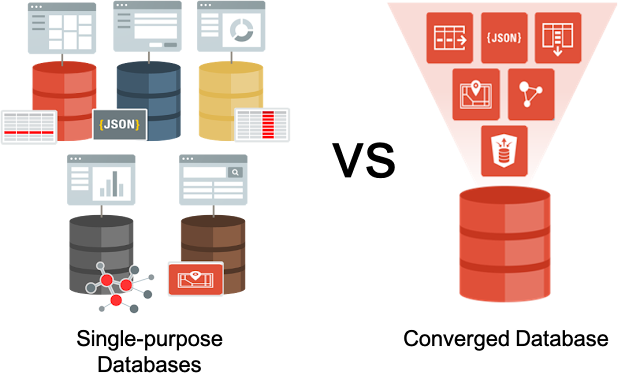
There is an on-going debate in our community about the best approach for developing cloud-native or data-driven apps. On one side, you have folks who say use a single-purpose "best-of-breed" database for each data type or workload you have. While the other half say, you should use a single converged database. So, which approach is right for you and your projects?
Oracle Database Tutorial and Material, Database Certification, Database Learning, Database Exam Prep

Let's examine some of the pros and cons of each approach.

Single-purpose Databases


Single-purpose databases or purpose-built databases as they are often as known, are engineered to help solve a single or small number of problems. Given their narrow focus, they can ignore the tradeoffs usually required when trying to accommodate multiple data types or workloads. It also allows them to use a convenient data model that fits the purpose and to adopt APIs that seem natural for that data model. They offer less functionality than converged databases, and therefore, fewer APIs, making it easier to start developing against them. Their simplicity means they do a few things very well, but other things not at all. For example, a lot of single-purpose databases scale well, because they offer no strong consistency guarantees.

At first glance, single-purpose databases appear to be a good option. Developers are happy because they get exactly what they need to begin a project. However, when you look at the bigger picture, single-purpose databases can cause a lot of pain and end up costing more in the long run.

Very often, development requirements change mid-project, unforeseen business needs crop up, which render the original sound choice of single-purpose database “A”, sadly lacking. This leaves developers with a tough decision. Start from scratch with another single-purpose database to accommodate the new requirements and hoping that no others will surface, or work around the limitations of the original single-purpose database, adding unnecessary complexity to the application code and the maintenance of that code.

Organizations typically have a lot more than just one data type or workload to deal with. What happens when you have numerous single-purpose databases to support all of your business applications? What you quickly realize is that your data has become fragmented across different databases, which use different formats and types and have no direct way to integrate the data between them. How do you manage, secure or integrate such data with other parts of your organization?

Oracle Database Tutorial and Material, Database Certification, Database Learning, Database Exam Prep

Each single-purpose database is an entirely different database technology, with separate management controls, security models and high availability architectures. Sharing or propagating data across these databases is tricky because there isn't a shared API.

Unfortunately, your organization must bear the brunt of the integration work required to make a single-purpose database approach feasible on a large scale. You will need personal who are knowledgeable about the operational aspects of each single-purpose database. Your security policies will have to re-implemented in every database, and your apps will become more complex to deal with propagating data from one database to another. Integrating single-purpose databases has the potential to become a job that never ends.

Converged Databases


Converged databases support all data types and workloads. They can also handle any development paradigm, including Microservices, Events, REST, and SaaS, to name just a few. By integrating data types, and workloads as features within a converged database, you can support mixed workloads and data types using a common language (SQL), and a standard set of APIs. You don't need to manage and maintain multiple systems or worry about having to provide unified security across them.

By eliminating data fragmentation, you also eliminate copy contagion. Application modules or services automatically use a single copy of shared data in a converged database. There are no errors or time delays due to data propagated.

Application code overall becomes more straightforward, as you no longer have to work around the limitations of a single-purpose database or worry about integrating data from multiple sources or propagating data across numerous systems.

You also get synergy across datatypes and workloads. For example, by having support for Machine Learning algorithms and Spatial data in the same database, you can efficiently run predictive analytics on Spatial data. Data-driven app development becomes dramatically more straightforward and faster.

A converged database helps keep things less complicated, which in turn helps reduce the cost of implanting and maintaining your system. It also makes things more reliable.

In the video below, Juan Loaiza and Andrew Sutherland discuss this on-going debate and explain how a converged database makes it easy to develop Data-Driven Apps that enable enterprises to unlock endless possibilities and insights.


Single-purpose “best-of-breed” databases means no vendor lock-in, right?


Unfortunately, that's not the case. Using a best-of-breed approach creates vendor lock-in, as each single-purpose database has proprietary APIs and transaction models instead of ISO standards like SQL. This fragments development and locks the application into the single-purpose database and very often, the particular cloud vendor providing that database.

It is dramatically simpler for developers to invoke extended SQL to execute ML, graph, spatial, blockchain, IoT and others in one converged database instead of implementing distributed execution and data movement across multiple databases.

But it’s expensive to get started with a Converged Database, right?


The introduction of database cloud services has removed the cost barrier to getting started with a converged database. Oracle Autonomous Database is an excellent example of a converged database. It’s available to developers as part of Oracle Cloud’s Free-Tier or and at a low hourly rate for production or pre-prod environments.

In the long run, organizations save time and money by using converged databases where they can manage all their data types and workloads with only one database technology that caters for all use cases and requirements from different parts of the organization.

Are there cases where a single-purpose database is the right choice?


As in other industries, there are new or boutique use cases that benefit from single-purpose or specialized products. Especially if the use-case exceeds the limits of a converged database in terms of cost, performance, or scalability, for example, a stock trading system or telephone exchange. These are latency-critical, transaction processing application that require guaranteed microsecond response times and would benefit from being run on Oracle TimesTen.

The use of single-purpose databases should be limited to a small set of very specific tasks.

Source: oracle.com

Monday, July 6, 2020

Dynamic CPU Scaling in Oracle Database 19c

Oracle Database 19c (release 19.4 and later) now includes the ability to dynamically scale compute for Pluggable Databases up and down in response to workload demands using CPU min/max ranges.  Scale-up and scale-down of compute resources available to a Pluggable Database can be configured to happen automatically, instantly, and dynamically without intervention.

Why does this matter? All systems (whether bare metal or virtual machines) have some amount of un-used compute capacity at any given point in time.  Database workloads are not constant and can vary significantly throughout the day. Dynamic CPU Scaling allows Pluggable Databases to automatically consume extra capacity when needed if it’s available on the system. This capability eliminates the need to over-provision at the system level, resulting in much more predictable performance while also taking advantage of un-used compute capacity. For databases running in a Cloud subscription model, Dynamic CPU Scaling makes more effective use of provisioned capacity and therefore reduces subscription costs.

A Better Approach to the Noisy Neighbor Problem


Prior to this new feature, DBAs had to allocate resources for peak loads to a database to ensure scale up was possible, and to ensure needed resources weren’t taken by other applications, commonly known as “Noisy Neighbors”. The ability to use min/max ranges in Oracle Database 19.4 provides a better approach to the “Noisy Neighbor” problem because it doesn’t rely on over-provisioning, which is difficult to control and can result in severe performance problems.  The “Noisy Neighbor” problem is really caused by the over-provisioning of resources as we will see below.

First, some basics…

Servers can be configured as Bare Metal or as Virtual Machines. Bare Metal servers can use all of the CPU cores available on the chips, or the number of active cores can be limited in the system BIOS. Each processor core can also have multiple hyperthreads, which are referred to as a Virtual CPU (vCPU). The current generation of Intel processors have 2 hyperthreads (2 vCPUs) for each processor core.

Virtual Machines are typically configured on top of Virtual CPUs (vCPU) and can be configured to use all of the available vCPUs or a subset of vCPUs on a server.  Of course, it is also possible to over-provision Virtual Machines by giving VMs on a machine more vCPUs than the machine has available.

For example, assume a machine has 100 vCPUs (hyperthreads) available. Creating 10 VMs with 10 vCPU each would not be over-provisioning the system.  However, creating 20 VMs with 10 vCPU each would exceed the number of available vCPUs on the system, and we would say this system is over-provisioned by a factor of 2X.  If all 20 VMs simultaneously consumed all of the vCPU allocated to them, the system as a whole would experience severe performance problems. This condition can be viewed at the system level by looking at the processor run queue using tools such as the “sar -q” command on Linux.

Note that Oracle Cloud (unlike some other Cloud vendors) does not over-provision Virtual Machine compute shapes. Note also that Oracle charges customers for usage of processor cores rather than hyperthreads. One OCPU equals one processor core in the Oracle Cloud, while some other Cloud providers charge based on vCPUs (hyperthreads) or approximately ½ core.

On top of the Bare Metal or Virtual Machine, each instance of an Oracle database is configured to use a number of vCPUs by enabling Oracle Database Resource Manager (DBRM) and setting the CPU_COUNT parameter. If DBRM is not configured, the CPU_COUNT setting simply reflects the total vCPUs on the system. Enabling DBRM allows the CPU_COUNT setting to control the number of vCPUs available to the database. This applies at both the CDB (Container Database) and PDB (Pluggable Database) levels.

As noted earlier, we can over-provision at the system level, but it’s also possible to over-provision at the database level as well.  For example, assume a Virtual Machine is configured with 10 vCPUs and we create 10 databases with 2 vCPU each (CPU_COUNT=2). That VM would therefore be over-provisioned by a factor of 2X.  If all 10 databases simultaneously consumed all of the vCPU allocated to them, the system (Bare Metal or VM) as a whole would experience severe performance problems.

In short, over-provisioning is essentially “selling” the same resource multiple times to multiple users. It’s making a promise of resources in the hopes that not everyone will need those resources at the same time.  The danger of over-provisioning is when all of the users (all of the databases) become active at the same time. Overrunning the available vCPUs puts work into the run queue of the processor, and the system can become unstable or even unresponsive.

CPU Allocation Approach


The most common approach to managing CPU resources is to NOT over-provision and simply allocate CPU according to what’s available.  While this certainly is quite simple to implement, it will always result in under-utilization of system resources. All databases will spend some amount of time operating at LESS than the maximum allocated CPU (vCPU), so this approach results in lower utilization and therefore higher cost to the organization.

Whether CPU is allocated to Virtual Machines that each contain a single database, or CPU is allocated to individual databases residing on a single Virtual Machine, the result is the same. Each database is given an amount of excess CPU headroom, and CPU usage below that threshold will fluctuate. The result is excess un-used CPU capacity and higher costs as shown in the following graphic.

Oracle Database 19c, Oracle Database Exam Prep, Oracle Database Tutorial and Material

CPU Over-Provisioning


As noted earlier, one commonly used approach to capturing the un-used CPU resources is to simply over-provision the system. Each database can be given access to more CPU resources, such that the total amount allocated exceeds the amount of CPU on the system.  Whether this is done at the system (Virtual Machine) level or by over-provisioning across and within databases, the result is the same.  Over-provisioning is what causes the “Noisy Neighbor” problem and can result in unstable or unresponsive systems.

Shares & Limits


Oracle offers the ability to configure “shares” for each Pluggable Database within a Container Database.  Each instance of a Container Database is given an amount of vCPU to use by enabling DBRM and setting CPU_COUNT. The Pluggable Databases within that Container Database are then given “shares” of the vCPU available to the Container Database. Each Pluggable Database then receives the designated share of CPU resources, and the system is not over-subscribed. 

Each Pluggable Database can also be assigned a limit of CPU resources it can use, which serves to prevent wide swings in database performance. Without a limit imposed on a Pluggable Database, each database is able to use the ENTIRE amount of un-used CPU on the system, which can appear to users as a large variation in performance. Shares are expressed as a share value, whereas utilization limit is expressed as a percentage such as shown in the example below:

Pluggable Database Shares  Shares%  Utilization Limit 
PDB1  1 10% 20%
PDB2  20%  40% 
PDB3  20%  40% 
PDB4  50%  90% 
Total: 10 100%

Shares values are relative to other Pluggable Databases in the Container Database. The share percentage can be calculated by simply dividing the share value by the total of all shares in the Container Database.  Utilization limits are expressed in terms of percentages. Notice that the total of Utilization Limits is greater than 100%, but the Shares value will take precedence if the Container database reaches its limit. Pluggable Databases will receive their stated share of CPU and can exceed that share up to their limit if additional CPU is available. Shares and Limits can be difficult to manage in environments where Pluggable Databases are frequently added to and removed from Container Databases.  Share and limit values need to be re-factored each time a Pluggable Database is added or removed. Rather than using the shares & limits approach, we now recommend using the CPU min/max range feature.

Dynamic CPU Scaling in Oracle Database 19c (19.4)


Now that we have explained why Dynamic CPU Scaling is so important, let’s look at how this feature works.  Using CPU min/max ranges, administrators can establish lower and upper bounds of vCPU available to each Pluggable Database.  Each Pluggable Database receives a guaranteed minimum amount of vCPU but is also able to automatically scale up to a maximum level.  This feature is controlled by 2 simple parameters within each Pluggable Database as follows:

◉ CPU_MIN_COUNT
◉ CPU_COUNT

CPU_MIN_COUNT is the minimum number of vCPUs the Pluggable Database Instance will receive.  The total of CPU_MIN_COUNT for all Pluggable Database instances should not exceed the CPU_COUNT of the Container Database instance. When DBRM is enabled, and when CPU_MIN_COUNT has been set, the CPU_COUNT parameter defines the maximum number of vCPUs that can be used by a Pluggable Database Instance.  

By eliminating hard allocations to databases through Virtual Machines or individual database allocations within a single Container Database, all databases are able to share any excess capacity.  All databases also share a single allocation for CPU headroom, and all databases share the same capacity with minimum guarantees. In the example below, the overall capacity used is approximately ½ as much as shown in the previous graphic, yet all databases are able to use the capacity they require:

Oracle Database 19c, Oracle Database Exam Prep, Oracle Database Tutorial and Material

We recommend establishing a standardized ratio between CPU_MIN_COUNT and CPU_COUNT. For example, set CPU_COUNT equal to 3 times the value for CPU_MIN_COUNT. This means that Oracle Database vCPU utilization would run within a 3X range from MIN to MAX. Using wide ranges may result in larger variability in performance and user satisfaction issues, while narrow ranges may leave excess (unused) compute capacity, resulting in higher costs. The exact CPU min/max range will depend on the database workloads that reside within a specific Container Database. We also recommend using symmetric clustered configurations (in an Oracle Real Application Clusters environment) with equally sized database nodes and equal settings for CPU min/max ranges on each instance. Asymmetric clusters (using different sized database servers or Virtual Machines) is acceptable if the degree of asymmetry is low (small variation in server or VM sizes).

Note that both CPU_MIN_COUNT and CPU_COUNT apply at the instance-level for each Pluggable Database. If the Pluggable Database is part of a Real Application Cluster (RAC) configuration, the total CPU min/max range for the Pluggable Database will be multiplied by the number of Oracle Real Application Cluster (RAC) instances. For example, a Pluggable Database with CPU_MIN_COUNT=2 belonging to a 2-node RAC cluster will have access to a minimum of 4 vCPUs in total.  The Container Database level only uses CPU_COUNT (not CPU_MIN_COUNT), and this also applies to each RAC instance. CPU min/max ranges at the Container Database level (as well as for non-PDB/Non-CDB databases) is not available as of Oracle Database 19c. Each instance of a RAC cluster should ideally use a symmetrical configuration with similarly sized compute nodes and the same values for these parameters in both the Pluggable Database and Container Database levels.

DBRM constantly monitors demand for CPU resources within each Pluggable Database, as well as the overall availability of CPU resources at the Container Database level. DBRM allows each Pluggable Database to automatically and immediately scale up to use more CPU resources if available in the Container Database. DBRM automatically and immediately scales CPU resource down again when demand subsides. Other Pluggable Databases residing within the container may begin to consume their CPU allocation, so any capacity above CPU_MIN_COUNT is not guaranteed and can be withdrawn for use by those other Pluggable Databases.

Saturday, July 4, 2020

The CLOUD_VERIFY_FUNCTION in Autonomous Database Cloud

Choosing a hard-to-guess but easy-to-remember password is by far the easiest one from all the hard tasks!

1. Database passwords and their complexity:


According to GDPR personal data must be processed “in a manner that ensures appropriate security of personal data including protection against unauthorized or unlawful processing and against accidental loss, destruction or damage, using appropriate technical or organizational measures.”

But GDPR does not define any requirements about passwords such as password length, complexity, or how often password should be renewed. Regulation (EU) 2016/679 just stipulates that “a high level of protection of personal data” is required.

One way to enforce strong passwords on database users is by using the following rule:

A minimum of 1 lower case letter [a-z] and
a minimum of 1 upper case letter [A-Z] and
a minimum of 1 numeric character [0-9] and
a minimum of 1 special character: ~`!@#$%^&*()-_+={}[]|\;:”,./?
Passwords must be at least N characters in length
N attempts to block login
Set password expiration to N days

Oracle is following the above mentioned rules and the Oracle script catpvf.sql provides several password functions for taking care of the verification process:

– ora_complexity_check,
– verify_function
– verify_function_11G
– ora12c_verify_function
– ora12c_strong_verify_function
– ora12c_stig_verify_function

Note that the VERIFY_FUNCTION and VERIFY_FUNCTION_11G password verify functions are desupported in Oracle Database 20c. Also, in Oracle 20c, the IGNORECASE parameter for the orapwd file is desupported. All newly created password files are case-sensitive.

2. Non-autonomous databases


Now, how about those who prefer to use less complex passwords for database users? How do you bypass that problem first in a non-autonomous environment?

There are several ways to avoid the verification process by say the ora12c_verify_function:

– ALTER PROFILE DEFAULT LIMIT PASSWORD_VERIFY_FUNCTION NULL;
– Create a separate profile for the user
– Edit the catpvf.sql script to use the password verification function that you want, and then run the script to enable it – it is located in $ORACLE_HOME/rdbms/admin/utlpwdmg.sql
– Modify “CREATE OR REPLACE FUNCTION ora12c_verify_function …” in utlpwdmg.sql, a file which is used to change the DEFAULT profile to use different password complexity functions – it is located in $ORACLE_HOME/rdbms/admin/utlpwdmg.sql (not in 20c though)

Note here that the Oracle documentation says clearly: “Do not modify the admin/catpvf.sql script or the Oracle-supplied password complexity functions. You can create your own functions based on the contents of these files.”

3. Autonomous databases


Next, how about Autonomous, where we have no access to the operating system layer?

The Oracle Autonomous Database Cloud offers a new (unique to ADB) a function called CLOUD_VERIFY_FUNCTION. It is not available in the non-autonomous releases and not even in Oracle 20c.

The CLOUD_VERIFY_FUNCTION function is specified in the PASSWORD_VERIFY_FUNCTION attribute of the DEFAULT profile. This function internally calls ORA_COMPLEXITY_CHECK and checks the password entered according to the following specifications.

– If password contains the username
– The password must contain 1 or more lowercase characters
– The password must contain 1 or more uppercase characters
– The password must contain 1 or more digits
– The password length less than 12 bytes or more than 60 bytes

Let us check first what the function CLOUD_VERIFY_FUNCTION looks like:

create or replace FUNCTION cloud_verify_function
(username varchar2,
password varchar2,
old_password varchar2)
RETURN boolean IS
   differ integer;
  db_name varchar2(40);
  i integer;
  reverse_user dbms_id;
  canon_username dbms_id := username;
  len integer := nvl (length(password), 0);
BEGIN
  IF (substr(username,1,1) = '"') THEN
    execute immediate 'begin dbms_utility.canonicalize(:p1,  :p2, 128); end;'
                        using IN username, OUT canon_username;
  END IF;
   IF NOT ora_complexity_check(password, 12, null, 1, 1, 1, null) THEN
     RETURN(FALSE);
   END IF;
-- Check password length
   IF len > 60 THEN
     raise_application_error(-20020, 'Password too long');
   END IF;
-- Check if the password contains the username
   IF regexp_instr(password, canon_username, 1, 1, 0, 'i') > 0 THEN
     raise_application_error(-20002, 'Password contains the username');
   END IF;
RETURN(TRUE);
END;
/

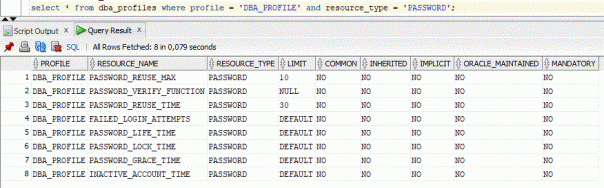
We cannot modify the scripts mentioned above as we do not have OS access in ADB – may be then we can change the default profile or create a new one? But in ATP, user’s profile will be set to ‘DEFAULT’, and you are not allowed to create additional PROFILEs. Autonomous Data Warehouse requires strong passwords – the password must meet the default password complexity rules.

The output below is identical in ADW and ATP:

Database Tutorial and Material, Database Learning, Database Exam Prep, Database Learning

Well, we are stubborn – so let us try in any case:

In ATP:

create profile DBA_PROFILE 
LIMIT PASSWORD_REUSE_MAX 10 PASSWORD_REUSE_TIME 30
ORA-01031: insufficient privileges

In ADW:

create profile DBA_PROFILE 
LIMIT PASSWORD_REUSE_MAX 10 PASSWORD_REUSE_TIME 30;
Profile DBA_PROFILE created.

alter profile DBA_PROFILE limit PASSWORD_VERIFY_FUNCTION null;
Profile DBA_PROFILE altered.

alter user admin profile DBA_PROFILE;
ORA-01031: insufficient privileges

create user app_user identified by abc profile DBA_PROFILE
ORA-28219: password verification failed for mandatory profile
ORA-20000: password length less than 12 bytes

create user app_user identified by Exadataa2020 profile DBA_PROFILE;
User APP_USER created.

Database Tutorial and Material, Database Learning, Database Exam Prep, Database Learning

alter user app_user identified by abc
ORA-28219: password verification failed for mandatory profile
ORA-20000: password length less than 12 bytes

Well, the password verify function is still used although we set the app_user’s profile to DBA_PROFILE.

Friday, July 3, 2020

A Quick how-to RMAN backup to OCI Object Storage

This is a quick how-to article on setting up RMAN to backup to Object Storage on OCI. This is applicable when you build your on Oracle database on an OCI instance, or when you have a database on-premise you wish to backup to the (OCI) cloud.

Database Tutorial and Material, Database Exam Prep, Database Certification

What do you need? Off course an Oracle Cloud tenancy,but to be more specific: you need an user (principal) that is permitted to manage objects in a bucket (or if you like, to manage buckets in a compartment). The creation of the user, bucket and relevant permissions is not in the scope of this article.

RMAN can backup to the Oracle Cloud using a SBT library “plugin”, the installer can be downloaded from here. This installer will take care of configuring and downloading the right binaries. It will require Java.

This installer services both the classic Oracle Public Cloud and the new Oracle Cloud. In this article, only the new Oracle cloud will be used. The zipfile can be unzipped anywhere, but keep the resulting jar file available for later use. We need the OCI version, so make use of opc_installer/oci_installer/oci_install.jar.

To authenticate against OCI the library needs a keypair, where the public key will be uploaded to the user in OCI. The oci_install.jar program has an option to generate a keypair for you:

java –jar oci_install.jar -newRSAKeyPair -walletDir /home/oracle/oci/wallet
Oracle Database Cloud Backup Module Install Tool, build 19.3.0.0.0DBBKPCSBP_2019-10-16
Please specify parameter -configFile: /home/oracle/oci/opcxxx.ora
OCI API signing keys are created:
   PRIVATE KEY --> /home/oracle/oci/wallet/oci_pvt
   PUBLIC  KEY --> /home/oracle/oci/wallet/oci_pub
Please upload the public key in the OCI console.

The tool tells you what your next step will be: upload the public key to the OCI account to be used for authenticating. See the image below for the way to upload the key.

Database Tutorial and Material, Database Exam Prep, Database Certification

After uploading the file you can see the key’s fingerprint. Copy this for the next step, or if you want to determine it on your own, use the OpenSSL commandline tool:

openssl rsa -pubout -outform DER -in oci_pvt | openssl md5 –c

Now it’s time to configure the RMAN SBT library, use the oci_installer tool again:

java -jar oci_install.jar \
  -configFile /path/to/configfile.ora
  -host https://objectstorage.eu-frankfurt-1.oraclecloud.com \
  -pvtKeyFile /home/oracle/the/path/to/the/private/key \
  -pubFingerPrint THE_FINGERPRINT_YOU_FOUND \
  -tOCID ocid1.tenancy.oc1..YOURTENANCY_OCID \
  -uOCID ocid1.user.oc1..THE_USERS_OCID \
  -libDir /home/oracle/lib \
  -walletDir /home/oracle/oci/wallet \
  -bucket YOUR_FAVOURITE_BUCKET
Oracle Database Cloud Backup Module Install Tool, build 19.3.0.0.0DBBKPCSBP_2019-10-16
Oracle Database Cloud Backup Module credentials are valid.
Backups would be sent to bucket YOUR_FAVOURITE_BUCKET.
Oracle Database Cloud Backup Module wallet created in directory /home/oracle/oci/wallet.
Oracle Database Cloud Backup Module initialization file /path/to/configfile.ora created.
Downloading Oracle Database Cloud Backup Module Software Library from Oracle Cloud Infrastructure.
Download complete.

With this step a wallet is generated, the library for the correct platform is downloaded and a configuration file is built. Note that when your database server is on a private subnet in OCI (or a subnet on-premise) that there needs to be a way to reach the object storage. On OCI this is best done using a service gateway, on-premise it may be necessary to use a proxy server.

The last step is to configure rman to use the SBT library:

rman target /

configure channel device type sbt parms='SBT_LIBRARY=/home/oracle/lib/libopc.so, SBT_PARMS=(OPC_PFILE=/path/to/configfile.ora)';

Please note that when you make a backup to the cloud, this SBT library requires encryption of the backupset, so use SET ENCRYPTION when you take a backup.

RMAN> set encryption on identified by "A_Difficult_passphrase" only;
executing command: SET encryption
RMAN> backup device type sbt database;

You should save this passphrase, as restoring without this passphrase will not work.

When you need to restore your database, you can follow the next steps. If the configuration for the SBT library has been lost the first steps should be recreating the configuration. When the connection is restored to the Object Store then RMAN can restore the database. In the example below we assume complete loss of the database, including controlfile and spfile.

rman target /

-- find the dbid in the snapshot controlfile name: in your bucket:
-- in sbt_catalog/c-nnnnnnnnnn-YYYYMMDD-nn –> nnnnnnn is the dbid
RMAN> set dbid = 2384917801;
RMAN> startup nomount
-- this will give a warning about a missing pfile
-- it's safe to ignore
RMAN> set controlfile autobackup format for device type sbt to '%F';
RMAN> set decryption identified by ‘YourVerySecurePassPhrase’;
RMAN> run {
allocate channel c1 device type sbt PARMS 'SBT_LIBRARY=/home/oracle/lib/libopc.so, SBT_PARMS=(OPC_PFILE=/path/to/your/config.ora)';
restore spfile from autobackup;
}
-- restart database with your spfile:
RMAN> startup nomount force;
-- restore controlfie
RMAN> run {
allocate channel c1 device type sbt PARMS 'SBT_LIBRARY=/home/oracle/lib/libopc.so, SBT_PARMS=(OPC_PFILE=/path/to/your/config.ora)';
restore controlfile from autobackup;
}
RMAN> alter database mount;
RMAN> run {
allocate channel c1 device type sbt PARMS 'SBT_LIBRARY=/home/oracle/lib/libopc.so, SBT_PARMS=(OPC_PFILE=/path/to/your/config.ora)';
allocate channel c2 device type sbt PARMS 'SBT_LIBRARY=/home/oracle/lib/libopc.so, SBT_PARMS=(OPC_PFILE=/path/to/your/config.ora)'
restore database;
recover database;
}
RMAN> alter database open resetlogs;

Thursday, July 2, 2020

Six new features of Data Pump in Oracle Database 20c

Oracle Database 20c, Oracle Database Tutorial and Material, Database Exam Prep, Database Certifications

In Oracle version 20c, the Data Pump export job accepts 54 different parameters and the import jobs can have up to 59 different parameters. Most of us who used until Oracle 10g (and even afterwards) the old fashioned traditional export import tool probably knew by heart the syntax of exp/imp and never needed to copy paste the command from a text file. With more than 50 parameters in 20c, I am sure it is a different story.

There are 6 new features of Data Pump in Oracle 20c and here are their short descriptions:

1. Oracle Data Pump checksums support for cloud migrations


The new parameter CHECKSUM can be used for validity as a checksum is now added to the dumpfile. Oracle Data Pump can be, and is mostly used, for migrating data from on-premises Oracle Databases into the Oracle Public Cloud. You can use the checksum to help confirming that the file is valid after a transfer to or from the Oracle Cloud object store. Checksums are also useful after saving dumpfiles to on-prem locations for confirming that the dump files have no accidental or malicious changes.

Here is an example of how to use the new CHECKSUM parameter – I am exporting my own schema. The parameter accepts 2 values:

YES – Oracle calculates a file checksum for each dump file in the export dump file set
NO – Oracle does not calculate file checksums

The checksum is calculated at the end of the data pump job. Notice that I am not specifying below the other new parameter CHECKSUM_ALGORITHM, thus using its default value SHA256. The other optional secure hash algorithms are: CRC32, SHA384 and SHA512.

SQL> !expdp dbexam DIRECTORY=data_pump_dir DUMPFILE=jmd.dmp CHECKSUM=YES

Export: Release 20.0.0.0.0 - Production on Sat May 30 07:20:55 2020
Version 20.2.0.0.0

Copyright (c) 1982, 2020, Oracle and/or its affiliates.  All rights reserved.

Connected to: Oracle Database 20c EE High Perf Release 20.0.0.0.0 - Production
Starting "DBEXAM"."SYS_EXPORT_SCHEMA_01":  dbexam/********@//localhost:1521/novopdb1.laika7.laika.oraclevcn.com DIRECTORY=data_pump_dir DUMPFILE=jmd.dmp CHECKSUM=YES
Processing object type SCHEMA_EXPORT/TABLE/TABLE_DATA
Processing object type SCHEMA_EXPORT/TABLE/INDEX/STATISTICS/INDEX_STATISTICS
Processing object type SCHEMA_EXPORT/TABLE/INDEX/STATISTICS/FUNCTIONAL_INDEX/INDEX_STATISTICS
Processing object type SCHEMA_EXPORT/TABLE/STATISTICS/TABLE_STATISTICS
Processing object type SCHEMA_EXPORT/STATISTICS/MARKER
Processing object type SCHEMA_EXPORT/USER
Processing object type SCHEMA_EXPORT/SYSTEM_GRANT
Processing object type SCHEMA_EXPORT/ROLE_GRANT
Processing object type SCHEMA_EXPORT/DEFAULT_ROLE
Processing object type SCHEMA_EXPORT/PASSWORD_HISTORY
Processing object type SCHEMA_EXPORT/PRE_SCHEMA/PROCACT_SCHEMA
Processing object type SCHEMA_EXPORT/TABLE/TABLE
Processing object type SCHEMA_EXPORT/TABLE/COMMENT
Processing object type SCHEMA_EXPORT/TABLE/INDEX/INDEX
Processing object type SCHEMA_EXPORT/TABLE/INDEX/FUNCTIONAL_INDEX/INDEX
Processing object type SCHEMA_EXPORT/TABLE/CONSTRAINT/CONSTRAINT
. . exported "DBEXAM"."BLOGS"                            9.983 MB   73991 rows
. . exported "DBEXAM"."SALES"                            14.38 MB  295240 rows
. . . . . . . . . . . . . . . . . . . . . . . . . . . . . . . . . . . . . . .
. . exported "DBEXAM"."RDBMS_BRANDS"                     7.726 KB      12 rows
. . exported "DBEXAM"."CLIENTS"                          6.007 KB       2 rows
. . exported "DBEXAM"."T"                                5.476 KB       1 rows
ORA-39173: Encrypted data has been stored unencrypted in dump file set.
Master table "DBEXAM"."SYS_EXPORT_SCHEMA_01" successfully loaded/unloaded
Generating checksums for dump file set
******************************************************************************
Dump file set for DBEXAM.SYS_EXPORT_SCHEMA_01 is:
  /u01/app/oracle/admin/ORCL/dpdump/9D45645C541E0B7FE0530206F40AE9E9/jmd.dmp
Job "DBEXAM"."SYS_EXPORT_SCHEMA_01" successfully completed at Sat May 30 07:24:59 2020 elapsed 0 00:04:01

You probably noticed the ORA-39173 warning at the end – it is because I did not specify an encryption password while exporting encrypted data. It is just a warning and not a real error.

Goes without saying that COMPATIBLE must be set to at least 20.0

2. Oracle Data Pump exports from Autonomous Database


Starting with Oracle Database 20c, Data Pump can perform exports from Oracle Autonomous Database into dump files in a cloud object store. Thus, now we can easily migrate data out from an Oracle Autonomous Database and import it into another location.

The new in 20c is the use of the new CREDENTIAL parameter which enables the export to write data stored into object stores. The CREDENTIAL parameter changes how expdp interprets the text string in DUMPFILE. If the CREDENTIAL parameter is not specified, then the DUMPFILE parameter can specify an optional directory object and file name in directory-object-name:file-name format. If the CREDENTIAL parameter is used, then it provides authentication and authorization for expdp to write to one or more object storage URIs specified by DUMPFILE.

Here is an example assuming that we have already created the credential_name JMD_OBJ_STORE_CRED:

expdp dbexam DUMPFILE=https://swiftobjectstorage.eu-frankfurt-1.oraclecloud.com/v1/dbexam/data_pump/jmd.dmp
CREDENTIAL=jmd_obj_store_cred

3. Oracle Data Pump includes and excludes in the same operation


Oracle Data Pump 20c can include and exclude objects in the same export or import operation meaning that now, Oracle Data Pump commands can include both INCLUDE and EXCLUDE parameters in the same operation. By enabling greater specificity about what is being migrated, this enhancement makes it easier to migrate to Oracle Cloud, or to another on-premises Oracle Database.

Note: when you include both parameters in a command, Oracle Data Pump processes the INCLUDE parameter first, and includes all objects identified by the parameter. Then it processes the EXCLUDE parameters, eliminating the excluded objects from the included set. Here is an example of including only 2 tables (SALES and CLIENTS) but excluding all indexes except the PKs (real use case: you want to enable Oracle Auto Indexing in ADB and while importing the data you need to drop all indexes except the PKs):

expdp dbexam SCHEMAS=DBEXAM DUMPFILE=dbexam.dmp REUSE_DUMPFILES=YES
INCLUDE=TABLE:\"IN \(\'CLIENTS\',\'SALES\'\)\"
EXCLUDE=INDEX:\"LIKE \'IDX\%\'\"


4. Oracle Data Pump parallelizes transportable tablespace metadata operations


Starting with Oracle 20c, Data Pump improves Transportable Tablespace metadata operations with parallelism. Starting with Oracle Database 20c, transportable tablespace exports can be done with degrees of parallelism greater than 1.

Parallelism higher than 1 improves TTS export and import performance especially when there are really a lot of database objects in the data files including tables indexes partitions and subpartitions. We probably see the real benefit when exporting packaged application schemas from SAP, EBS, etc.

5. Oracle Data Pump provides optional index compression


In Oracle Database 20c, Data Pump supports optional index compression on import including the Autonomous Database by introducing a new TRANSFORM parameter clause INDEX_COMPRESSION_CLAUSE. Thus, you can control whether index compression is performed during import.

Oracle Database 20c, Oracle Database Tutorial and Material, Database Exam Prep, Database Certifications
If NONE is specified in the INDEX_COMPRESSION_CLAUSE, then the index compression clause is omitted (and the index is given the default compression for the tablespace). However, if you use compression, then Oracle recommends that you use COMPRESS ADVANCED LOW. Indexes are created with the specified compression.

If the index compression clause is more than one word, then it must be contained in single or double quotation marks. Also, your operating system can require you to enclose the clause in escape characters, such as the backslash character. Here is an example of how to use the INDEX_COMPRESSION_CLAUSE:

TRANSFORM=INDEX_COMPRESSION_CLAUSE:\"COMPRESS ADVANCED LOW\"

Specifying this transform changes the type of compression for all indexes in the job.

6. Oracle Data Pump resumes transportable tablespace jobs


Starting with Oracle Database 20c, Data Pump resumes transportable tablespace export and import jobs that are stopped due to errors or any other problems. Oracle Data Pump’s capacity to resume these stopped jobs helps us to save time and makes the system more available.

Transportable jobs are now restartable at or near the point of failure.

To restart the job JMD_EXP_20C, first perform:

expdp system/password attach=jmd_exp_20c

Then restart the job with:

Export> continue_client

Monday, June 29, 2020

DBMS - Data Independence

DBMS - Data Independence, Oracle Database Tutorials and Material, Oracle Database Learning, Database Exam Prep

If a database system is not multi-layered, then it becomes difficult to make any changes in the database system. Database systems are designed in multi-layers as we learnt earlier.

Data Independence


A database system normally contains a lot of data in addition to users’ data. For example, it stores data about data, known as metadata, to locate and retrieve data easily. It is rather difficult to modify or update a set of metadata once it is stored in the database. But as a DBMS expands, it needs to change over time to satisfy the requirements of the users. If the entire data is dependent, it would become a tedious and highly complex job.

DBMS - Data Independence, Oracle Database Tutorials and Material, Oracle Database Learning, Database Exam Prep

Metadata itself follows a layered architecture, so that when we change data at one layer, it does not affect the data at another level. This data is independent but mapped to each other.

Logical Data Independence


Logical data is data about database, that is, it stores information about how data is managed inside. For example, a table (relation) stored in the database and all its constraints, applied on that relation.

Logical data independence is a kind of mechanism, which liberalizes itself from actual data stored on the disk. If we do some changes on table format, it should not change the data residing on the disk.

Physical Data Independence


All the schemas are logical, and the actual data is stored in bit format on the disk. Physical data independence is the power to change the physical data without impacting the schema or logical data.

For example, in case we want to change or upgrade the storage system itself − suppose we want to replace hard-disks with SSD − it should not have any impact on the logical data or schemas.