Wednesday, November 17, 2021

Is TimesTen an Oracle Database Cache or a System of Record?

Introduction

There seems to be some confusion on whether the Oracle TimesTen In-Memory Database is a cache or a system of record.

I often hear comments like:

◉ TimesTen can only be a cache as it has no persistence

◉ TimesTen is only a cache for Oracle databases

◉ TimesTen should only be used as a cache

This blog looks at the TimesTen fundamentals to answer those questions.

TimesTen Persistence

TimesTen is an in-memory database, so all of the data is in memory all of the time. This means that TimesTen can be optimzed for in-memory performance and as a result it can go really fast. Even though TimesTen is an in-memory database, it still supports ACID transactions and database recovery.

Oracle Database Cache, Oracle Database Exam Prep, Oracle Database Exam Preparation, Database Guides, Database Career, Database Jobs, Database Skills

TimesTen enables ACID transactions and database recovery much like an Oracle database does. TimesTen has transaction log files which store the REDO and UNDO records for transactions.

TimesTen also has checkpoint files which are like Oracle database data files as they store database objects like tables, indexes, views, materialized views, sequences and PLSQL packages/procedures/functions.

The combination of transaction log files and checkpoint files means that TimesTen can re-start from both scheduled and un-scheduled database shutdown much like an Oracle database does. This means than things like power failure, machines being turned off and databases processes being killed will not result in data being lost.

TimesTen transaction log files and checkpoint files are just files stored on a POSIX file system [eg ext4 or XFS on Linux].  The latency and bandwidth of the persistent storage will determine the database load time, and if needed the database recovery time.

The consequence of this design is that TimesTen has the same persistence and recovery ability as databases like Oracle, MySQL, PostgreSQL and SQL Server.

TimesTen as a System of Record


As TimesTen suports ACID transactions, data persistence and recovery, the TimesTen In-Memory Database can be used as a system of record. Most TimesTen customers do not like single points of failure, so TimesTen is almost always deployed in some high availability configuration. 

TimesTen has two different architectures:

◉ TimesTen Classic is a single instance In-Memory Database
◉ TimesTen Scaleout is a multi-instance, shared nothing, scale-out version of the TimesTen In-Memory Database

Oracle Database Cache, Oracle Database Exam Prep, Oracle Database Exam Preparation, Database Guides, Database Career, Database Jobs, Database Skills

TimesTen Classic uses replication to enable high availability. There are many different possible replication configurations, but some form of active-standby or active-active are the most common.

TimesTen Scaleout is a sharded database which has multiple copies of each shard to enable high availability.

The TimesTen In-Memory Database enables low latency SQL applications where microseconds matter for systems such as telecommuniations, financial services and trading systems.

TimesTen can be used a system of record, and about half of the TimesTen's customers use it that way.

TimesTen as a Cache


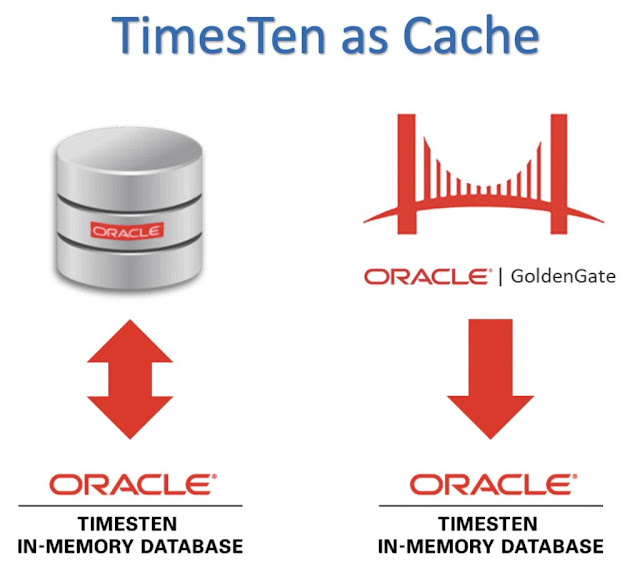
TimesTen can also be use a read/write, or a read-only cache for other databases.

Oracle Database Cache, Oracle Database Exam Prep, Oracle Database Exam Preparation, Database Guides, Database Career, Database Jobs, Database Skills

  • For read caching, Oracle database triggers + log tables with polling are used
    • Customers define the polling interval on a per table basis to get the commited inserts, updates and deletes of interest
    • Data can dynamically be loaded from the Oracle database if it does not already exist the in the cache tables
  • For write caching, the committed inserts, updates and deletes of interest are written to the Oracle database
    • Parallel replication allows these writes to occur in parallel while maintaining commit order
      • OCI array processing or PLSQL blocks are used to optimize the OracleNet traffic for the writes
For read only caching, TimesTen can also be used as a Oracle GoldenGate target. This does not require triggers on the Oracle database.

Oracle Database Cache, Oracle Database Exam Prep, Oracle Database Exam Preparation, Database Guides, Database Career, Database Jobs, Database Skills

This means that given one or more GoldenGate configured source databases, the committed inserts, updates and deletes of interest can be captured, replicated and applied to a TimesTen database, whether it is TimesTen Classic or TimesTen Scaleout.

Source: oracle.com

Monday, November 15, 2021

Simplified TimesTen 18.1 Licensing

Based on customer feedback, the Oracle TimesTen 18.1 licensing has been simplified:

◉ TimesTen In-Memory Database can now also be used for caching

◉ TimesTen Application Tier Database Cache can now also use TimesTen Scaleout

The complete licensing document for TimesTen 18.1 is here.

The relevant portion of the new licensing text is:

Oracle Database Preparation, Oracle Database Certification, Oracle Database Guides, Oracle Database Learning, Oracle Database Career, Database Guides

Oracle TimesTen In-Memory Database Licensing


Oracle Database Preparation, Oracle Database Certification, Oracle Database Guides, Oracle Database Learning, Oracle Database Career, Database Guides

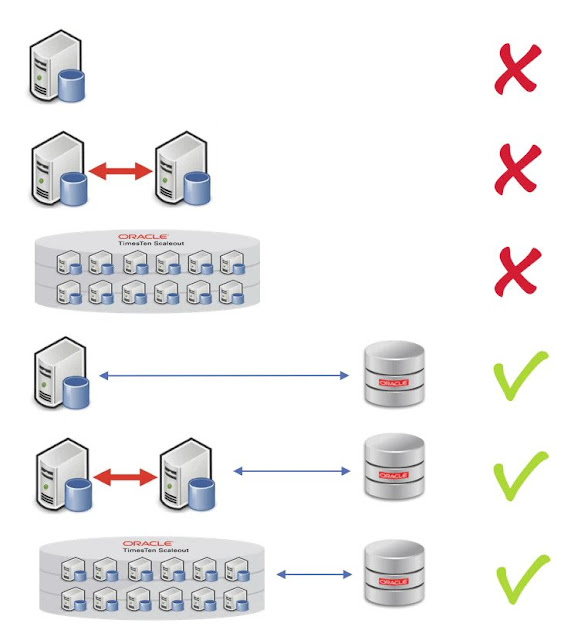
TimesTen In-Memory Database 18.1 supports:

◉ Single Instance TimesTen Classic
◉ Replicated TimesTen Classic
◉ TimesTen Scaleout
◉ Single Instance TimesTen Classic as a cache for the Oracle Database
◉ Replicated TimesTen Classic as a cache for the Oracle Database
◉ TimesTen Scaleout as a cache for the Oracle Database
 

Oracle TimesTen Application Tier Database Cache Licensing


Oracle Database Preparation, Oracle Database Certification, Oracle Database Guides, Oracle Database Learning, Oracle Database Career, Database Guides

TimesTen Application Tier Database Cache 18.1 supports:

◉ Single Instance TimesTen Classic as a cache for the Oracle Database [Enterprise Edition]

◉ Replicated TimesTen Classic as a cache for the Oracle Database [Enterprise Edition]

◉ TimesTen Scaleout as a cache for the Oracle Database [Enterprise Edition]

◉ At least one table on an Enterprise Edition Oracle Database needs to be cached for this product to be licensed

Disclaimer: These are my personal thoughts and do not represent Oracle's official viewpoint in any way, shape, or form.

Source: oracle.com

Wednesday, November 10, 2021

Is Kubernetes slowing down my database?

When size matters

This blog looks at the effect that Linux page size can have on database performance and hence how you can optimize your database Kubernetes nodes.

Most popular databases benefit from Linux huge pages, but most Kubernetes clusters use 4K Linux pages which is non optimal for popular databases.

Kubernetes was originally designed to orchestrate at scale, the life cycle of containers for light weight, stateless applications like Ngnix, Java and Node.js.  For this use case, Linux 4K pages are the correct choice.  More recently Kubernetes has been enhanced to support large, stateful, persistent databases by adding features like Statefulsets, Persistent Volumes and huge pages.

Kubernetes Database, Oracle Database, Database Exam Prep, Database Certification, Database Career, Oracle Database Guides

The following picture shows just how much effect that using Linux huge pages can have on database performance.

Kubernetes Database, Oracle Database, Database Exam Prep, Database Certification, Database Career, Oracle Database Guides

The above picture shows that for the same database, with the same data, for the same workload, that the throughput can be up to 8x better when Linux 2MB pages are used rather than 4K pages. The graph also shows that as the level of concurrency increases, the benefit of huge pages also increases.

The rest of this blog covers some background concepts and looks at the factors which affect Linux page sizes for database workloads.

Linux Page Sizes


All modern multi-user operating system use virtual memory to enable different processes to use memory without worring about the low level details. Linux x8664 systems use paging for its virtual memory management.

Linux x8664 supports the following page sizes:

◉ 4K
◉ 2MB
◉ 1GB

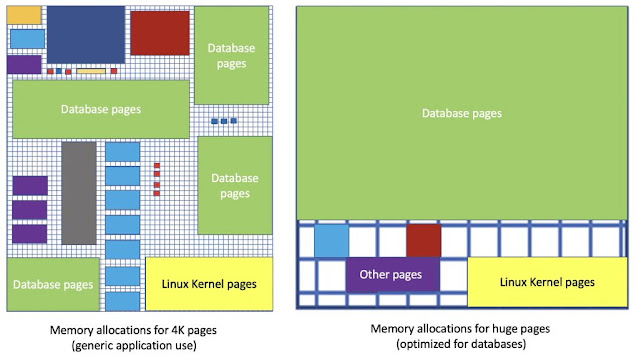
The page size is the smallest unit of contiguous data that can be used for virtual memory management. 
Kubernetes Database, Oracle Database, Database Exam Prep, Database Certification, Database Career, Oracle Database Guides

The size of a page is a trade off.  A 4K page minimizes memory wastage for small memory allocations. For large memory allocations, using 2MB or 1GB pages requires less pages in total and can be significantly faster as there is a cost associated with translating virtual memory to physical memory addresses. 

TLB cache hits and misses


Every memory access for any process on Linux (eg whether it is for Ngix, Node.js or MySQL) requires a translation from virtual memory to physical memory.  As this is such a common operation, all CPUs have some form of Translation Lookaside Buffer [TLB] which acts as a cache for recently translated memory addresses.

Kubernetes Database, Oracle Database, Database Exam Prep, Database Certification, Database Career, Oracle Database Guides

All translations from virtual memory to physical memory first look to see whether the mapping already exists in the TLB. If the mapping already exits, it is called a TLB cache hit. TLB cache hits are very fast and occur in hardware.  When a translation from virtual memory to physical memory does not exist in the TLB cache, it is called a TLB cache miss. TLB cache misses require the mapping to be resolved in software in the Linux kernel page table via a page walk. Although a page walk is efficient C code, it is significantly slower than doing the mapping in hardware via the TLB cache.

Why TLB cache misses matter for databases


All databases ultimately need to access data in memory for reads or writes. All of these database reads or writes need to do at least one TLB lookup. TLB cache misses can significantly slow down database reads and writes:

◉ The larger the database and the more distinct pages are accessed, the more TLB lookups are required. This is effectively the database workingset size.

◉ The greater the concurrency the more TLB lookups are needed per unit time
Kubernetes Database, Oracle Database, Database Exam Prep, Database Certification, Database Career, Oracle Database Guides

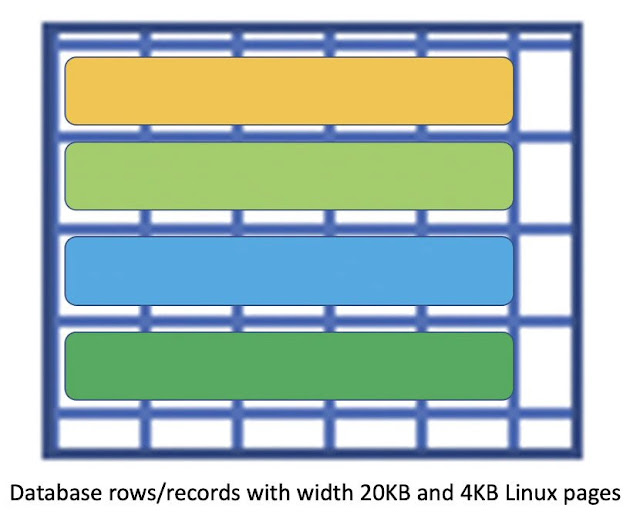
If you have rows/records with variable length data types (eg character strings, JSON, CLOBs or BLOBs) then these rows/records can easily be wider than 4KB.  Accessing a single row/record with a width of 20KB will usually require at least five TLB lookups when the Linux page size is 4KB.  Accessing the same 20KB row/record would usually only take one TLB lookup if 2MB or 1GB Linux pages are used.  So generally, the wider the database rows/record, the greater the benefit of huge pages vs 4K Linux pages.

The challenge is that CPUs have a small number of TLB cache entries:

◉ Intel Xeon Ice Lake
    ◉ 64 entries in L1 TLB for 4K pages, 32 entries for 2MB pages, 8 entries for 1G pages
    ◉ 1024 entries in L2 TLB for 4K + 2MB pages
    ◉ 1024 entries in L2 TLB for 4K + 1GB pages
◉ AMD EPYC Zen 3
    ◉ 64 entries in L1 TLB for 4K + 2MB pages + 1GB pages
    ◉ 512 entries in L2 TLB for 4K and 2MB pages

As there are usually only about 64 TLB 4K entries for the L1 CPU cache, and between 512 to 1024 4K entries for the L2 cache on the latest Intel and AMD CPUs, if your database has wide rows/records and accesses a lot of different rows/records, then it will tend to almost always get TLB cache misses.

If you use 2MB pages, then you are less likely to get a TLB cache miss as you effectively have made the TLB cache larger:

◉ 512 times larger on AMD EPYC Zen 3 CPUs for both the L1 and L2 CPU caches
◉ 256 times larger for Intel Ice Lake CPUs for the L1 CPU cache and 512 times larger for the L2 CPU cache

Reducing the number of TLB cache misses can have a significant positive effect on database performance.

Benchmarks


Linux does not care whether your database is MySQL, PostgreSQL or Oracle. Linux does not care whether your application was written in Node.js, Java, Go, Rust or C. Linux performance is dependent on metrics like how many TLB cache misses occur per unit time for your workload.

The following benchmarks look at several configurations:

◉ Narrow rows/records [128 Bytes] with an even probability of accessing 100 million different rows/records
   ◉ The entire row/record should fit within a single 4KB Linux page
 Medium rows/records [8 KB] with an even probability of accessing 100 million different rows/records
   ◉ The row/record should fit within at least two 4KB Linux pages
◉ Wider rows/records [16 KB] with an even probability of accessing 100 million different rows/records
   ◉ The row/record should fit within at least four 4KB Linux pages
   ◉ 16 KB is not very wide, but the results were significant

To minimize the number of variables:

◉ Only database reads were performed, all 100 millions rows in the database could easily fit into DRAM and the database was 'warmed up'
◉ The database clients used IPC rather than TCP sockets to access the database

This configuration meant that there was no disk IO or network processing, so the workload would bottleneck on CPU and/or memory accesses.

4K Linux pages for 128 Byte rows/records

Kubernetes Database, Oracle Database, Database Exam Prep, Database Certification, Database Career, Oracle Database Guides

The above picture shows that it is possible to execute just over 3.5 millions database reads per second on a single Linux machine using 4K Linux pages with 128 database connections on an AMD EPYC 7J1C3 @ 2.55 GHz processor.

4K vs 2MB pages for 128 Byte rows/records

Kubernetes Database, Oracle Database, Database Exam Prep, Database Certification, Database Career, Oracle Database Guides

The above picture show that for the same hardware, same database, same table, same data, same queries, that 2 MB huge pages can enable up to 8x more throughput than when using 4K Linux pages.

8x more throughput is a significant result for narrow rows/records.

4K vs 2MB pages for 8 KB rows/records

Kubernetes Database, Oracle Database, Database Exam Prep, Database Certification, Database Career, Oracle Database Guides

With database rows/records which are 8KB wide, 2MB pages can provide up to 8x more throughput than 4K pages.

8x more throughput is a significant result for medium width rows/records.

4K vs 2MB pages for 16 KB rows/records

Kubernetes Database, Oracle Database, Database Exam Prep, Database Certification, Database Career, Oracle Database Guides

The above picture show that for the same hardware, same database, same table, same data, same queries, that 2 MB huge pages can enable up to 5x more throughput than when using 4K Linux pages.

5x more throughput is a significant result for wider rows/records.

What about 2MB vs 1GB Linux Pages


The benefit of 2MB Linux pages vs 4K pages is easy to see, eg up to 8x better.  Should you also expect to see significant differences between 2MB and 1GB Linux pages?

As all of the tested row widths could fit into a 2MB page, the only variable was the TLB cache miss ratios for 2MB vs 1GB Linux pages for 100 million different rows/records.

For all tested row widths [128 Bytes, 8KB and 16KB] 1GB Linux pages gave between between 1 and 21% better throughput than 2MB Linux pages.

While a throughput improvement of up to 21% is not as impressive as 8x, it is still something.

Maybe tests with rows/records wider than 2MB would show a significant difference?

Kubernetes Node Specialization


In the early days of Kubernetes, the workloads tended to be for small, stateless 'web based' applications, eg load balancers, web servers, proxies and various application servers. For this use case, using Linux 4K pages is an appropriate choice.

Recently, more specialized workloads are being run in Kubernetes clusters which have distinct hardware and/or software requirements. For example machine learning workloads can run on generic x8664 CPUs, but tend to run much faster on Kubernetes Nodes which have GPUs or ASICs. Also some Kubernetes nodes may be specialized to have fast local storage, have more RAM or maybe run ARM64 CPUs.

So instead of all Kubernetes Nodes having the exact same CPU, RAM, storage etc, some Nodes could use daemonsets or node labels to define and expose the specific capabilities of those Nodes. Using POD labels [with selectors to match node labels], allows the Kubernetes scheduler to automatically run PODs on the most appropriate Nodes.

Kubernetes Database, Oracle Database, Database Exam Prep, Database Certification, Database Career, Oracle Database Guides

The above picture shows a Kubernetes cluster with four types of specialized Nodes.
 

What can you do to optimize database performance on Kubernetes


Things which are usually outside your control:

◉ The width of your database rows/records
◉ How many rows/records are in your database
◉ Your database workingset size
◉ The concurrency and frequency of data access in your database
◉ The TLB cache size of your CPU

Things that you can control in your Kubernetes cluster:

◉ Whether the Linux kernel uses 4KB, 2MB or 1GB Linux pages on your Linux x8664 Kubernetes nodes
◉ How many Linux huge pages [2MB or 1GB] that you configure
◉ The requests and limits for the memory and huge page resources of your Kubernetes applications
   ◉ A database is considered an application in Kubernetes

You can choose to configure the Kubernetes Node [ie Linux host] with either 2MB or 1GB huge pages for a set of machines that you want to run database workloads on.

The way to configure huge pages on Linux is independent of Kubernetes.   You must configure huge pages in the Linux kernel as you cannot do it at the Kubernetes or container level. Usually you want to turn off transparent huge pages as they generally do not benefit database performance and just wastes RAM.

Configuring 2MB pages on Linux x8664 is fairly simple for any Linux distribution and can normally be done without changes to boot time parameters.

The steps to configure 1GB Linux pages varies slightly by distribution and requires boot time parameters. I was able to configure 1 GB Linux pages on recent Intel Xeon and AMD CPUs for:

◉ Red Hat Enterprise Linux 7.9 and 8.4
◉ Oracle Linux 7.9 and 8.4
◉ CentOS 7 and 8
◉ Ubuntu 18.04 and 20.04
◉ SuSE 12 and SuSE15
 

How many huge pages should you configure for your database on Kubernetes


This question is database specific. It depends on how much RAM your Kubernetes Node has, how many other [non database] PODs you want to run on the Node, how much RAM those PODs need, and ultimately how much your database benefits by using more memory.

Kubernetes Database, Oracle Database, Database Exam Prep, Database Certification, Database Career, Oracle Database Guides

Source: oracle.com

Monday, November 8, 2021

Upgrade Database version to 19c on Gen2 ExaCC

We are pleased to announce the General Availability (GA) of Database Upgrade to 19c on Exadata Cloud@Customer Gen2. With this release, you have a simple way to upgrade your 11.2, 12.1, 12.2, or 18c databases to Oracle 19c using cloud automation through OCI. As Oracle Database 11.2 is nearing the end of support, this capability will enable you to easily upgrade your databases to the next long-term support release - Oracle 19c.

Key Customer Benefits

With the Database Upgrade to 19c capability, you can now

1. Upgrade existing databases to Oracle 19c by moving the database to a 19c Oracle home within the same VM Cluster

2. Plan the upgrade by running a precheck and address any compatibility issues in advance to prepare the target 19c home for an upgrade

3. Perform a rollback in case the upgrade flow encounters an issue and needs mitigation

4. Receive notifications about databases running a version nearing the end of support* through the OCI console with a recommendation to upgrade to 19c

Since Exadata Cloud@Customer service supports sharing an Oracle Database Home across databases, upgrade to a 19c database requires a target 19c Oracle Home within the same VM Cluster. You can provision the target home with the standard Oracle published 19c software image or a custom database software image built with the 19c version. Existing databases running the 11.2 or 18c versions will have a notification banner in the OCI console reminding customers of the end of support and the option to upgrade to the 19c database version.

OCI Console Experience

We will go over the following user journeys for database upgrade to 19c using the OCI console

◉ Run Precheck for Database Upgrade to 19c

◉ Upgrade Database to 19c

1. Run Precheck for Database Upgrade to 19c

From the database details page, you can initiate an upgrade to the 19c version. If your database version is older than 19c, the upgrade eligibility is part of the toot tip next to the database version and recommends an upgrade. For database versions nearing the end of support like 11.2 and 18c, an additional banner at the top of the database details page reminds you to upgrade to 19c before the support for your version runs out.

Database Upgrade to 19c, Oracle Database 19c, Oracle Database Preparation, Oracle Database Certification, Oracle Database Guides, Database Career

As part of the upgrade flow, you can select a target database home running 19c database version. If a database upgrade precheck was never done for this target database home, you will get a warning message to run a precheck as part of the upgrade workflow. If you have already run a precheck using this target home, the workflow will show the successful precheck timestamp as you prepare to upgrade. If your prior precheck failed, you get a warning message to address issues identified by the precheck and run precheck again before upgrading your database.

Database Upgrade to 19c, Oracle Database 19c, Oracle Database Preparation, Oracle Database Certification, Oracle Database Guides, Database Career

Running a successful precheck before a database upgrade to 19c is not mandatory but is highly recommended. Running a precheck does not incur any downtime and does not affect the availability of the running database workloads.

Database Upgrade to 19c, Oracle Database 19c, Oracle Database Preparation, Oracle Database Certification, Oracle Database Guides, Database Career

You can view the results of the precheck through the update history of your database. A successful precheck helps ensure the target home is compatible and ready for the database to upgrade and move. In case of a failure, you can take corrective action to resolve the issues found during precheck before proceeding with an upgrade.

Database Upgrade to 19c, Oracle Database 19c, Oracle Database Preparation, Oracle Database Certification, Oracle Database Guides, Database Career

Note: Database lifecycle management actions are briefly unavailable from the console while the precheck is running.

2. Upgrade Database to 19c

Once the precheck is successful (recommended but not required), you can upgrade the database using the selected 19c target database home. The upgrade will incur a database downtime, and you need to acknowledge this impact before proceeding with the upgrade.

Database Upgrade to 19c, Oracle Database 19c, Oracle Database Preparation, Oracle Database Certification, Oracle Database Guides, Database Career

All database lifecycle actions are unavailable while upgrading. The database home field shows the database moving to a different home with the target home name and version displayed in the status tooltip while the upgrade is in progress. 

Database Upgrade to 19c, Oracle Database 19c, Oracle Database Preparation, Oracle Database Certification, Oracle Database Guides, Database Career

Note: The upgrade flow always runs an implicit precheck to ensure compatibility and sets up a guaranteed restore point before running the Oracle Database Upgrade Assistant (DBUA) to upgrade. These details are visible through the work request for the upgrade flow.

After the upgrade is complete, the database is now available to perform regular lifecycle operations. The database home and version are updated to reflect the upgrade to 19c. You will see a new timestamp for the last update performed on the database. You can view details of all the upgrade-related operations performed on this database through the update history accessible via a hyperlink next to the last updated timestamp field.

Database Upgrade to 19c, Oracle Database 19c, Oracle Database Preparation, Oracle Database Certification, Oracle Database Guides, Database Career

Note: In case of an upgrade failure, you can use the rollback capability to undo the upgrade, which internally uses the guaranteed restore point automatically set up by the workflow before starting the upgrade. The workflow will automatically drop the guaranteed restore point on a successful upgrade.

Considerations


◉ Database upgrade to 19c requires Grid Infrastructure upgrade to 19c and is available through OCI UI/API.

◉ Database upgrade requires VM clusters to run Exadata System Software with Oracle Linux 7. Exadata Software 20.1.x.0.0 is the best upgrade target for customers who want to move to Oracle Linux 7.

◉ Database upgrade will incur downtime, and Oracle recommends planning your upgrade by taking a backup, running precheck, and addressing compatibility issues reported by the precheck to prepare the target database home for an upgrade.

◉ Upgrade to 19c is not supported for databases configured with Data Guard association for this release.
 

Availability


The support for database upgrade to 19c is now available on Exadata Cloud@Customer Gen2 in all OCI commercial regions.

Source: oracle.com

Wednesday, November 3, 2021

Accelerate analytics at scale with Oracle Analytics Cloud’s in-memory technology

Quickly visualizing and analyzing data is key to creating a data-driven culture. Speed improves productivity and creativity and helps you focus on business problems. Oracle Analytics Cloud includes a new in-memory technology that provides in-memory caching, where data is optimized and compressed for much faster performance for large datasets. With this technology, you see 2-5 times improved query performance with some queries improving by 20 times or more!

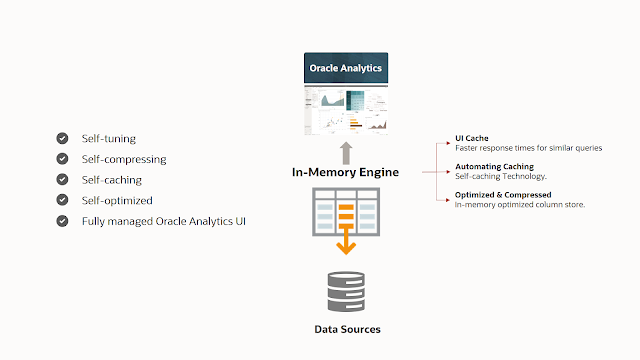
In Oracle Analytics Cloud, the new in-memory engine provides Automatic Caching, which is built on the Oracle Database in-memory compute technology. Because it's built on Exadata hardware and the advanced Oracle Database query engine, Automatic Caching for datasets offers query performance improvements without any changes to your datasets. The in-memory technology is especially helpful for larger datasets or datasets with complex calculations.

While in-memory technology is becoming commonplace in the analytics industry, Oracle Analytics Cloud’s approach leverages all of the power of the Oracle in-memory database compute technology. This new acceleration cache supports complex data types and advanced features such as geometry data types, complex joins, and the full range of Oracle Database capabilities. The performance of queries in Oracle Analytics Cloud improves with the number of users running queries as the system learns from and optimizes based on real-world usage.

The ability to quickly answer questions is at the heart of self-service analytics. Speed is essential to enable users to focus on the business problem and not the tool. Business users can ask new questions and quickly get answers without worrying about optimization and data management. The ability to do fast filtering, including capabilities such as partial string matches on text, enables business users to quickly and easily answer questions, which would have required data preparation or new datasets in the past.

Oracle Analytics Cloud’s, DB Exam Prep, DB Exam Preparation, Database Guides, Database Certification, Database Cert, Database Career, Database Learning
Oracle Analytics Cloud In-Memory Engine

The new caching engine is available in Oracle Analytics Cloud in Oracle Cloud Infrastructure (OCI). When users reload datasets in the latest release, the Automatic Caching engine leverages this new in-memory technology. The new engine has a hybrid columnar and row store to enable the fastest and richest query semantics. Oracle Analytics Cloud’s in-memory technology uses the latest, deep technology such as SIMD vector instructions and Exadata cell-off loading for optimal performance. In earlier Oracle Analytics Cloud releases, users in logistics saw typical queries running in a range from 0.9 second up to 180 seconds. After the rollout for the same query patterns, the queries ranged from 0.6 second to 3.2 seconds. With the new engine, 83% of queries return in less than 2 seconds with a 30% increase in sub-second queries. 

Oracle Analytics Cloud’s, DB Exam Prep, DB Exam Preparation, Database Guides, Database Certification, Database Cert, Database Career, Database Learning

Some of the best performance improvements are for more complex scenarios. Datasets with multiple users using shared workbooks see query performance improving as more queries are run. Users often see the most benefit when employing complex filters and calculations. 

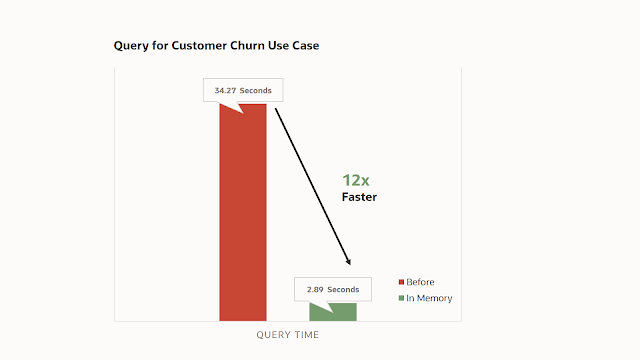
For example, the following figure shows a comparison of a cash-on-hand forecast by month for the next 12 months showing a 20 times query performance improvement.

Oracle Analytics Cloud’s, DB Exam Prep, DB Exam Preparation, Database Guides, Database Certification, Database Cert, Database Career, Database Learning

These performance benefits come with the same security and ease-of-use that you expect with an Oracle Analytics Cloud dataset. For example, you can combine Automatic Caching with a blend of datasets from different data sources, and the mashup has the same blazing performance. Whether your data comes from an Oracle Application such as Oracle Fusion ERP or Taleo, from a source such as Google Drive or Dropbox, or an on-premises database using the remote data gateway, the new caching engine can bring in-memory technology and performance to those datasets. You can also schedule reloads of the datasets to ensure data is up-to-date for your business needs. Beyond self-service data visualization workbooks, you can use these datasets with capabilities such as dashboards and OA Publisher reports scheduled with Delivers, utilizing the enterprise capabilities of Oracle Analytics Cloud. All of this is built on the world-class cloud infrastructure and security of the Gen2 Oracle Cloud Infrastructure (OCI).

This new engine is the foundation of a range of new features, which will be released in Oracle Analytics Cloud over the next year, including advanced capabilities such as spatial analysis and advanced analytic functions such as market basket analysis. Sharing this core technology with the Oracle Database team also means that Oracle Analytics Cloud will keep innovating and adding deep capabilities to the engine.

The best part of this new capability is that customers already have it. Starting with Release 6.1, all customers using Oracle Analytics Cloud on OCI Gen2 have been automatically upgraded. Simply continue to use datasets with Automatic Caching, and when the data is reloaded, it will use in-memory technology.

Source: oracle.com

Monday, November 1, 2021

Oracle TimesTen and Intel Optane Persistent Memory

Oracle TimesTen 18.1.4.1.0 now supports Intel Optane persistent memory in Memory Mode for the following TimesTen configurations on Linux x8664:

◉ Oracle TimesTen In-Memory Database used as a system of record

◉ Oracle TimesTen Application Tier Database Cache used as a cache for the Oracle Database

◉ Oracle TimesTen Scaleout used as a system of record

◉ Oracle TimesTen Scaleout used as a cache for the Oracle Database

Intel Optane persistent memory supports two modes (Memory Mode and App Direct Mode):

◉ Oracle TimesTen 18.1.4.1.0 supports Intel Optane persistent memory in Memory Mode

◉ Oracle TimesTen demonstrated using App Direct Mode at Oracle Open World 2018 with Intel

    ◉ Loading a 2.7 TB database in under half a second

    ◉ An increase of over 6x in durable transaction performance when using synchronous writes to Intel Optane persistent memory

     ◉ Oracle TimesTen plans to support App Direct Mode in a future release

Larger capacity memory at a cheaper price point

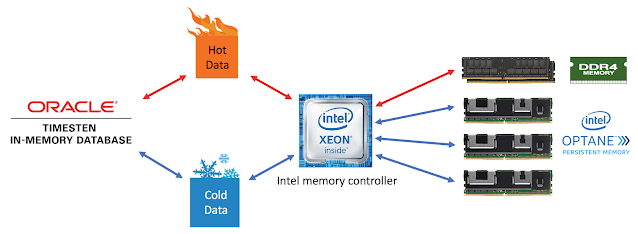
When used in Memory Mode, persistent memory acts like standard system memory, with DRAM used as a low-latency cache layer. The benefits of running persistent memory in Memory Mode are larger effective system memory at a cheaper price point.  Despite the name, persistent memory is actually non persistent when running in Memory Mode.

Oracle TimesTen, Intel Optane Persistent Memory, Oracle Database Exam, Oracle Database Exam Preparation, Oracle Database Guides, Oracle Database Career

The price of both DDR4 SDRAM and Intel Optane persistent memory are constantly changing and dependent on factors like memory capacity and volume, so price comparisons are difficult. One comparison from April 2019 showed persistent memory to be about 1/5 of the price of the equivalent DDR4 SDRAM 128 GB memory. You need to make your own comparisons for the memory capacity for a specific server hardware model to have any meaningful results.
 

Larger TimesTen Classic and Scaleout Databases


◉ Due to the high cost of large capacity (eg 128 GB  module) DRAM, most two socket Linux x8664 servers without using persistent memory can only support up to 1.5 TB of RAM

◉ Two socket Linux x8664 servers can support up to 6 TB of persistent memory

◉ Single instance Oracle TimesTen Classic databases of nearly 6 TB are now cost effective

◉ Oracle TimesTen Scaleout databases of nearly 200 TB are now cost effective

Oracle TimesTen, Intel Optane Persistent Memory, Oracle Database Exam, Oracle Database Exam Preparation, Oracle Database Guides, Oracle Database Career

Intel Specific Memory Controller, firmware, CPUs and DIMMs


Intel Optane persistent memory when used in Memory Mode needs to be used in conjunction with DRAM as the DRAM acts as a low latency cache for the most frequently accessed data. The Intel Xeon Scalable processor memory controller transparently handles the DRAM caching operations.  The implications of using this Intel specific memory controller are that Intel Optane persistent memory will only work with recent [second generation and newer] Intel Xeon Scalable processors and firmware.

Oracle TimesTen, Intel Optane Persistent Memory, Oracle Database Exam, Oracle Database Exam Preparation, Oracle Database Guides, Oracle Database Career

TimesTen In-Memory Database Effective Memory Latency


Intel Optane persistent memory has very low latency, but it can be up to three times slower than using DRAM depending on whether there is a cache hit or miss in DRAM. The trick is to try to use DRAM for the most frequently accessed data and to use the slower persistent memory for the less frequency accessed data.

The performance of using the TimesTen In-Memory Database with Intel Optane persistent memory in Memory Mode depends on two things:

◉ The size of the hot data
◉ The ratio of DRAM to Persistent Memory

If the hot data can fit within the DRAM then TimesTen will work at DRAM speeds. If the hot data is larger than the DRAM size, then the effective memory latency will be proportional to the ratio of DRAM to Persistent Memory.

Oracle TimesTen, Intel Optane Persistent Memory, Oracle Database Exam, Oracle Database Exam Preparation, Oracle Database Guides, Oracle Database Career

The good news is that most database transactional workloads tend to have some data that is more frequently used that other data, so the hot data will always tend to be smaller than the total database size.

Persistent Memory Configuration


There is no TimesTen specific configuration required to use Intel Optane persistent memory.

Oracle TimesTen, Intel Optane Persistent Memory, Oracle Database Exam, Oracle Database Exam Preparation, Oracle Database Guides, Oracle Database Career

Intel Optane persistent memory needs to be configured before it can be used on a Linux x8664 machine:
  • The full details for configuration are here
  • The following highlight some of the configuration considerations
    • Currently only a subset of latest Intel CPUs (2nd generation Xeon Scalable Processor Family and newer) are supported
    • A combination of both DRAM DIMMs and Optane persistent memory mobules must be used
      • Only certain combinations are supported (contact your platform provider for specific options)
    • All Optane persistent memory modules should have the same part number
    • All of the Optane persistent memory modules should use the same version of the firmware
    • The libnvdimm & ipctl libraries and the ndctl utility using Linux Kernel 4.19+ are recommended
    • The ext4 or XFS file systems are required
  • TimesTen 18.1.4.1.0 was tested using Red Hat 7.6 with Intel Optane persistent memory 100 series modules on servers configured with 2nd Generation Intel Xeon Scalable Processors

Hardware that supports Intel Optane persistent memory


Although persistent memory is a new technology, it is already available on Linux x8664 servers from the following vendors:

Oracle TimesTen, Intel Optane Persistent Memory, Oracle Database Exam, Oracle Database Exam Preparation, Oracle Database Guides, Oracle Database Career

Source: oracle.com