Friday, August 14, 2020

ACID Properties in DBMS

A transaction is a single logical unit of work which accesses and possibly modifies the contents of a database. Transactions access data using read and write operations.

In order to maintain consistency in a database, before and after the transaction, certain properties are followed. These are called ACID properties.
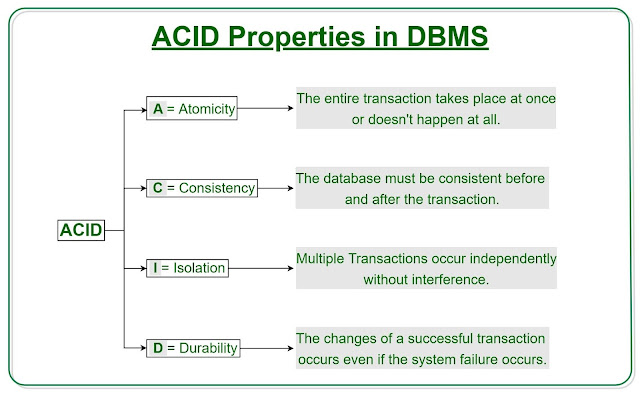
Oracle Database Study Materials, Database Learning, Database Exam Prep

Atomicity


By this, we mean that either the entire transaction takes place at once or doesn’t happen at all. There is no midway i.e. transactions do not occur partially. Each transaction is considered as one unit and either runs to completion or is not executed at all. It involves the following two operations.

—Abort: If a transaction aborts, changes made to database are not visible.

—Commit: If a transaction commits, changes made are visible.

Atomicity is also known as the ‘All or nothing rule’.

Consider the following transaction T consisting of T1 and T2: Transfer of 100 from account X to account Y.

Oracle Database Study Materials, Database Learning, Database Exam Prep

If the transaction fails after completion of T1 but before completion of T2.( say, after write(X) but before write(Y)), then amount has been deducted from X but not added to Y. This results in an inconsistent database state. Therefore, the transaction must be executed in entirety in order to ensure correctness of database state.

Consistency


This means that integrity constraints must be maintained so that the database is consistent before and after the transaction. It refers to the correctness of a database. Referring to the example above,
The total amount before and after the transaction must be maintained.

Total before T occurs = 500 + 200 = 700.
Total after T occurs = 400 + 300 = 700.

Therefore, database is consistent. Inconsistency occurs in case T1 completes but T2 fails. As a result T is incomplete.

Isolation


This property ensures that multiple transactions can occur concurrently without leading to the inconsistency of database state. Transactions occur independently without interference. Changes occurring in a particular transaction will not be visible to any other transaction until that particular change in that transaction is written to memory or has been committed. This property ensures that the execution of transactions concurrently will result in a state that is equivalent to a state achieved these were executed serially in some order.

Let X= 500, Y = 500.

Consider two transactions T and T”.

Oracle Database Study Materials, Database Learning, Database Exam Prep

Suppose T has been executed till Read (Y) and then T’’ starts. As a result , interleaving of operations takes place due to which T’’ reads correct value of X but incorrect value of Y and sum computed by
T’’: (X+Y = 50, 000+500=50, 500)
is thus not consistent with the sum at end of transaction:
T: (X+Y = 50, 000 + 450 = 50, 450).
This results in database inconsistency, due to a loss of 50 units. Hence, transactions must take place in isolation and changes should be visible only after they have been made to the main memory.

Durability:


This property ensures that once the transaction has completed execution, the updates and modifications to the database are stored in and written to disk and they persist even if a system failure occurs. These updates now become permanent and are stored in non-volatile memory. The effects of the transaction, thus, are never lost.

The ACID properties, in totality, provide a mechanism to ensure correctness and consistency of a database in a way such that each transaction is a group of operations that acts a single unit, produces consistent results, acts in isolation from other operations and updates that it makes are durably stored.

Thursday, August 13, 2020

Difference between File System and DBMS

Prerequisite – DBMS over File system


A File Management system is a DBMS that allows acces to single files or tables at a time. In a File System, data is directly stored in set of files. It contains flat files that have no relation to other files (when only one table is stored in single file, then this file is known as flat file).

1. File System :


File system is basically a way of arranging the files in a storage medium like hard disk. File system organizes the files and helps in retrieval of files when they are required. File systems consists of different files which are grouped into directories. The directories further contain other folders and files. File system performs basic operations like management, file naming, giving access rules etc.

Example:

NTFS(New Technology File System), EXT(Extended File System).

Database File System, DBMS, Oracle Database Certification, Database Learning

2. DBMS(Database Management System) :


Database Management System is basically a software that manages the collection of related data. It is used for storing data and retrieving the data effectively when it is needed. It also provides proper security measures for protecting the data from unauthorized access. In Database Management System the data can be fetched by SQL queries and relational algebra. It also provides mechanisms for data recovery and data backup.

Example:

Oracle, MySQL, MS SQL server.

Database File System, DBMS, Oracle Database Certification, Database Learning

Difference between File System and DBMS :


FILE SYSTEM DBMS 
File system is a software that manages ad organizes the files in a storage medium within a computer. 
DBMS is a software for managing the database.
Redundant data can be present in a file system. 
In DBMS there is no redundant data. 
It doesn’t provide backup and recovery of data if it is lost. 
It provides backup and recovery of data even if it is lost. 
There is no efficient query processing in file system. 
Efficient query processing is there in DBMS. 
There is less data consistency in file system. 
There is more data consistency because of the process of normalization. 
It is less complex as compared to DBMS. 
It has more complexity in handling as compared to file system. 
File systems provide less security in comparison to DBMS. 
DBMS has more security mechanisms as compared to file system. 
It is less expensive than DBMS. 
It has a comparatively higher cost than a file system. 

Tuesday, August 11, 2020

Differences between Operational Database Systems and Data Warehouse

Operational Database Systems, Data Warehouse, Database Study Material, Database Exam Prep, Database Certifications

The Operational Database is the source of data for the information distribution center. It incorporates point by point data utilized to run the day to day operations of the trade. The information as often as possible changes as upgrades are made and reflect the current esteem of the final transactions.

Operational Database Systems, Data Warehouse, Database Study Material, Database Exam Prep, Database Certifications
Operational Database Administration Frameworks too called as OLTP (Online Transactions Processing Databases), are utilized to oversee energetic information in real-time.

Data Stockroom Frameworks serve clients or information specialists within the reason of information investigation and decision-making. Such frameworks can organize and show data in particular designs to oblige the differing needs of different clients. These frameworks are called as Online-Analytical Processing (OLAP) Frameworks.

Difference between Operational Database and Data Warehouse:


OPERATIONAL DATABASE DATA WAREHOUSE 
Operational frameworks are outlined to back high-volume exchange preparing.   Data warehousing frameworks are regularly outlined to back high-volume analytical processing (i.e., OLAP).
operational frameworks are more often than not concerned with current data.  Data warehousing frameworks are ordinarily concerned with verifiable information. 
Data inside operational frameworks are basically overhauled frequently agreeing to need.  Non-volatile, unused information may be included routinely. Once Included once in a while changed. 
It is planned for real-time commerce managing and processes.  It is outlined for investigation of commerce measures by subject range, categories, and qualities. 
Relational databases are made for on-line value-based Preparing (OLTP)  Data Warehouse planned for on-line Analytical Processing (OLAP) 
Operational frameworks are ordinarily optimized to perform quick embeds and overhauls of cooperatively little volumes of data.  Data warehousing frameworks are more often than not optimized to perform quick recoveries of moderately tall volumes of information. 
Data In  Data out 
Operational database systems are generally application-oriented.   While data warehouses are generally subject-oriented. 

Monday, August 10, 2020

Difference between Single User and Multi User Database Systems

A criterion for classifying a database system is according to the number of users who can use the system concurrently. It can be divided into single-user and multi-user database systems.

1. Single User Database Systems :


In these DBMS, at one time, only a single user can access the database. Hence, the user can use all the resources at all times. All these systems are used for personal usage, such as personal computers experience. In this type of DBMS, both the physical and application layer can be used by the user.

Example –

Personal Computers

2. Multi User Database Systems :


These DBMSs supports two or more than two users accessing the database simultaneously. Multi-user systems contains all the mini-computers and mainframe computers. In mainframe computer, the database may exist on a single computer and in other computers, the database may be distributed in multiple computers. Multiple users can update data while working together simultaneously.

Example –

Databases of Banks, insurance agencies, stock exchanges, supermarkets, etc.

Difference between Single User and Multi User Database Systems :


SINGLE USER DATABASE SYSTEMS MULTI USER DATABASE SYSTEMS 
A DBMS is single-user if at most one user at a time can use the system. A DBMS is multi-user if many/multi users can use the system and hence access the database concurrently.
Single-User DBMSs are mostly restricted to personal computer systems.  Most DBMSs are multi user, like databases of airline reservation systems, banking databases, etc. 
Single user databases do not have multiprogramming thus, single CPU can only execute at most one process at a time.  Multiple users can access databases and use computer systems simultaneously because of the concept of Multiprogramming. 
Example: Personal Computers.   Example: Databases of Banks, insurance agencies, stock exchanges, supermarkets, etc. 

A single central processing unit (CPU) can only execute at most one process at a time. However, multi-programming operating systems execute some commands from one process, then suspend that process and execute some commands from the next process, and so on. A process is resumed at the point where it was suspended whenever it gets its turn to use the CPU again.

Hence, concurrent execution of processes is actually interleaved, as illustrated in figure below –

Database Exam Prep, Database Study Materials, Database Prep, Database Learning

The above figure shows two processes, A and B, executing concurrently in an interleaved fashion.

Interleaving keeps the CPU busy when a process requires an input or output (I/O) operation, such as reading a block from disk. The CPU is switched to execute another process rather than remaining idle during I/O time

Interleaving also prevents a long process from delaying other processes. If the computer system has multiple hardware processors (CPUs), parallel processing of multiple processes is possible, as illustrated by processes C and D in the above figure.

Friday, August 7, 2020

A Fully Refreshed Oracle Audit Vault and Database Firewall for Auditing and Monitoring

DB Exam Study, DB Tutorial and Material, Database Learning, DB Guides, DB Exam Prep

Organizations today have hundreds or even thousands of databases, applications, and operating systems where user and administrator activities need to be audited and monitored for security and compliance reasons.  That oversight requires continuous collection and analysis of huge amounts of activity data in order to run reports and generate alerts on anomalous activities for further investigation. Of course, network monitoring and database auditing solutions have existed for several years, but organizations must now rethink how to achieve 360-degree visibility while facing shrinking IT resources and considering not just today’s demands, but also those of tomorrow.

We are thrilled to announce that the fully revamped and refreshed Oracle Audit Vault and Database Firewall 20 is now available to help you meet auditing and monitoring requirements for your databases whether they are on-premises or on the cloud. Oracle Audit Vault and Database Firewall 20 brings not just improved ease-of-use and wider coverage, but also enhancements to address enterprise requirements for extensibility, scale, and security.

We upgraded the user interface engine to give a modern, responsive, and intuitive look and feel.  We simplified and optimized the UI for common workflows and easier navigation.  Both Audit Vault and Database Firewall components can now be managed from the same console, centralizing the administrative activities.

To reduce the cost of operations, we brought the proven best practices through single-click provisioning of out-of-the-box audit policies for Oracle databases.  Along with dozens of out-of-the-box reports on the activity data from across all your resources, you can easily filter reports by a given user, IP address, type of activity, time period, or any combination.  For Oracle databases, we can provide both the before and after values for transactions on specific tables or schemas, making it easy to track the lifecycle of sensitive data.

We extended coverage by collecting audit data from PostgreSQL in addition to our existing support for Oracle, MySQL, Microsoft SQL Server, SAP Sybase, and IBM Db2 LUW databases.  With our rich and extensible audit collection framework, you can collect and analyze audit data from almost any system that generates an audit trail.  Our collector framework now reads audit data stored in JSON or XML files, database tables, or available via RESTful API - making it possible to collect audit data from databases such as MongoDB via a simple attribute mapping table. 

Database Firewall continues to stand out as a major differentiator through its highly accurate grammar analysis of the SQL statements, and its ability to identify anomalous SQL traffic.  The multi-stage database firewall analyzes different contextual conditions to implement access control policies without impacting the database.  At the simplest level, it can allow or deny SQL statements based on connection metadata such as IP address, OS user name and database user name.  Next, Database Firewall uses allow-list and deny-list rules on clusters of SQL statements to block and raise alerts on SQL injection attempts well before the SQL has even reached the database.  Finally, the Database Firewall can enforce policies based on table names and even the type of SQL statement.

To simplify deployment across complex networks, customers can now use the Host Monitor agent on Windows (in addition to Linux, AIX, Solaris) to forward a copy of the SQL traffic to the Database Firewall independent of the actual network topology.

In response to customer feedback, we added support for automatically archiving the audit data to low-cost storage locations after a predefined time period.  For centralized user management, we now support authentication and authorization with Microsoft Active Directory and OpenLDAP.

Oracle Audit Vault and Database Firewall 20 supports both network-based SQL monitoring and database auditing with the needed scale and flexibility that enterprise organizations demand. It implements the ever-important ‘trust but verify’ security principle and can serve as the first line of defense for your data assets.

Source: oracle.com

Wednesday, August 5, 2020

Difference between CouchDB and Relational Database

Database CouchDB, Relational Database, Oracle Database Tutorial and Material, Database Guides, Database Exam Prep

1. CouchDB:


Apache CouchDB is an open-source document-oriented NoSQL database that uses multiple formats and protocols to store, transfer, and process its data, it uses JSON to store data, JavaScript as its query language using MapReduce, and HTTP for an API. It was developed by Apache Software Foundation and initially released in 2005. It is written in Erlang.

2. Relational Database:


RDBMS stands for Relational Database Management Systems. It is most popular database. In it, data is store in the form of row that is in the form of tuple. It contain numbers of table and data can be easily accessed because data is store in the table. This Model was proposed by E.F. Codd.

Difference between CouchDB and Relational Database:


COUCHDB RELATIONAL DATABASE 
It is developed by Apache Software Foundation and initially released in 2005. It is developed by Oracle on May 1995.
It is written in Erlang language.   It is developed in C and C++ languages. 
The primary database model for CouchDB is the Document Store.  The primary database model for a relational database is client/server model. 
It can handle only one connection at a time.  It can handle multiple connections simultaneously. 
It does support XML data format.  It does not support XML data format. 
In CouchDB, there is no predefined datatypes.  It supports predefined data types such as float, date, number, etc. 
It does not support Secondary indexes.  It supports secondary indexes. 
It does not support ACID transactions.  It provides ACID transactions. 
It supports Map Reduce method.  It does not support Map-Reduce method. 
It has no Data Schema.  It has Data Schema.